Custom Associations
Use workflows to automatically associate objects in HubSpot. Match objects based on specific properties stored in their records and add association labels to provide context to the relationships. This automation reduces manual effort and improves data accuracy, ensuring all records are correctly associated and labelled. Standardise and Optimise your CRM data management with seamless object association and labelling, improving workflow efficiency and data integrity.
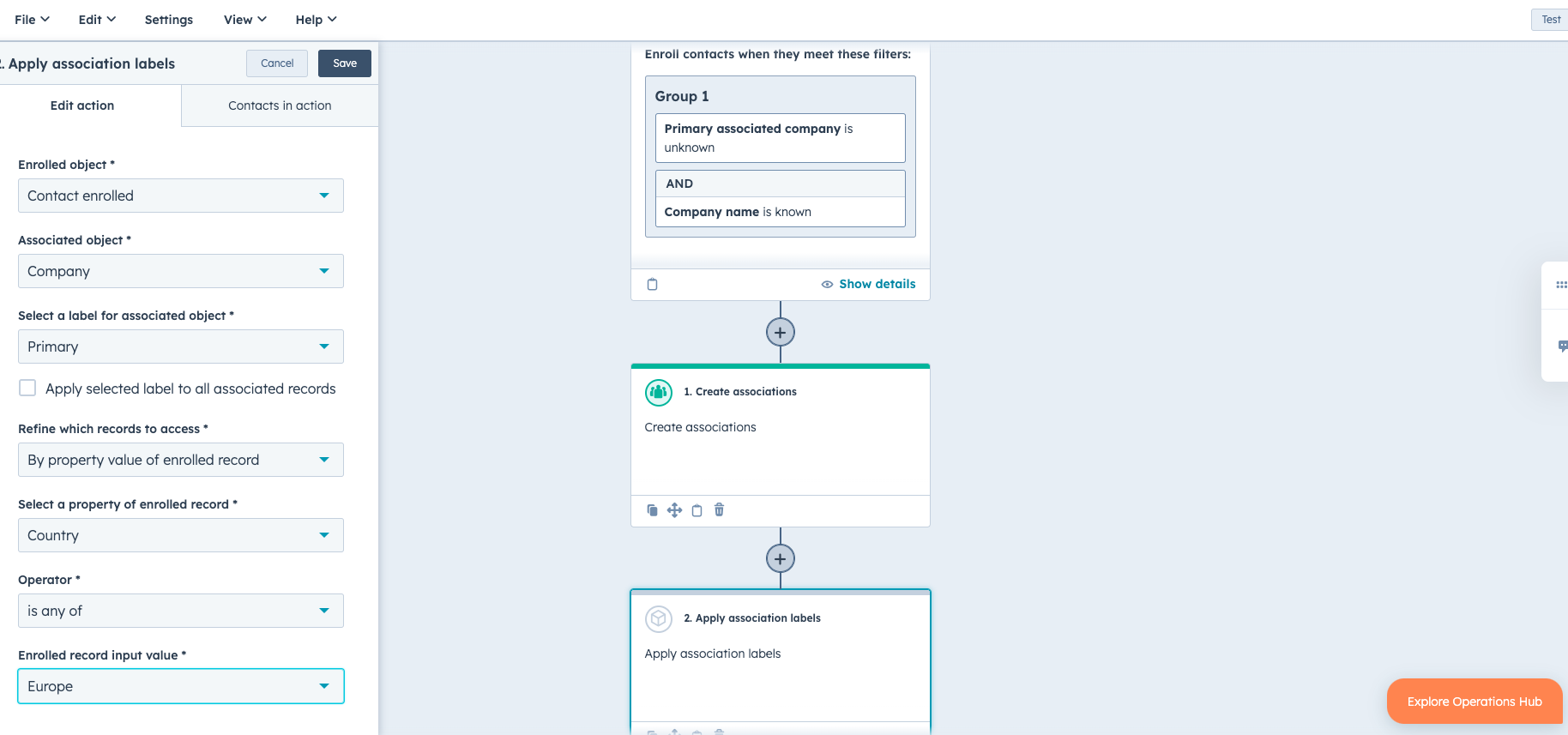
Use Case
Managing associations and their labels in HubSpot has historically been a tedious and manual process. Previously, you could only do associations using code actions, which limited automation capabilities. The new functionality allows admins to automate parts of the association management process through workflows for contacts, companies, deals, tickets, and custom objects. As companies scale and the usage of associations and labels increases, it becomes challenging to manage these associations manually. With this solution, admins can use association actions within their workflows to apply, update, or remove association labels and create new associations based on matching property values. This automation significantly reduces manual effort and improves data accuracy, ensuring all records are correctly associated and labelled.
The implementation process starts by setting up a workflow in HubSpot that triggers association actions based on specific criteria. For instance, when a new contact is added, or an existing record is updated, the workflow can automatically match the contact to a company or deal based on shared properties like email domain or company name. Additionally, the workflow can add association labels to provide context to these relationships, making it easier to manage and understand the connections between different records.
Learn how to implement the new association's action to optimise your workflow automation, making your CRM processes more efficient and reliable. Please note that associations involving line items and quote objects still require the use of custom code actions. HubSpot has a use case library with different use cases that can help get you started.
To use the association's action in HubSpot workflows, follow these step-by-step instructions along with an example:
Step-by-Step Instructions
-
Navigate to Workflows:
- In your HubSpot account, go to Automations > Workflows.
- In your HubSpot account, go to Automations > Workflows.
-
Select or Create a Workflow:
- Click the name of an existing workflow or create a new workflow.
- Click the name of an existing workflow or create a new workflow.
-
Set Enrollment Triggers:
- Set the triggers for enrolling records into the workflow.
- Set the triggers for enrolling records into the workflow.
-
Add an Action:
- Click the + plus icon to add an action.
- Click the + plus icon to add an action.
-
Create New Associations:
- In the left panel, expand the CRM section and click Create associations.
- Configure the action details:
- Enrolled object: This is set to the workflow's object type by default (e.g., Contact enrolled).
- Object to associate: Select the object type of the record to be associated with the enrolled record.
- Create association only without applying any label: Optionally, select this checkbox to associate records without applying an association label.
- Select a label to apply: Choose an association label to apply to the newly associated record (optional).
- Create association when there are: Select Matching property values option.
- Select a property of enrolled record: Choose a property from the enrolled record to be matched.
- Select a property to match on: Choose a corresponding property from the record to be associated.
- In the left panel, expand the CRM section and click Create associations.
-
Save the Action:
- After configuring the details, click Save at the top.
Example
You want to create an association between contacts and companies based on matching City and Location properties. Here’s how you can set it up:
-
Navigate to Workflows:
- Go to Automations > Workflows in your HubSpot account.
-
Create a New Workflow:
- Click Create workflow.
-
Set Enrollment Triggers:
- For example, set the trigger to enroll contacts who have a specific property value.
-
Add the Association Action:
- Click the + plus icon and select Create associations from the CRM section.
-
Configure the Action:
- Enrolled object: Contact enrolled.
- Object to associate: Company.
- Create association only without applying any label: (Optional) Leave unchecked if you want to apply a label.
- Select a label to apply: (Optional) Choose a label like "Decision maker."
- Create association when there are: Matching property values.
- Select a property of enrolled record: City.
- Select a property to match on: Location.
-
Save the Action:
- Click Save at the top.
By following these steps, you can automate the creation of associations between CRM records in HubSpot workflows based on matching property values.
Video Resources
Demo from HubSpot Product Team
In this demo, Maggie from HubSpot's product team guides us through the process of creating associations between HubSpot and contacts based on matching properties like City. The goal is to form new associations and label them as a good fit. Watch the demo to learn how to create these associations based on matching property values. She also demonstrates using association actions in workflows to automatically apply association labels. By setting criteria based on contact roles such as executive sponsor or decision maker, we can efficiently label primary buyers. Follow along as she sets up the workflow and applies the labels to contacts associated with deals.
Create Associations
Apply Associations
Limitations of the Association Action
The Association Action in HubSpot workflows has the following limitations:
- Property Types for Matching: Only single-line text, multi-line text, or phone number properties can be used when matching records to create associations.
- Matching Based on Property Values: Associations are created based on matching property values. The label and internal name of the properties selected will not be used for matching.
- Limited Scope: The action is primarily used to create new associations or apply association labels within HubSpot CRM records, such as between contacts and companies. There still objects like Line Items and Quotes that cannot be associated with the association action.
- Association Labels: Applying association labels is limited to records already associated within the CRM. Labels can be applied to all associated records of a certain object type or refined based on matching property values.
When to Use Custom Code Instead
Custom code actions should be used instead of the built-in association action when you need to:
- Advanced Matching Logic: Implement complex matching logic that goes beyond simple property value matching, such as combining multiple properties or applying more sophisticated conditions.
- Integration with External Systems: Interact with external systems or APIs to fetch data for associations using libraries like
requestsfor Python oraxiosfor Node.js to perform HTTP requests. - Additional Data Processing: Perform additional data processing or transformations before creating associations, including data validation, enrichment, or other preprocessing steps.
- Dynamic Association Creation: Create associations dynamically based on runtime conditions or data fetched during the workflow execution, offering more flexibility.
- Use of Secrets and Private Apps: Securely use secrets or private app tokens to access data, which is not possible with the standard association action.
Looking for Code Snippets?
Use custom code actions for more complex associations.
Use the built-in association actions for straightforward property value matching and label application within HubSpot CRM. Opt for custom code when you need advanced matching logic, external integrations, additional data processing, dynamic association creation, secrets, and private apps.
You can find use cases in HubSpot Programmable Automation Use Case Library to get you started.
Suppose you need to associate contacts with companies based on a combination of properties like City, Industry, and Annual Revenue, and also need to fetch additional data from an external API to enrich the contact records before associating them. In this case, custom code would allow you to:
- Fetch and process external data using
requestsoraxios. - Implement complex matching logic combining multiple properties.
- Dynamically create associations based on the enriched data.
Ready to standardise your HubSpot CRM?
Leverage our Furball AI app integrated with HubSpot to automate data standardisation and validation. This solution will improve data accuracy, streamline your CRM processes, and boost team efficiency. Contact us today for expert assistance and make the most of our programmable automation and data solutions.
