AI-Powered Email Marketing
A deep dive into HubSpot’s latest AI-driven email tools and what’s coming.
Mícheál Markey - Product Manager - HubSpot
2:15 PM – 2:45 PM
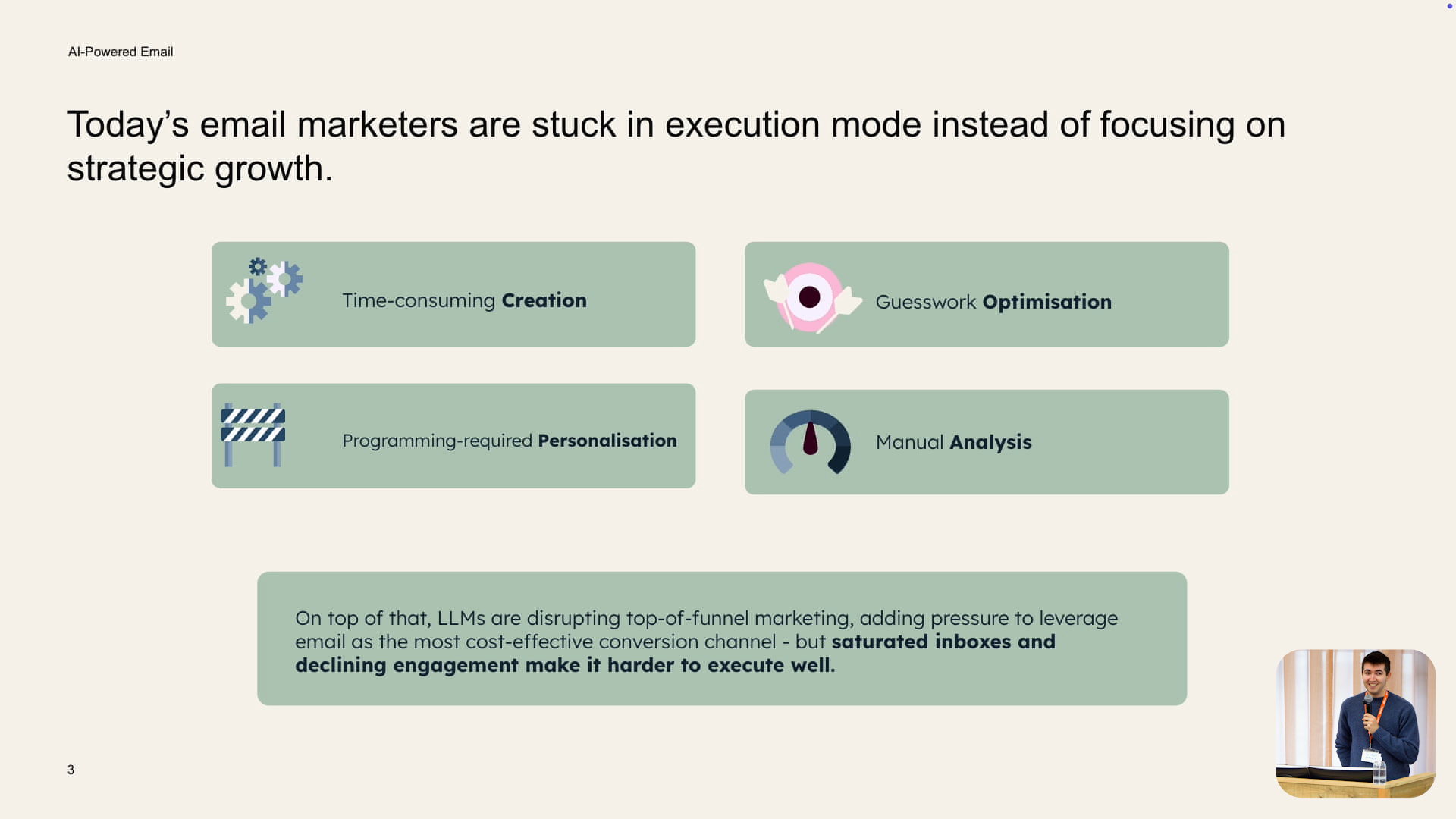
In this session, Mícheál Markey, Product Manager at HubSpot, introduces AI Powered Email – a complete relaunch of HubSpot’s marketing email tool for the AI era. Drawing on regular conversations with email marketers, he explains how many teams in 2025 are stuck in execution mode, battling time-consuming creation, limited personalisation, guesswork optimisation and manual analysis, all while inboxes are more saturated than ever.
Mícheál presents AI Powered Email as HubSpot’s intelligent email engine, built on unified CRM data to create, personalise and optimise every campaign. He shows how it can drive higher engagement and conversions while cutting time from creation to send by around 25%, and walks through a live demo of new capabilities – from AI-generated templates and 1:1 personalisation to predictive engagement, send-time optimisation and AI-driven performance insights.
Session Summary
The summary below breaks Mícheál Markey’s talk into five core themes that together explain why and how HubSpot has reimagined marketing email. It follows his journey from the problems email marketers face today through the new AI-powered workflows to the practical details of rollout, data requirements, and real-world usage.

Email Marketers’ Reality and the Vision for AI-Powered Email
Mícheál begins by introducing himself as a Product Manager on HubSpot’s marketing email team and acknowledging that many people in the room are active marketing email users. He shares that he speaks with email marketers daily, and a clear pattern has emerged: in 2025, they are struggling. Instead of focusing on strategic growth, they are stuck in execution mode, constantly chipping away at repetitive work. He breaks their challenges into four main areas: time-consuming creation, limited and often basic personalisation, difficulty optimising for open and click-through rates, and labour-intensive analysis that does not easily feed into better future sends.
At the same time, inboxes are more saturated than ever and engagement rates are declining across the board, making it even harder to cut through. In response, HubSpot has relaunched its marketing email tool as AI-Powered Email. He describes it as HubSpot’s intelligent email engine that uses unified CRM data to create, personalise and optimise campaigns, driving higher engagement and conversions and reducing the time from creation to send by around a quarter. The rest of his talk is framed around showing how this new approach tackles each of the four problem areas in turn.
Creating Emails Faster: AI Generation, Cloning and Template Upload
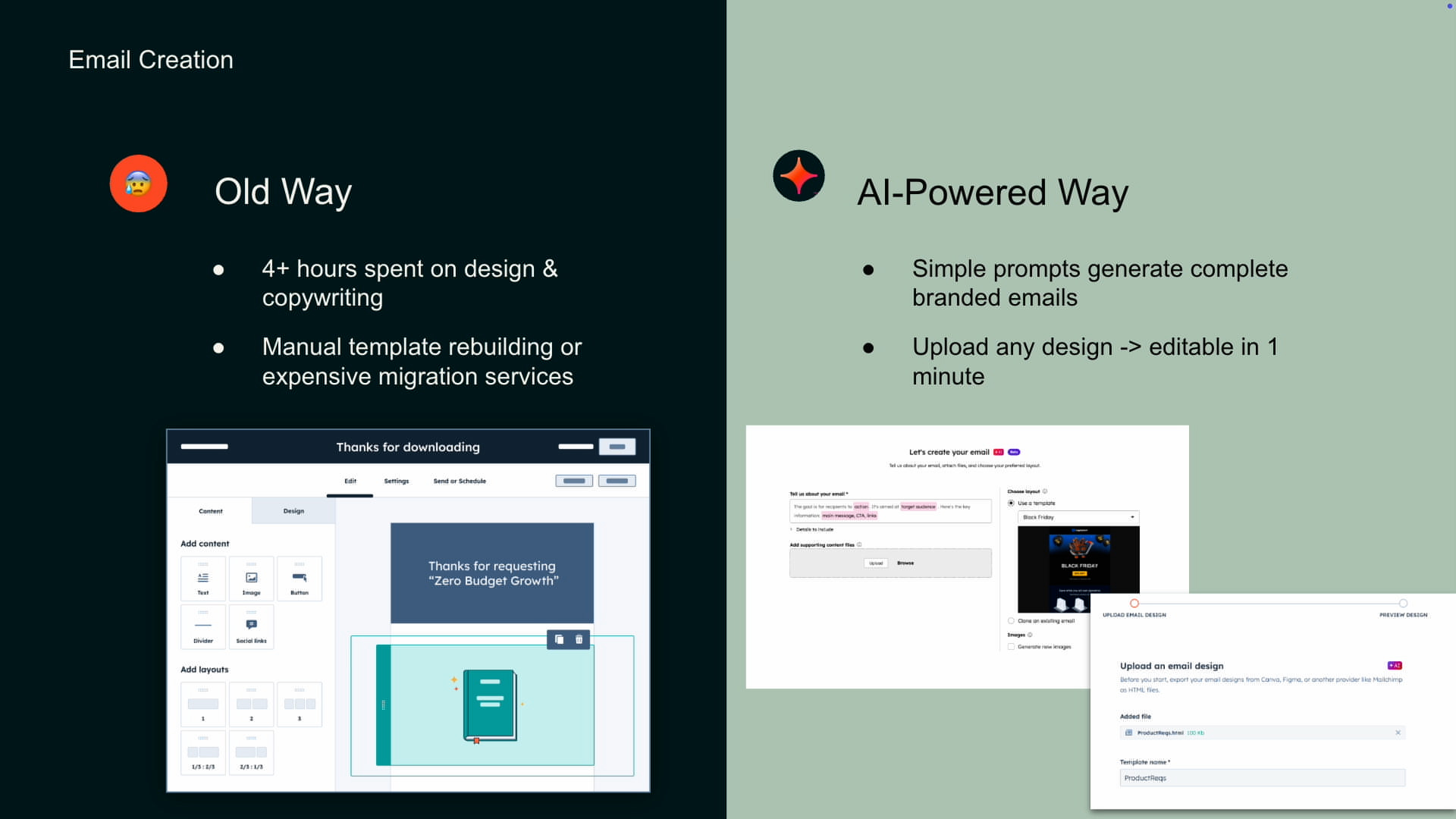
To address the heavy lift of creation, Mícheál contrasts the “old way” and the “AI-powered way”. Previously, marketers could easily spend four hours or more on copywriting and template design for a single campaign.
Any significant redesign often meant mocking up ideas in tools like Figma and then painstakingly rebuilding them in HubSpot, a process that was slow and repetitive. The new approach replaces much of this manual work with prompts and automation. Marketers can now create an email with AI by selecting a template (either a HubSpot one or a custom build), providing details about a product or offer and optionally uploading supporting PDFs or documents. HubSpot then generates a complete, branded email in seconds.
For those who routinely clone their last send and tweak it, there is now a “clone with AI” option. It keeps the structure and layout of the previous email, but lets marketers simply describe what the new version should cover – for example, turning “Week 3 newsletter” into “Week 4 newsletter” – and automatically inserts updated content. Mícheál also introduces AI email template upload, which lets users import any external HTML email design (for instance from Mailchimp). Behind the scenes, HubSpot’s AI analyses the logo, colours, text, imagery and links, and recreates the layout as a fully editable drag-and-drop template. The result is a near-identical design within HubSpot that can be easily modified, removing the fear of HTML and dramatically speeding up the process of moving or refreshing email designs.


From One-to-Many to True 1:1 Email Personalisation
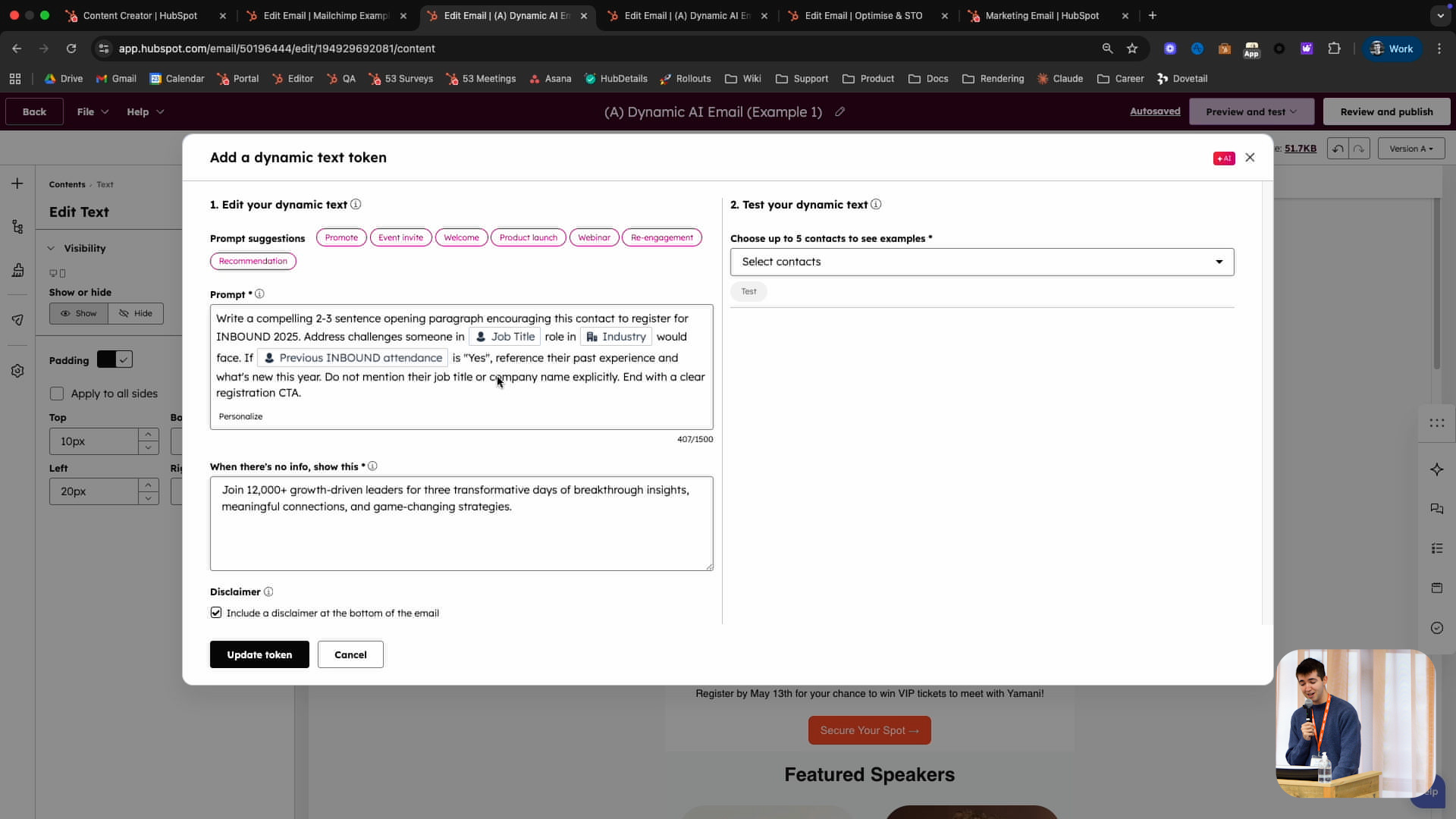
Turning to personalisation, Mícheál explains that the old world of marketing email relied on basic tokens such as “Hi ” and smart content blocks tuned for one-to-many use cases. While smart content served teams well for years, it is tedious to set up, hard to maintain and difficult to scale. More advanced, logic-driven personalisation often required developer involvement to build and maintain programmable email modules. HubSpot’s AI dynamic email personalisation is designed to move beyond one-to-many and make true 1:1 content achievable without code. Instead of creating multiple rule sets, marketers add an AI dynamic text token and provide a single prompt that can reference any contact or company property.
He demonstrates this with an email promoting INBOUND 2025. In one example, he uses a prompt to generate a compelling two- to three-sentence opening tailored to each recipient’s job title, industry and past attendance. The prompt also includes a fallback for contacts who lack enough data, ensuring they still see appropriate copy. Marketers can preview up to five contacts at a time, iterating on the prompt until the outputs feel right. In another example, he builds a “recommended sessions” section using a simple custom property capturing each contact’s areas of interest (e.g. AI, marketing, agents, keynotes), collected via a form. The prompt feeds the tool a list of session options and asks it to pick three relevant ones for each contact and explain why they matter for that person’s role and industry. The result is highly tailored content that previously would have required a huge team to produce manually – and, crucially, the AI has context of the brand voice and the entire email so marketers do not need to over-specify every detail.
Smarter Targeting and Send-Time Optimisation with AI
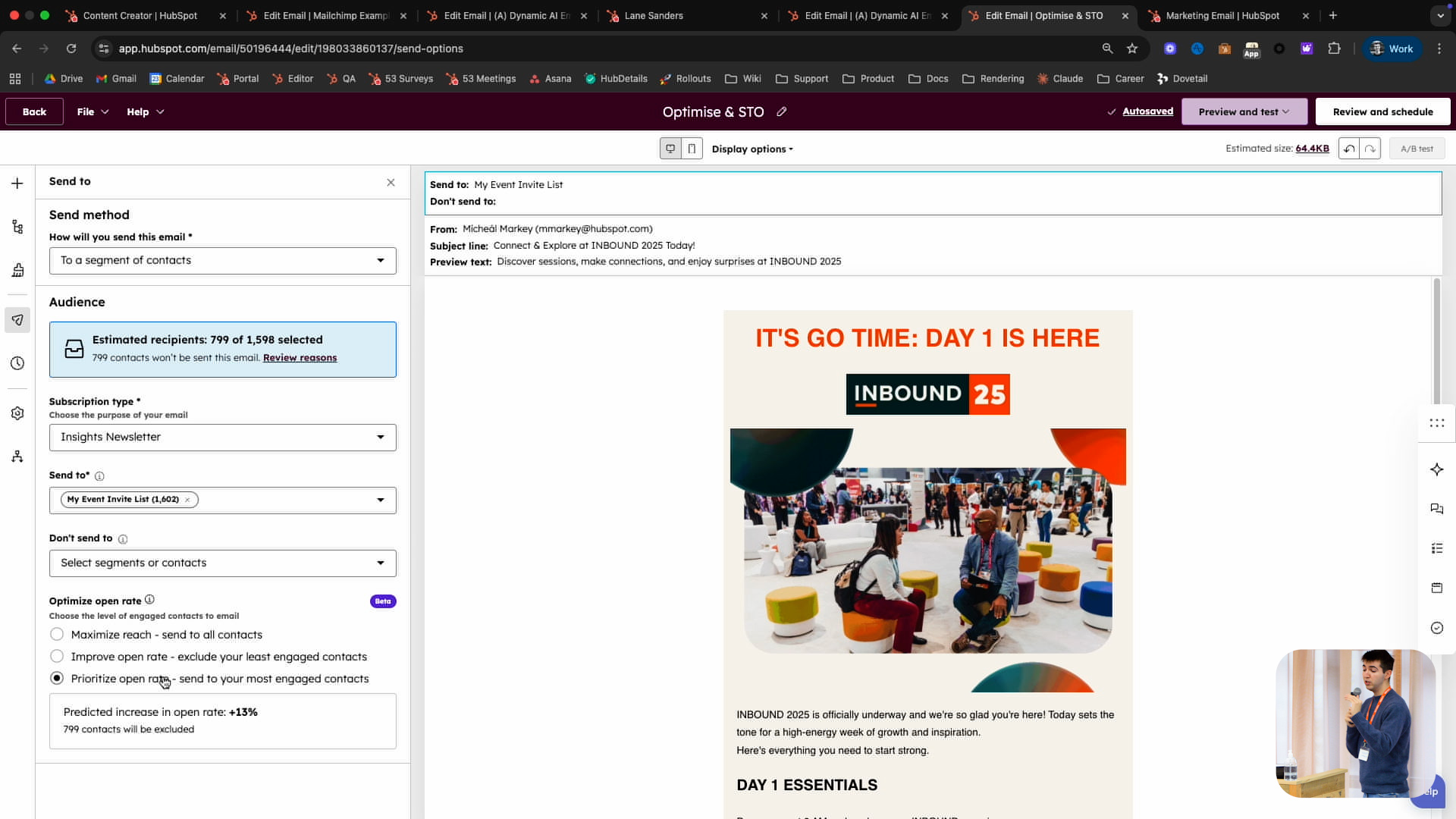
On optimisation, Mícheál notes that marketers historically had to make difficult calls on audience selection and timing with limited guidance. They might filter lists based on past opens or clicks, but this put a lot of responsibility on the marketer’s shoulders and still involved guesswork about who to include and when to send. AI Powered Email introduces predictive engagement before send and a new Email Engagement Optimiser to address this. When choosing an audience, marketers can now choose to maximise reach, maximise
engagement or pick a balanced middle option. Behind the scenes, HubSpot predicts how the email will perform for the selected audience and shows an expected open-rate uplift for each choice. For example, prioritising the most engaged contacts might yield a predicted 13% increase in open rate, and marketers can review exactly which contacts have been suppressed for optimisation, alongside those removed for reasons like unsubscribes or invalid addresses.
Send-time optimisation is another long-standing request that AI now makes possible. Instead of choosing a single send moment for everyone, marketers can ask HubSpot to optimise send time for each individual contact within a specified window, such as the next 24 or 48 hours. The system uses previous email engagement data to identify when each person is most likely to open – sending to one contact at, say, 3 p.m. when they habitually check their inbox, and to another at 5 p.m. on their commute. If there is no prior engagement data for a contact within that window, HubSpot picks a random time, then refines its approach as more interactions occur. These optimisation capabilities apply not just to marketing emails but also to regular automated transactional emails, making them broadly relevant across customer communication.


Leaning into AI: Concrete Wins Across the Funnel
Despite the challenges, Rich says he is proud of what his team has achieved by committing to become AI-fluent and making experimentation a norm. He describes how HubSpot’s marketing team created Loop Marketing to keep inbound leads flowing during this disruptive period. On the sales side, they have used AI-powered data enrichment and sequences to book thousands of additional meetings each month for reps, leveraging the extensibility of the HubSpot CRM.
Rich then outlines several AI-driven initiatives in customer success and support. The team has built an AI-powered guided selling tool embedded directly in the sales workspace, helping reps increase their win rate by 10%. They have also developed an AI-powered customer success assistant, similar to Breeze, which 80% of customer success reps use weekly and value highly, and which contributes to improved activation and retention. Finally, an AI-powered support bot, similar to Customer Agent, now fully handles 60% of support queries with no drop in CSAT, delivering a major operational efficiency gain. He concludes this section by stressing that AI is real, here to stay, and genuinely exciting if teams are willing to lean in and learn.
Q&A Highlights: Practical Implementation and Edge Cases
The session closes with a Q&A that surfaces several practical questions about how AI Powered Email behaves in the real world. Below are the key questions – reformulated for clarity – and Mícheál’s answers, reflecting what is available today and how teams can get access
Will AI Powered Email features work with automated and transactional emails, or only standard marketing sends?
Yes. The functionality, including AI-driven optimisation, will be available for regular automated transactional emails as well as traditional marketing campaigns. The goal is to bring the same intelligence to all email touchpoints, not just newsletters and promos.
How does send-time optimisation work, especially when there is little or no engagement history for a contact?
Send-time optimisation looks at past email engagement to identify when each contact is most likely to open. If there is no engagement data for a contact within the time window you select (for example, the next 24 or 48 hours), HubSpot will choose a random time within that window. As you send more to that contact and gather more behavioural data, the system continually refines the send-time predictions for future campaigns.
What is the rollout plan for send-time optimisation, and how can we request early access?
Send-time optimisation is being rolled out over the next few months. If you would like access sooner, you can request it via the Product Updates section of your HubSpot portal by looking for “send-time optimisation” under marketing email updates and submitting a request there.
What happens with AI dynamic personalisation if some contacts do not have all the properties referenced in the prompt?
At the moment, if your prompt references properties such as location, industry and job title, all of those fields must be present on the contact for personalised content to be generated. This “all or nothing” approach is intentional, to avoid half-baked or misleading personalised copy. If a contact is missing one or more of the required fields, they will see the fallback text you specify instead. HubSpot is considering more flexible options in future, such as marking some fields as mandatory and others as optional.
Can we use custom properties and interest tags (for example, “interested in running shoes” vs “interested in boots”) in prompts and targeting?
Yes. Any custom contact or company property can be referenced in prompts for AI dynamic personalisation. A common pattern is to capture interests or preferences via form fields – such as areas of interest for an event – and then feed those values into the prompt. This allows the AI to recommend content, sessions or offers that are highly relevant to each person based on those tags.
How should we approach personalising at scale when our audience spans many industries and segments?
Mícheál recommends building and testing prompts using a deliberately mixed sample of contacts across industries, locations and roles so you can see how the AI behaves for different segments. You can preview outputs for multiple contacts, look for patterns and adjust the prompt accordingly. For the first time, you will also be able to see exactly what AI-generated text was sent to each contact on their record, making it easier to spot issues and refine your approach over time.
How is language handled, and can we ensure copy uses the right regional variant (for example, British English)?
By default, the AI generates content in the language selected for the email itself – for example, English (United States) or French. If the email language is set to French, the personalised text will be returned in French. If you want to enforce a particular variant, such as British English spelling, you can include that instruction directly in your prompt. HubSpot has chosen not to mix languages within a single email by default, as that can result in inconsistent experiences if only the personalised fragment changes language.
How do we access these features, and are they all enabled at once?
Although they sit under the AI-Powered Email umbrella, features such as AI email creation, dynamic personalisation, engagement optimisation and send-time optimisation are being rolled out as separate capabilities. Each will appear individually in the Product Updates section of your portal under the marketing email filter. From there, you can see availability details and request access where applicable.

Sales Workspace
Explore the latest Sales Workspace tools and how they help boost productivity and improve pipeline visibility. Katie Magorrian from HubSpot’s Customer Success team walks through real scenarios and shares best practices to help your sales team get the most out of the workspace.
✦ Dublin HubSpot User Group
Prospecting Agent & Target Account
Explore the latest AI-powered sales tools in HubSpot, including the Prospecting Agent and new Target Accounts features. Fiachrá Duffy demos what’s possible and dives into a live Q&A on how sales teams can get the most from these updates.
✦ Dublin HubSpot User Group
Prospecting Agent & Target Account
Explore the latest AI-powered sales tools in HubSpot, including the Prospecting Agent and new Target Accounts features. Fiachrá Duffy demos what’s possible and dives into a live Q&A on how sales teams can get the most from these updates.
✦ Dublin HubSpot User Group