




Making Sense of HubSpot Credits
Credits are the meter behind HubSpot's agentic layer — and this session was an attempt to make that meter legible. Rather than a pricing pitch, the walkthrough answered three practical questions that admins keep asking: which features actually consume credits, how each one is metered, and what controls exist inside the portal to stop spend running away from you.
The material had been refreshed in the weeks before the session to align with the agent launches announced at Unbound, and the deck — including the full rate sheet and the knowledge-base definition of a “resolution” — was promised to attendees afterwards, so nobody needed to take notes or screenshots. Questions were held to the end, with the chat monitored throughout for anything urgent.
The narrative arc was deliberate. The first half explained consumption: what work an agent does, and at which precise moment that work becomes a charge. The second half flipped the perspective to control: portal, feature and action-level spend caps, reporting, pausing and notifications. The closing Q&A dealt with the anxieties that sit underneath the whole topic — overages, roll-over, forecasting, and how far custom agents can realistically be pushed.
What actually consumes credits
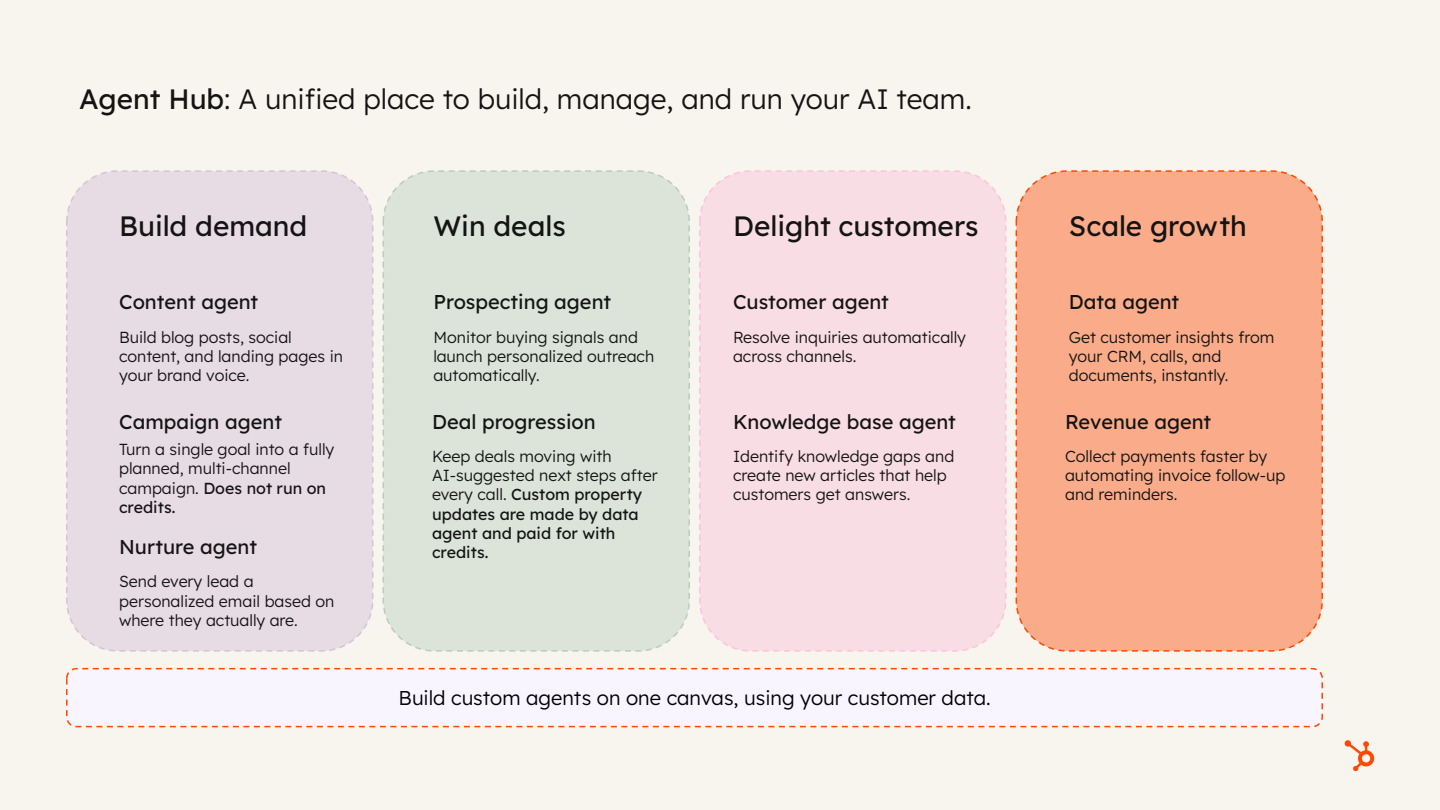
The short answer is that credits are consumed primarily by AI agents, with a small number of non-agent features also drawing on them — buyer intent being the example called out. In practice, the overwhelming majority of consumption in customer portals today comes from deploying agents across go-to-market motions rather than from anything else.
The agents highlighted as new or updated at Unbound were the content agent, campaign agent, nurture agent, knowledge base agent and revenue agent. Every one of those consumes credits, with one important exception.
“Campaign agent does not consume credits today.”
- Agents are the main driver. Content, nurture, customer, prospecting, data, knowledge base and revenue agents all meter against credits.
- Some non-agent features charge too. Buyer intent is metered, and has more than one chargeable action type.
- Custom agents count. Anything you build and prompt yourself, tailored to your own business processes, consumes credits when it runs.
- The model is work-specific. Each agent is metered against the work it actually performs, and a single feature can have several chargeable actions — the customer agent, for instance, bills text-based and voice-based channels separately.
- The rate sheet is the source of truth. The exhaustive list of credit-consuming features and their rates is linked in the deck.
Buying credits, and what your edition already includes
There are two routes to paying for credits, and the choice is essentially a budgeting decision rather than a functional one. You can buy credits upfront, which makes spend predictable and known month over month, or you can operate on a pay-as-you-go basis, where credits are consumed in real time as the work happens.
Sitting underneath both routes is the allowance that comes with your subscription. Every edition — Starter, Professional and Enterprise — includes a number of credits, and this is where one of the most frequently asked questions arises: does using those included credits quietly tip you into additional charges? It does not. The included allowance can be spent across any credit-consuming feature up to the included threshold, and when it is exhausted the product simply tells you so.
- Upfront purchase: predictable, budget-friendly, fixed monthly spend.
- Pay-as-you-go: consumed in real time, only applicable once additional credits have been purchased.
- Included credits: present in every edition and usable across any credit-consuming feature.
- No accidental overage: if you have not purchased additional credits, you cannot incur an overage charge.
- No roll-over: unused credits do not carry into the following month.
Agent by agent: how each one is metered
The most useful part of the session was the agent-by-agent breakdown, because the metering unit changes with the outcome each agent is designed to deliver. The pattern throughout is pay-per-outcome rather than pay-per-attempt: the charge lands at the moment something useful is produced, sent, resolved or written back to the CRM.
The rate sheet in the deck lists every agent and its per-action or per-minute cost. The walkthrough covered the headline cases in detail.
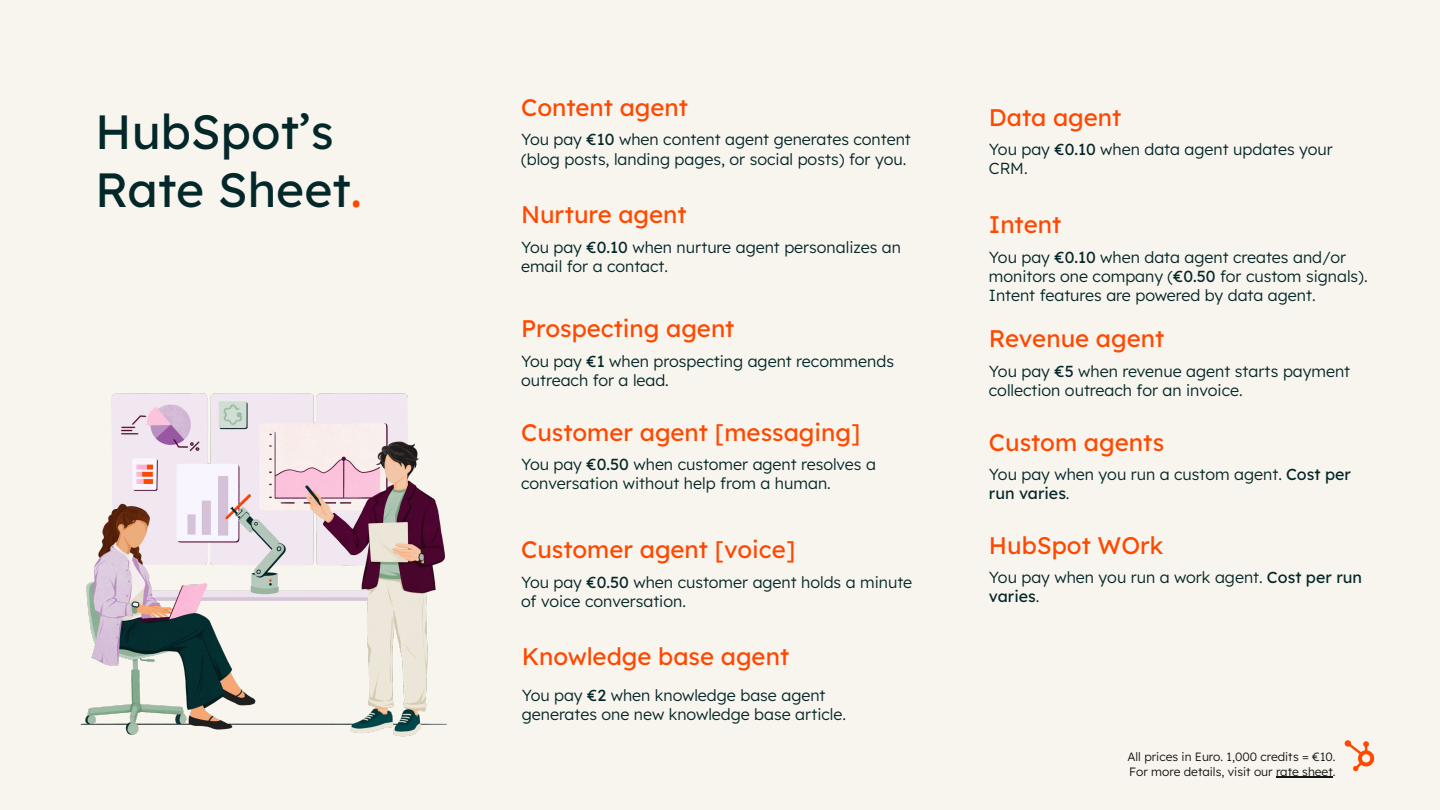
- Content agent (beta) — €10 per piece of content. Generates content using HubSpot context: AEO recommendations, brand, voice, identity and your contact base. The charge occurs when the content is generated. Worked example: AEO flags a gap around a loyalty programme, you prompt the content agent to action it, and the resulting blog post costs €10.
- Nurture agent (new at Unbound) — €0.10 per personalised email sent. Sits inside workflows and automated nurture, personalising an email immediately before it sends using CRM data, past activity, business context and optional web research. You control the prompt; it can personalise subject line, body and CTAs. One hundred contacts is roughly €10.
- Customer agent — €0.50 per resolution (messaging). The flagship and longest-standing agent, handling inbound questions through live chat and email, and now voice/calling as a separately charged channel. Crucially, billing is per resolution, not per reply.
- Prospecting agent — €1 per lead. Reviews addressable market, target audience and target accounts, sources warm-fit leads from buying signals and recommends them for enrolment in a play. The charge is triggered automatically once a manually enrolled lead has outreach drafted for it. It does not act autonomously — it must be prompted and set up — although lead sourcing itself can be automated.
- Data agent — €0.10 per answer. Pervasive across the platform, keeping the CRM current by updating properties. You pay at the point an individual property is updated, for example after it reviews past CRM activity or researches a prospect on the web and writes the findings back.
“You only pay when the agent actually resolves that conversation.”
Because “resolution” carries the cost, it was defined precisely. There are two qualifying types:
- The agent completes a configured action you have trained it on — a password reset, for example.
- The agent answers a question using a cited knowledge source (with sources controlled and trained by you) and the customer does not reopen the conversation.
“So long as the customer doesn't reopen that conversation within 72 hours, it's considered resolved.”
A fuller knowledge-base definition of resolution is linked in the deck for teams that need the exact wording.
Custom agents, action units and cost forecasting
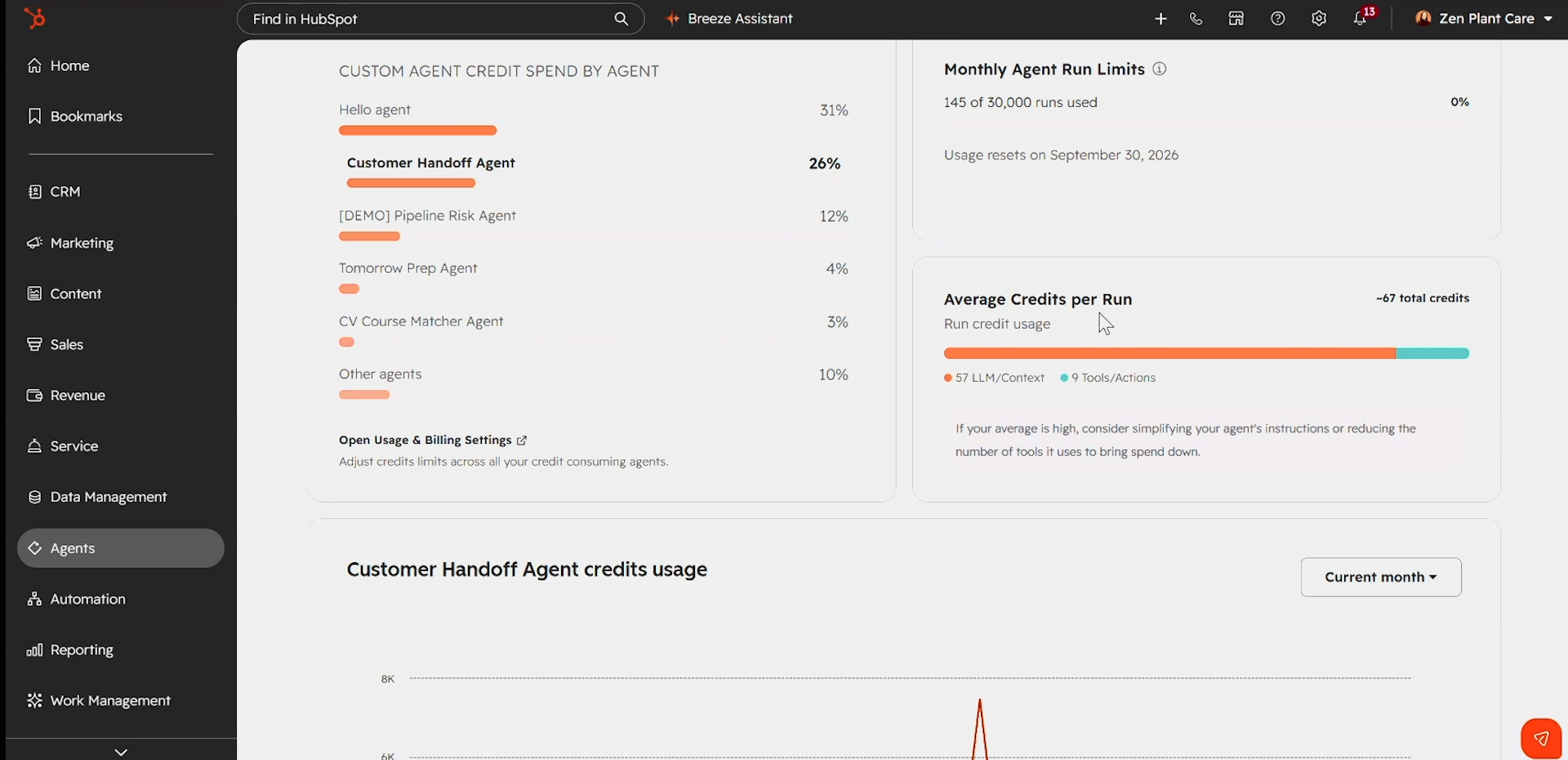
Custom agents were described as the most complex piece of the monetisation model, and the session admitted they could fill an entire hour on their own. They are fully tailored: you define the agent with prompts, instructions, knowledge sources, the things it should care about, the things it should ignore, and the guardrails around it — much like working directly with an LLM.
You pay per run, but the cost of a run varies with the amount of work required. Each action the agent takes consumes a number of action units, the metering unit for how much work that action involved. Summarising a record may cost considerably more than creating a note, and the difference is driven by context: a brand-new company with no CRM history takes far less work to summarise than one with years of relevant activity. At the end of the run, the total action units across all actions equate to the credits that run consumed.
The worked example used throughout was an agent triggered every time a demo is booked: it builds a personalised script for the company, saves it to the company record, creates a note, creates a task for the rep and notifies the company owner. Broad instructions such as “search the entire CRM” generate far more work per run; tight guardrails and a specified order of operations make the agent run more efficiently. That, in short, is good agent hygiene.
“You can test an agent to figure out … what is that average cost per run for this agent before you even turn it on and before any credit is ever consumed.”
How to forecast a custom agent's cost:
- Build it and test it in draft mode. Testing returns an estimated cost for each test run plus an average across tests — and no credits are consumed while testing. One demonstrated test run came back at an estimated 54 credits.
- Test representatively. Run across a broad range of use cases, including older records with rich history and newer records with almost no context, because context is the dominant cost driver.
- Separate the variable from the fixed. Summarising, analysing and researching a record varies enormously; creating actions and tasks is a consistent scope of work regardless of the company.
- Use the prompt as a consistency lever. Instructing the agent to look only at the past month of activity rather than years of history reduces outliers and stabilises the average cost per run. Prompt best practices are documented.
- Watch the credits breakdown. In the example shown, most cost per run came from LLM and context work — analysing, researching, web sourcing and making sense of portal data. Very little came from actions such as creating, saving or updating records, which are bounded, cheap and predictable.
- Cap the runs. Run limits multiplied by average credits per run effectively set a monthly spend ceiling for that agent, and limits are adjustable.
- Keep a human in the loop. Agents can require an approval step before defined actions such as creating or updating a record; runs awaiting sign-off appear as “action needed”, and clicking into a run opens the agent inbox showing timing and every individual step taken.
The recommendation was to trial custom agents using your included credits — a low-risk way to start deploying agents before any additional spend is committed.
Spend controls: portal, feature and action caps
The second half of the session pivoted from consumption to control. Some of these mechanisms have existed for some time; others were introduced only weeks before the session and were flagged as new. The design principle is simple: limits nest, so that budget is consumed by the tools that drive value while everything else sits behind guardrails.
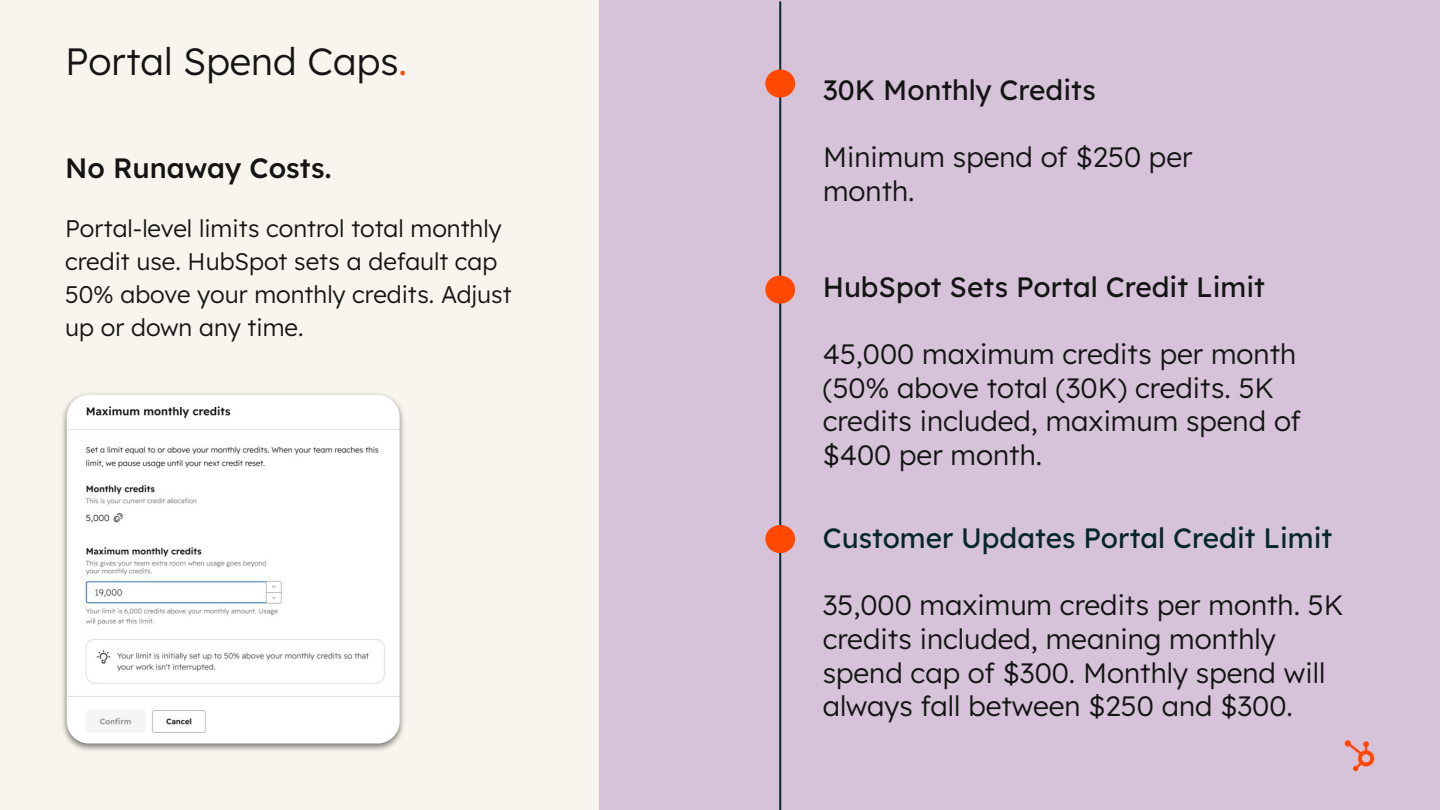
Caps can be set at three levels. The portal-level cap sets the maximum credits consumable across all credit-consuming features in a month — the example cited was 8,000 credits per month — and can be adjusted up or down at any time. Feature-level caps limit what a specific feature can consume, and are available for custom agents, the customer agent, content agent, data agent and others. Action-level caps, new as of earlier that month, apply to features that take multiple action types: the customer agent's text channel versus its voice channel, or buyer intent's custom signals versus standard signals.
- Limits must nest neatly. The sum of action-level limits cannot exceed the feature limit; the sum of feature limits cannot exceed the portal limit.
- Caps apply only where additional credits have been purchased. Customers operating inside their edition's included credits are unaffected.
- Defaults are now protective. Announced at Unbound: if you buy additional credits for the first time, HubSpot sets the portal spend cap for you by default, to prevent runaway costs and unexpected invoices.
- Everything lives in one place. The credits dashboard sits under Account and Billing, and is where all limits are set, adjusted and reviewed.
Reporting, pausing and usage notifications
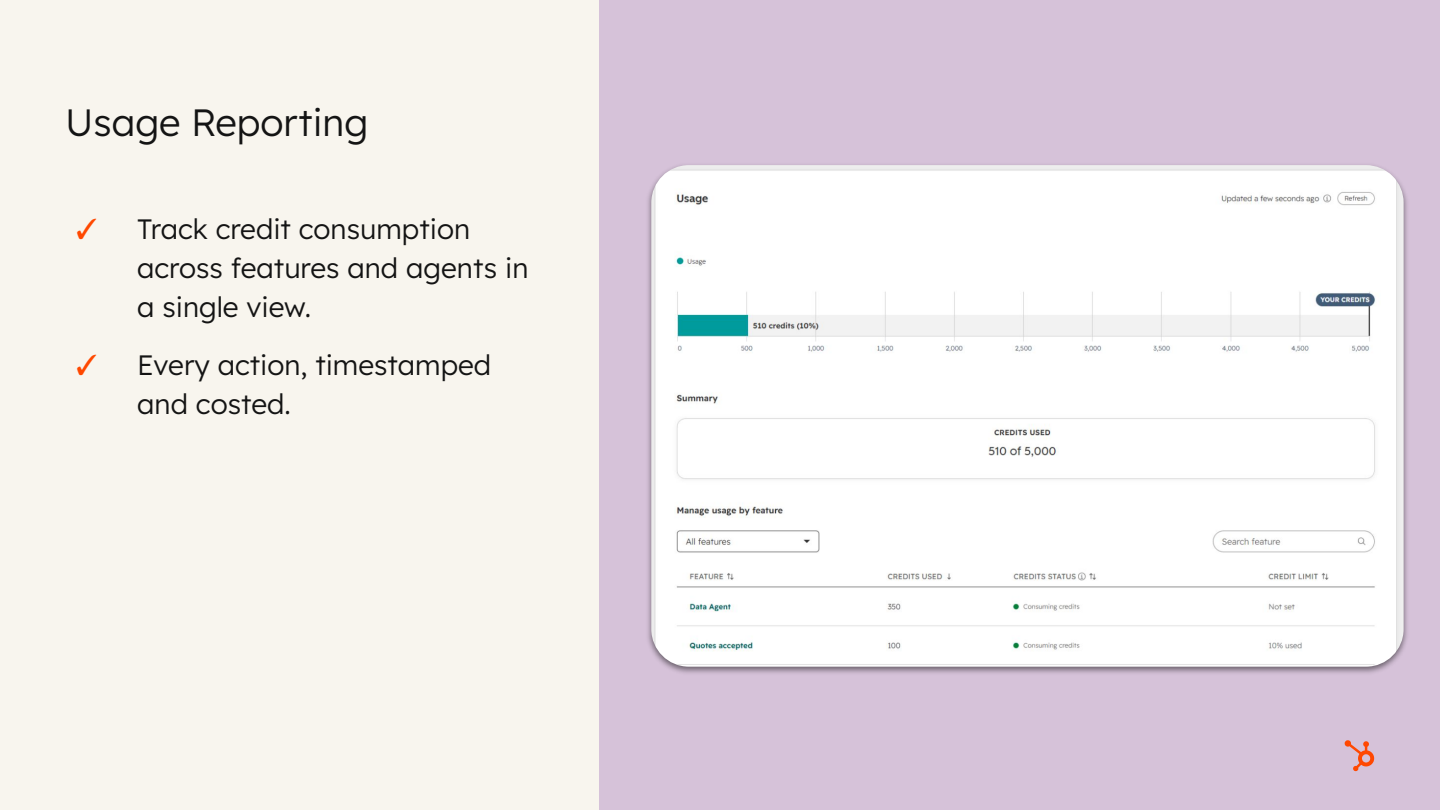
Controls are only as good as the visibility behind them. The credits dashboard reports granularly and historically: which features are enabled, which are consuming credits, which are not consuming, which are paused, the individual actions taken, and usage trends over time. Access is governed by permissions, with admins and anyone granted dashboard access seeing the full reporting picture, including historical trends. At agent level, an Activity tab plots individual live runs with the credits consumed by each, which is what feeds the average cost per run.
Pausing was singled out because it is routinely misunderstood. Pausing a feature stops it consuming credits until it is reactivated — but it does not give you the feature for free. It pauses use of the credit-consuming feature altogether, which may affect users and teams across the portal. The upside is that it eliminates accidental consumption from a feature you have decided should not be spending.
Notifications operate on two levels: administrative and educational. Billing contacts and admins receive notifications at defined thresholds as the total monthly credit limit is approached. Separately, end users get in-product education at the point of action — before taking a credit-consuming action, HubSpot states that credits will be consumed and, where limits are set, how much of the limit that action will use. The example shown was filling a smart property taking usage to 15% of the limit.
- Dashboard location: Account and Billing → credits dashboard.
- Reporting depth: feature status, individual actions and historical trends.
- Pausing: a hard stop on consumption, not a free tier.
- Notifications: threshold alerts for admins and billing contacts, plus in-flow warnings for end users.
Where to start, and HubSpot-built versus custom
The closing guidance was pragmatic. Start with HubSpot-built agents — the prospecting agent was named — because they are already optimised and efficiently built, and you do not have to worry about prompting or instructions to get good operational behaviour. Reach for custom agents when your requirement genuinely falls outside what a built-in agent can do; they are powerful, but they demand more care in set-up. Agent Builder allows both HubSpot-built and custom agents to be composed into a flow, and a custom agent can also be added as a prompt inside a workflow for tighter, more controlled triggering.
For customers nervous about switching anything on, a sequence was suggested. Begin with the data agent: insular, controlled and human-in-the-loop, because you decide which properties it updates, with what context and when. Move next to the customer agent, which offers strong control through defined actions and knowledge-base sources configured to suit the business. Both custom agents and Agent Builder are available on Starter plans, so the entry point is broadly accessible.
The question of whether to spend credits on the content agent at all, when an external LLM is available, was answered on grounds of context rather than raw generation. External models are efficient at producing copy — effectively a drafted document — but not a publish-ready, optimised page. The content agent shortens the path from zero to publish-ready, particularly where the website, landing pages or blog are hosted on HubSpot, and it sits directly on top of where your brand assets live. It also has context of AEO recommendations, a feature that has been available for a few months and was recommended to attendees focused on brand visibility in search engines. For pure copy editing an external LLM remains viable, but you will re-state your brand rules on every prompt — the example given was a brand that dislikes the Oxford comma — whereas a properly configured content agent should already know them.
“These agentic tools [are] only as powerful as their understanding of you, your business brand, tone, your logo, your imagery.”
Follow-ups for attendees:
- Build and test a custom agent in draft mode to estimate credit consumption before publishing — no credits are consumed during testing.
- Review and adjust agent run limits to set an effective monthly spend ceiling per agent.
- Use the Credits tab breakdown to identify and reduce LLM- and context-heavy cost drivers.
- Explore Agent Builder and workflow-triggered agent prompts for tighter control.
- Start experimenting with the data agent, then the customer agent, then custom agents.
- Configure portal-level and feature-level spend limits in line with budget if additional credits are purchased.
- Consult the linked rate sheet for exhaustive rates, and the knowledge-base article for the full resolution definition.
- Try HubSpot's AEO tool if you are not already using it.
Questions from the audience
Audience questions were detected and were taken at the end of the session, with the chat monitored throughout for anything urgent. The exchanges below are grouped by topic.
Is the per-lead charge only incurred after included credits are used up? (Tony)
Yes. Included credits can be spent across any credit-consuming feature up to the included threshold. The illustrative maths offered — explicitly flagged as done on the spot and open to fact-checking — was a Professional plan with 3,000 included credits and a prospecting agent costing 100 credits per lead, allowing roughly 30 lead enrolments in a month. The 31st lead could not be enrolled, and the product would show that the monthly credits were exhausted. Critically, there is no automatic tipping into pay-as-you-go: if you have not purchased additional credits, you will never incur overages or additional charges. Overage applies only where additional credits have been bought — and even then, HubSpot now sets a portal-level spend cap by default.
Do unused credits carry over to the next month? (Mitchell)
No. Credits do not roll over, so the guidance was to use them as needed within the month.
How do you forecast custom agent costs — is every run the same price?
No, the cost varies per run. The reliable method is to build the agent and test it: each test returns an estimated cost, and the average across tests is the best indicator of cost at scale. Test across a broad range of examples, including both older records with rich history and newer records with little context, because the agentic work of summarising, analysing and researching depends heavily on how much context exists. Creating actions and tasks, by contrast, is a consistent scope of work. Tightening the prompt — for example, instructing the agent to look only at the past month of activity — reduces outliers and stabilises the average.
Is there a benefit to spending credits on the content agent versus using Copilot, Claude or GPT?
External LLMs are efficient at producing raw copy but deliver a drafted document, not a publish-ready optimised page. The content agent's advantages are speed from zero to publishable — particularly where the site, landing pages or blog are hosted on HubSpot — proximity to brand context such as tone, logo and imagery, and awareness of AEO recommendations. For pure copy editing an external model is viable, but it requires you to restate brand rules on every prompt.
How large can custom agents get, and is there a point where you must build outside HubSpot? (Tony)
Effectively there is no hard ceiling — no inherent limit was identified on either scale of volume or scale of complexity.
“With our MCP, the answer is really no.”
Via HubSpot's MCP, with connectors available for all core LLMs, anything built externally can be connected back into HubSpot. The deciding factor is reliance on external tooling: if an agent must reference external tools consistently and repeatedly on every run, it is worth mapping and solutioning whether to build outside HubSpot on top of the MCP, for greater centralisation within the tech stack. Custom agents are otherwise comparable to workflows — they can be embedded in Agent Builder, which carries the traditional workflow actions, including calling out to external flows and bringing that data back so it becomes accessible to the agent.
What if we switch something on and credit consumption runs away from us?
This was described as the most common underlying concern, and the mitigations are layered: test custom agents before turning them on, and rely on the fact that included credits are a hard boundary.
“You're not going to exceed those unless you potentially choose to buy additional credits.”

.jpg?width=1200&length=1200&name=HUG%20Dublin%20-%20OCT%202025-070%20(1).jpg)


