


Session Summary 
HubSpot Prospecting Agent: AI-Powered Sales Outreach That Combines Timing, Context, and Personalisation
Closing the Gap Between Prospect Interest and Sales Engagement
Traditional prospecting forces sales teams into an uncomfortable trade-off: pursue quality through deep research and lose speed, or chase volume with generic sequences and lose relevance. HubSpot's Prospecting Agent, presented by Sales Specialist Coco Diana, is designed to eliminate that compromise. Functioning as an always-on BDR directly within the HubSpot CRM, the agent continuously monitors buying signals, researches accounts, and generates personalised outreach — enabling reps to respond faster without sacrificing message quality.
The session walked through the full lifecycle of the Prospecting Agent: from the business problem it addresses (leads going cold whilst reps are still preparing), through the Breeze AI framework that powers it, to a live demo of play configuration, signal setup, email templating, and performance dashboards. A candid Q&A session covered deployment timelines, credit governance, integration with third-party contact-sourcing tools, and practical rollout strategies for teams cautious about AI-generated outreach.
The Cost of Slow Response Times
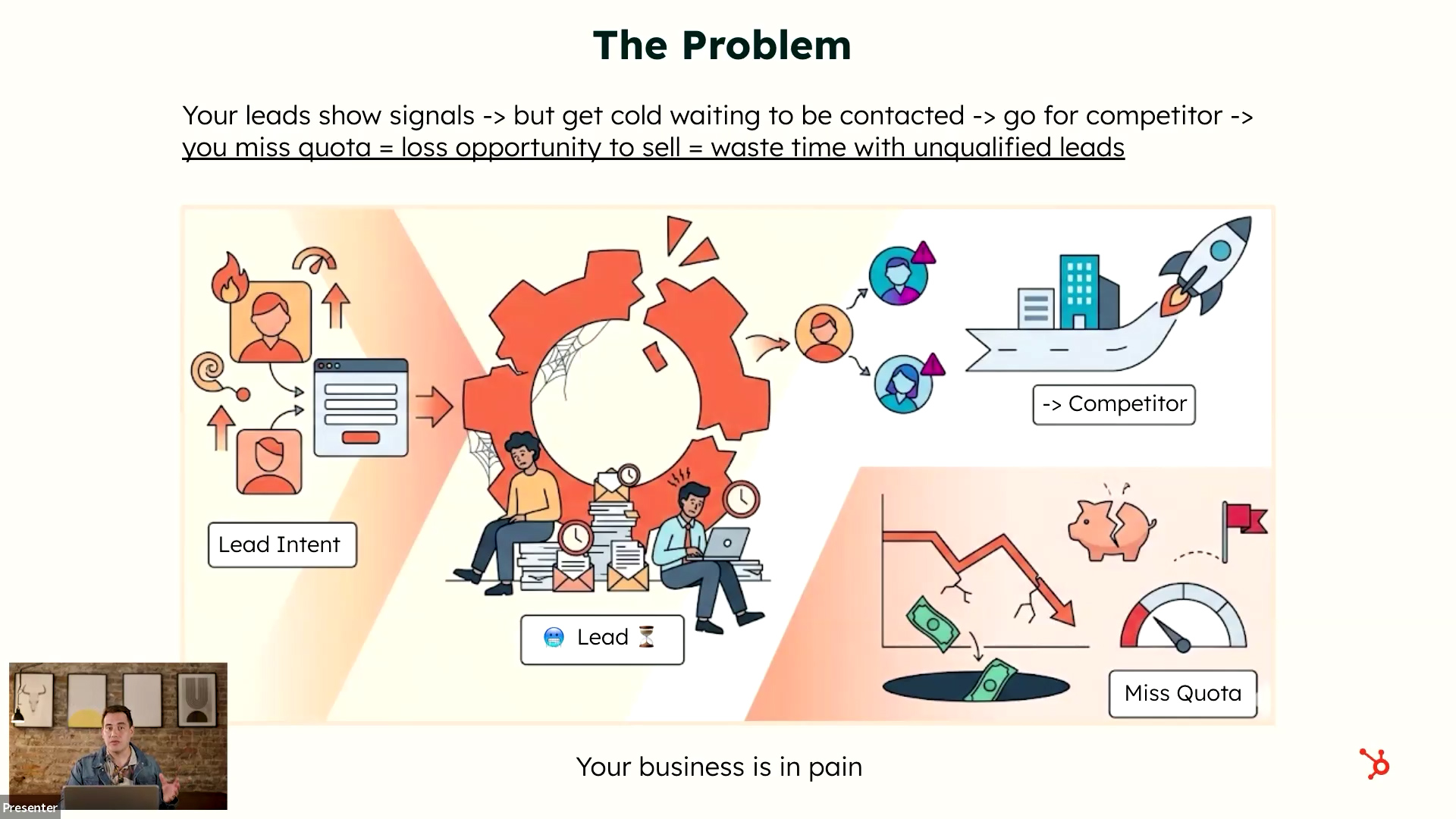
The core problem is straightforward but expensive. When leads show buying signals, sales teams are often still prioritising, researching, or preparing to respond. During that delay, prospects engage with competitors, lose interest, or move on entirely — resulting in missed quotas, lost opportunities, and wasted effort on leads that are no longer qualified.
- The issue is not lead generation itself, but response speed, relevance, and timing
- Reps spend the majority of their time preparing to prospect rather than actually moving deals forward
- Generic outreach sequences are easily recognised by prospects and produce diminishing returns
How the Prospecting Agent Works: Three Core Pillars
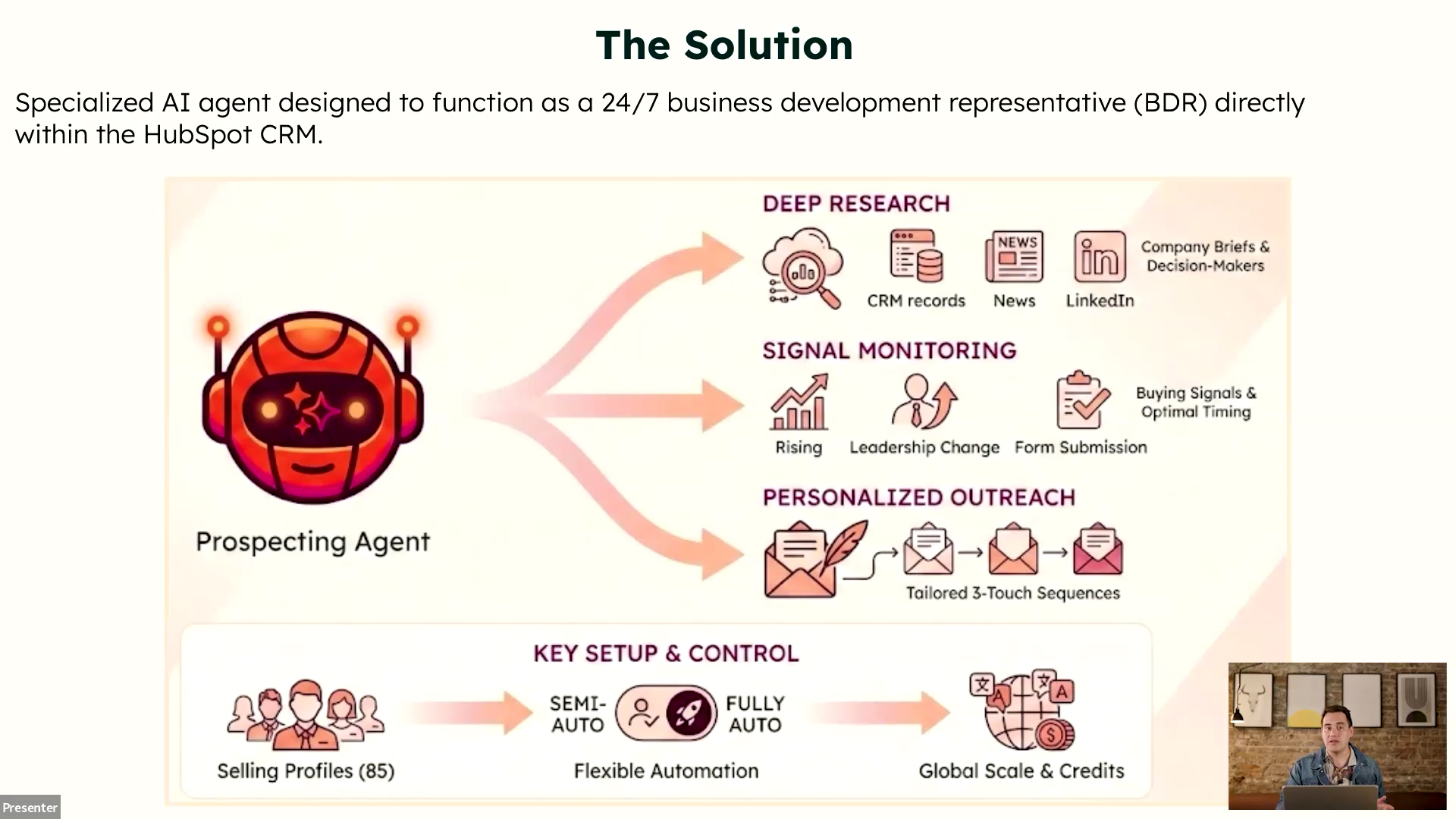
The Prospecting Agent is a specialised AI agent built to function as a 24/7 BDR within HubSpot CRM. It combines deep research, signal monitoring, and personalised outreach into a single automated workflow, removing the traditional trade-off between speed and quality.
- Deep research: Pulls together relevant information on companies and contacts so reps do not have to gather it manually
- Signal monitoring: Watches for buying signals and changes — such as page visits, downloads, funding rounds, hiring, and geo expansion — that suggest the timing is right to engage
- Personalised outreach: Uses research and signals to draft contextual emails that differ for every recipient, unlike static sequences
Intent Signals Meet CRM Context
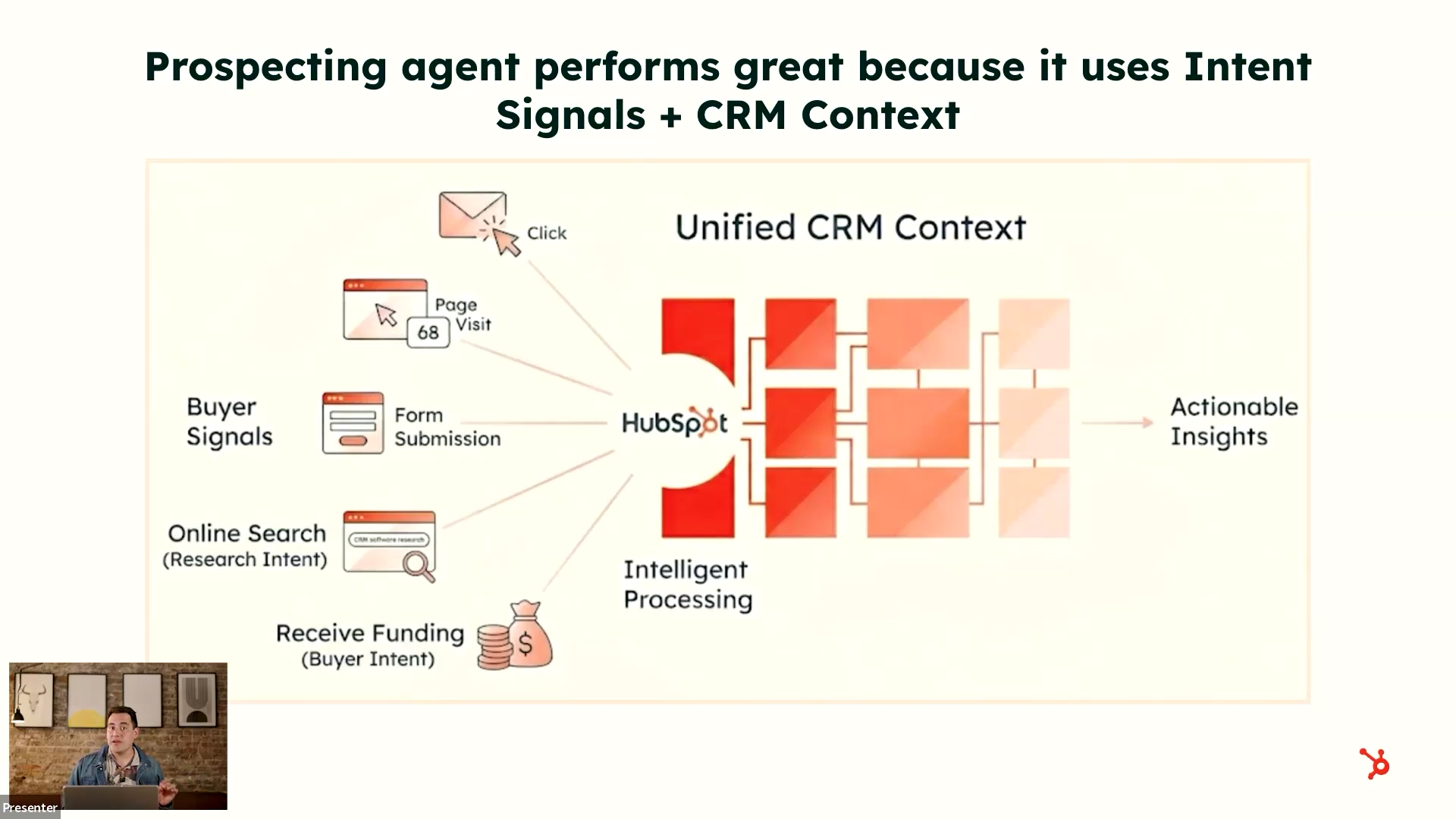
The Breeze framework combines two layers of intelligence to make outreach significantly more effective than traditional cold messaging. Intent signals tell the agent when to reach out, whilst CRM context tells it what matters to the prospect.
- Intent signals: Behavioural triggers including page visits, downloads, form submissions, research intent topics, and visitor intent on key pages such as pricing
- CRM context: Historical interactions, deal context, lifecycle stage, previous communications, active support tickets, and close-lost history
- Combining timing and context produces higher response rates than traditional cold outreach
- The agent avoids creating friction by recognising situations such as active tickets or recent close-lost deals
Credit Model and Cost Governance
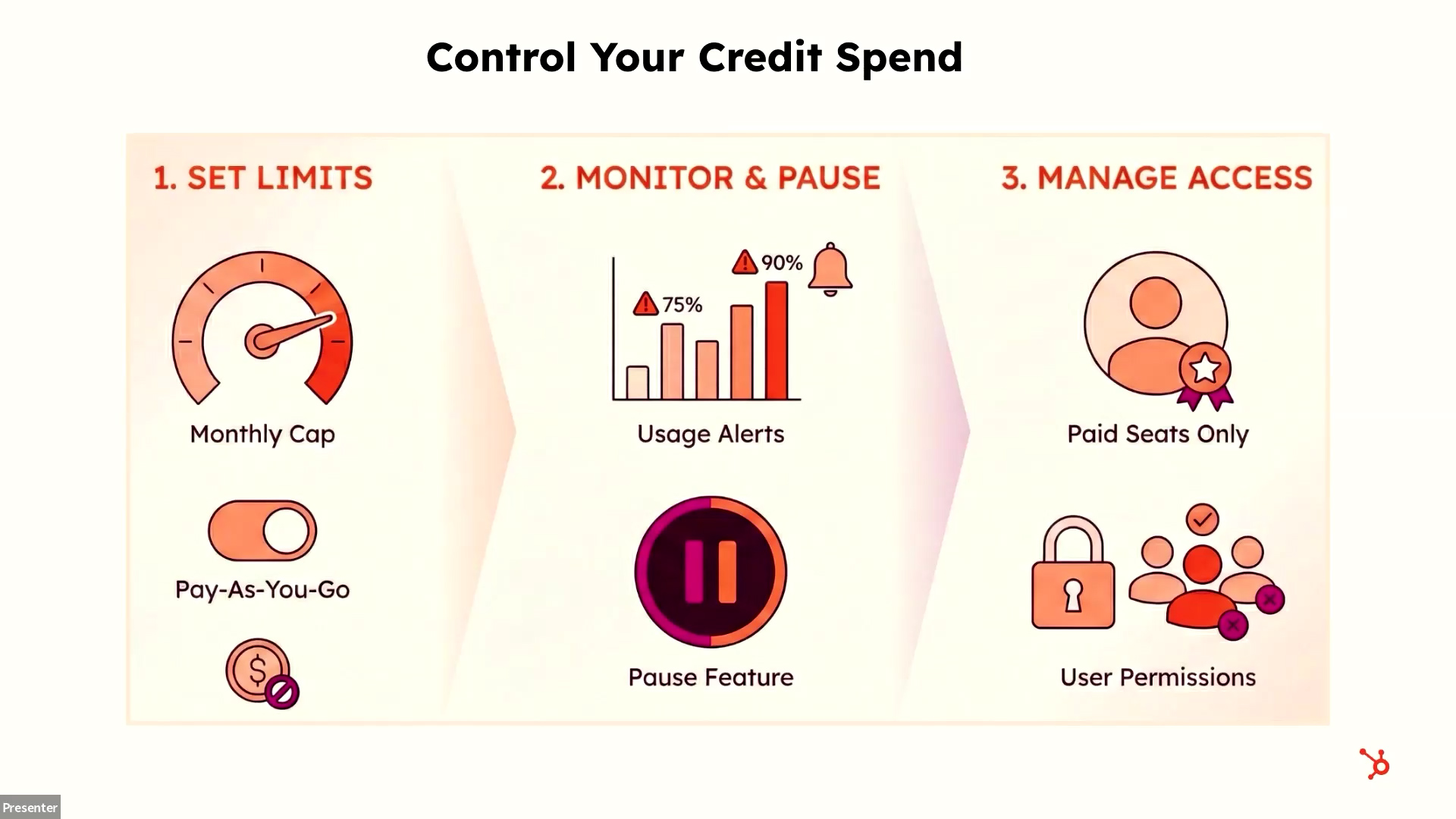
Breeze AI features run on a credit-based model, with different actions consuming different amounts of credit. The Prospecting Agent is available on Sales Hub Professional and Enterprise tiers. HubSpot provides a structured governance framework to help teams adopt the technology without losing visibility over costs.
- Set limits: Choose a monthly credit cap and configure pay-as-you-go or upgrade settings
- Monitor and pause: Track usage alerts and pause consumption if thresholds are approached
- Manage access: Restrict the agent to specific users who need the capability
- Company monitoring is now free of charge (previously 10 credits per company)
- A 28-day free trial is available for teams that have not yet used the Prospecting Agent — no credits consumed during the trial period
Custom Instructions and Flexibility
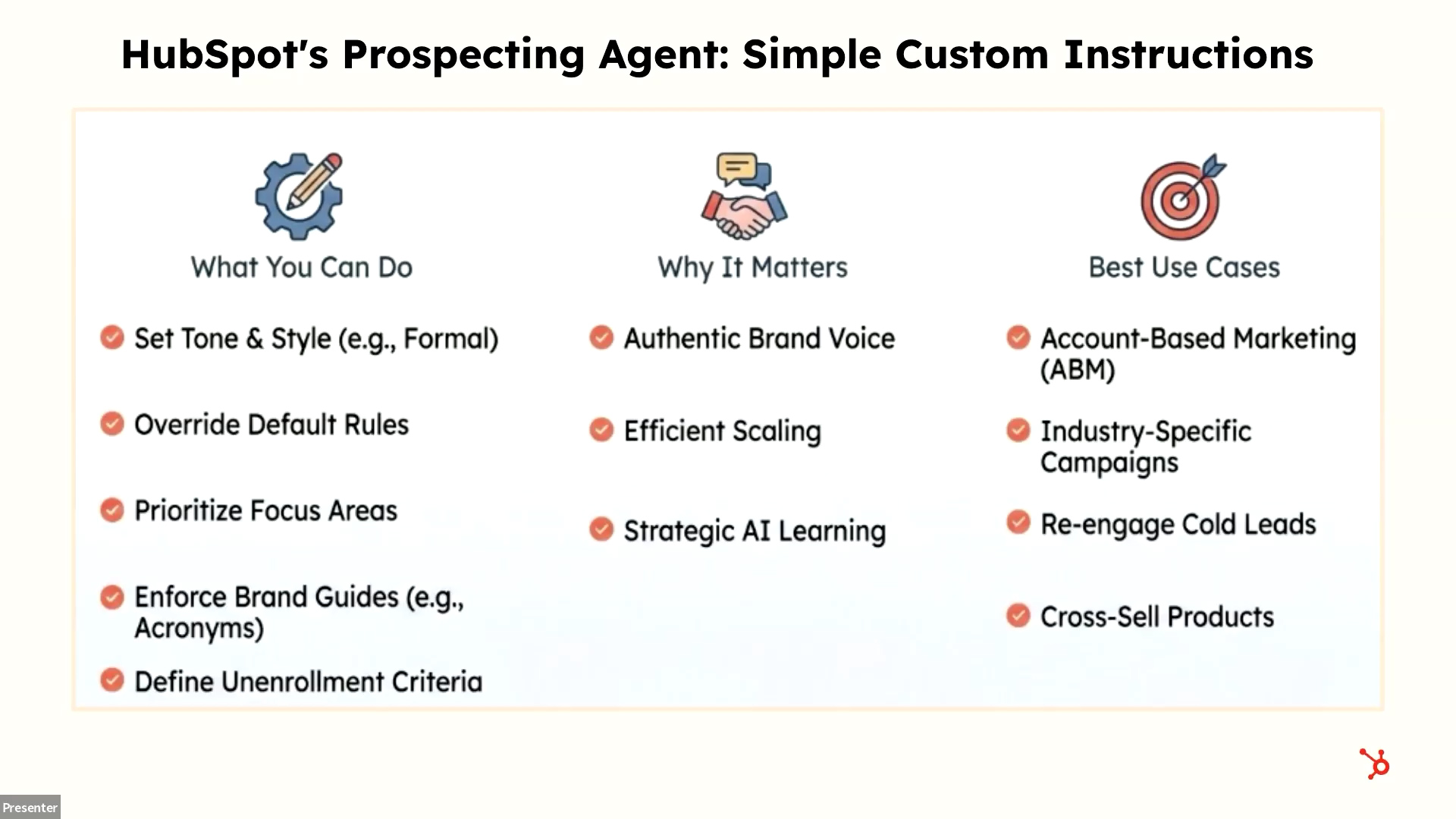
One of the most useful aspects of the Prospecting Agent is the ability for sales teams to define custom instructions so the agent behaves in line with their strategy, workflow, and brand identity. This makes the tool practical across a wide range of use cases.
- Set tone, style, and brand guidelines for all agent-generated communications
- Specify outreach frameworks (e.g. PAS, AIDA, BAB, value-first personalisation) in the instructions
- Define unenrollment criteria and stop conditions
- Support for multiple languages within outreach
- Use cases include account-based motions, industry-specific campaigns, re-engagement of cold leads, cross-sell/upsell, and customer success retention outreach
Live Demo: Building and Configuring Plays
The live demonstration walked through the full play-creation workflow inside HubSpot's Prospecting Agent interface. A "play" represents each scenario where the agent will outreach to someone — and multiple plays can be configured for different products, segments, or purposes (including non-sales customer success outreach).
Audience and Signal Configuration
- Select target companies using CRM segmentation
- Choose signals to monitor: buyer intent, research intent, client signing, event attendance, funding, geo expansion, and more
- Define target personas (job roles and contact types to prioritise)
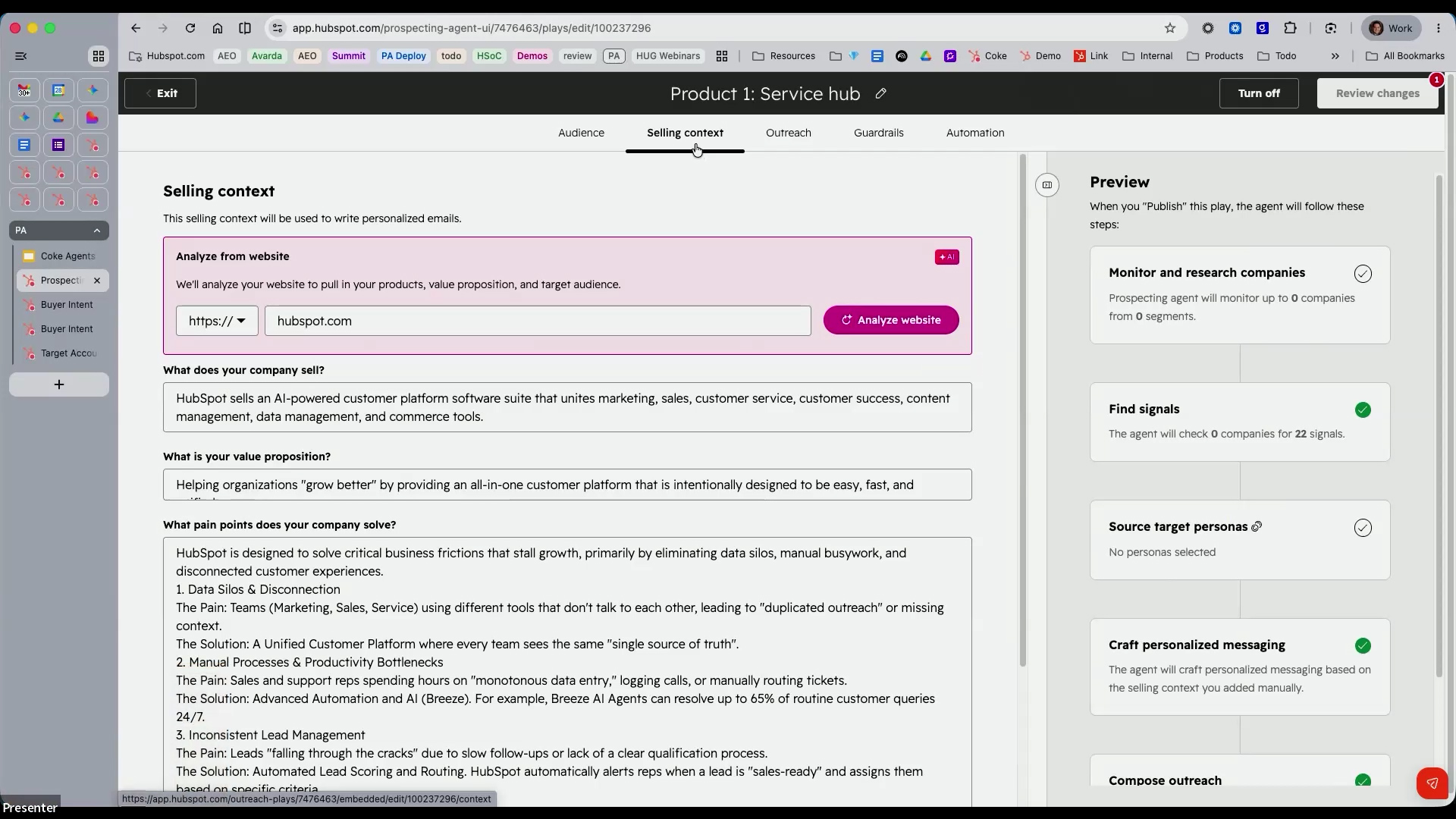
Selling Context Setup
- Enter your company domain and HubSpot analyses your business automatically
- Configure value proposition, pain points, and the specific product for each play
- Tweak and refine the auto-generated descriptions as needed
Email Templating with Smart Blocks
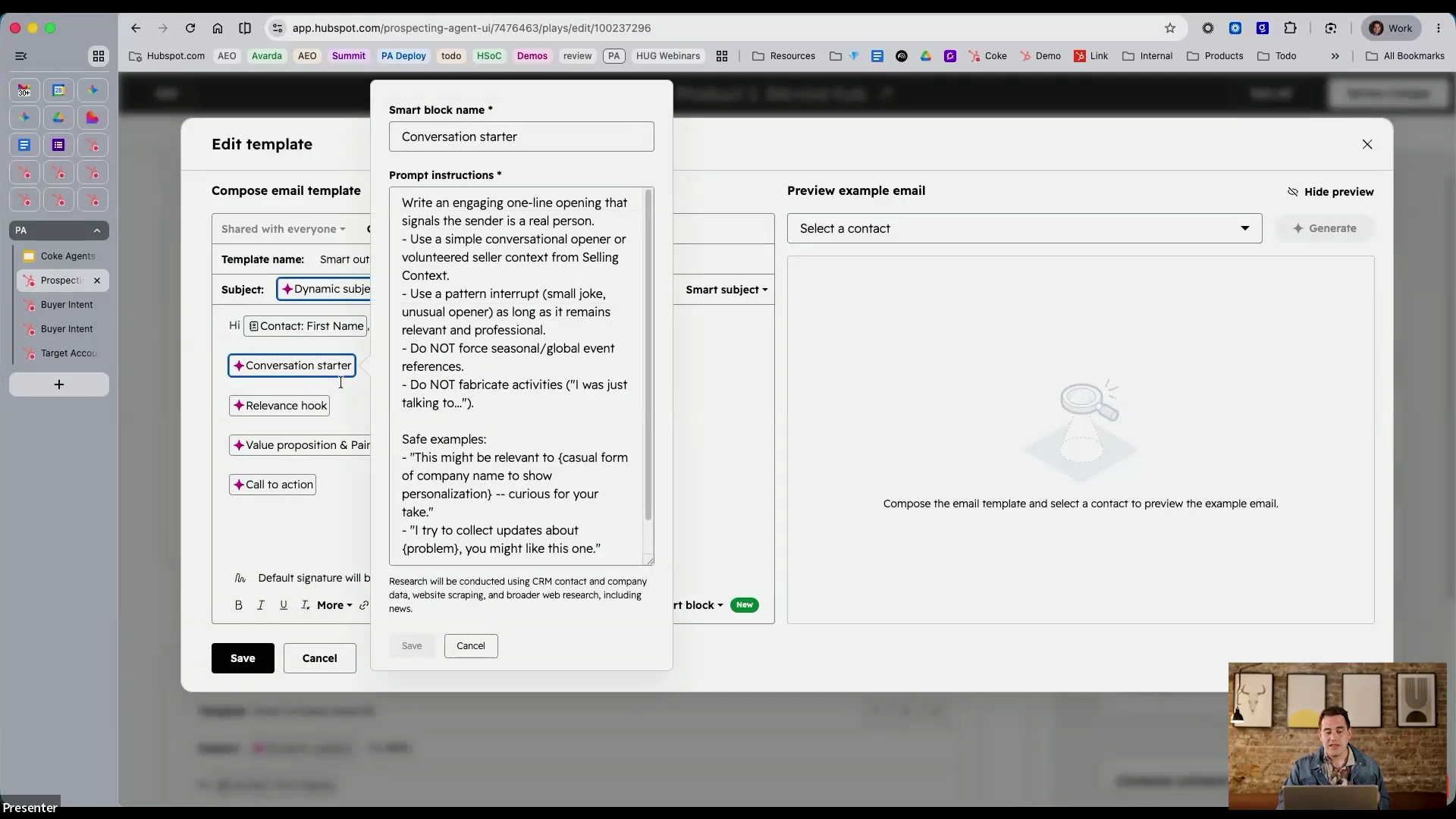
Unlike static sequences, each email generated by the Prospecting Agent is unique to the recipient. The email editor uses "smart blocks" with AI prompts for each section — subject line, conversation starter, relevance hook, value proposition, and call to action — that produce dynamically personalised content every time.
- Subject lines can be prompted with specific rules (e.g. 2–6 words, plain language, no exclamation marks)
- Personalisation tokens (e.g. contact first name) can be embedded alongside AI-generated content
- Two outreach methods available: sequence (structured multi-email) or adaptive (AI-driven with advanced instructions)
- Attach URLs, documentation, and booking links to outreach
- Configure send windows and business-day scheduling
Guardrails and Automation Controls
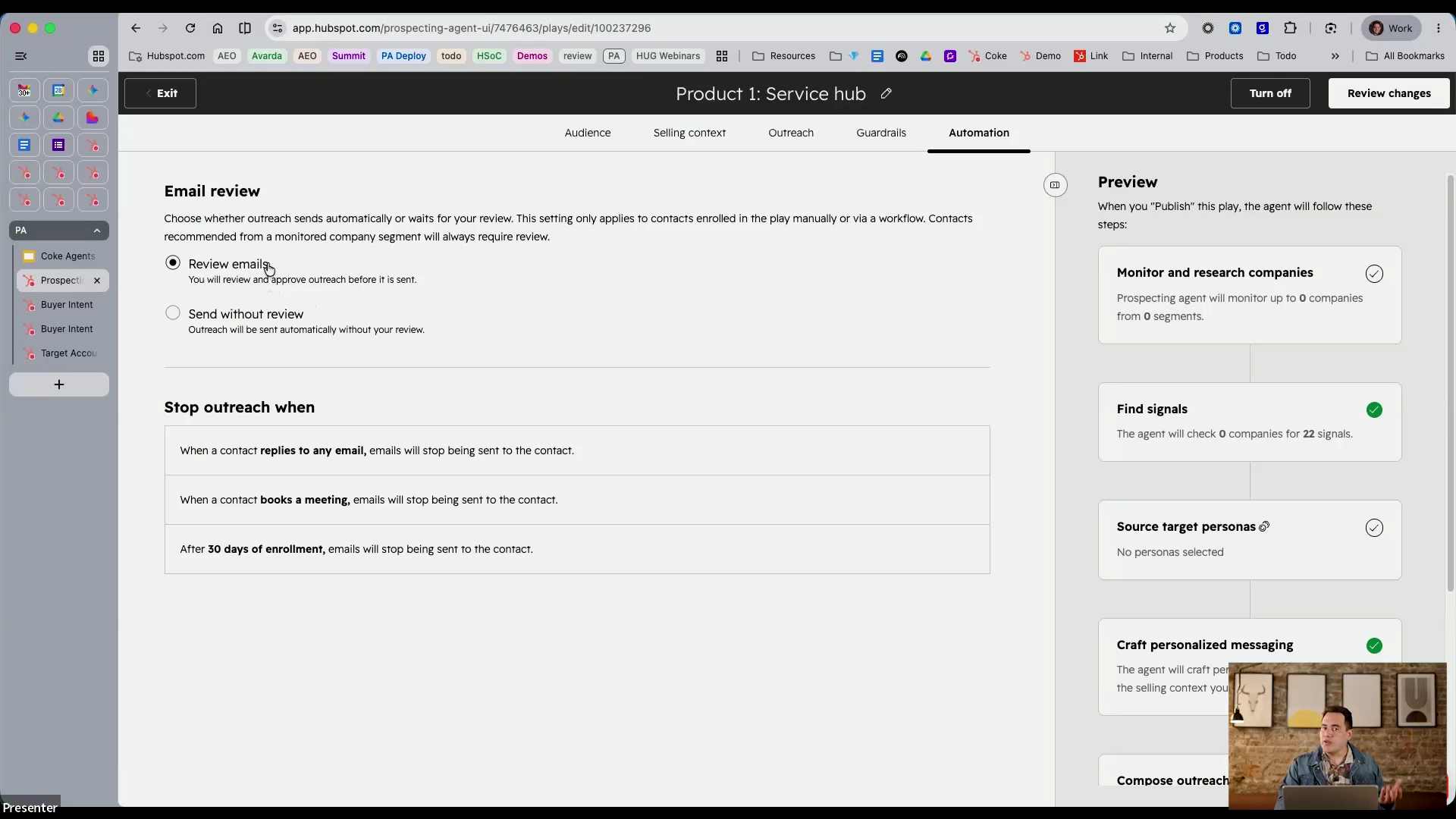
Teams can choose between semi-autonomous mode (review every email before it sends) and fully autonomous mode (send without review). The recommendation is to start with semi-autonomous mode to build confidence in email quality, then transition to full autonomy once results are validated.
- Select the sending email address and connected calendar
- Choose tone of voice and language settings
- Define outreach stop conditions (e.g. when a meeting is booked or a deal is opened)
- Set maximum email frequency per contact
Performance Tracking and Reporting
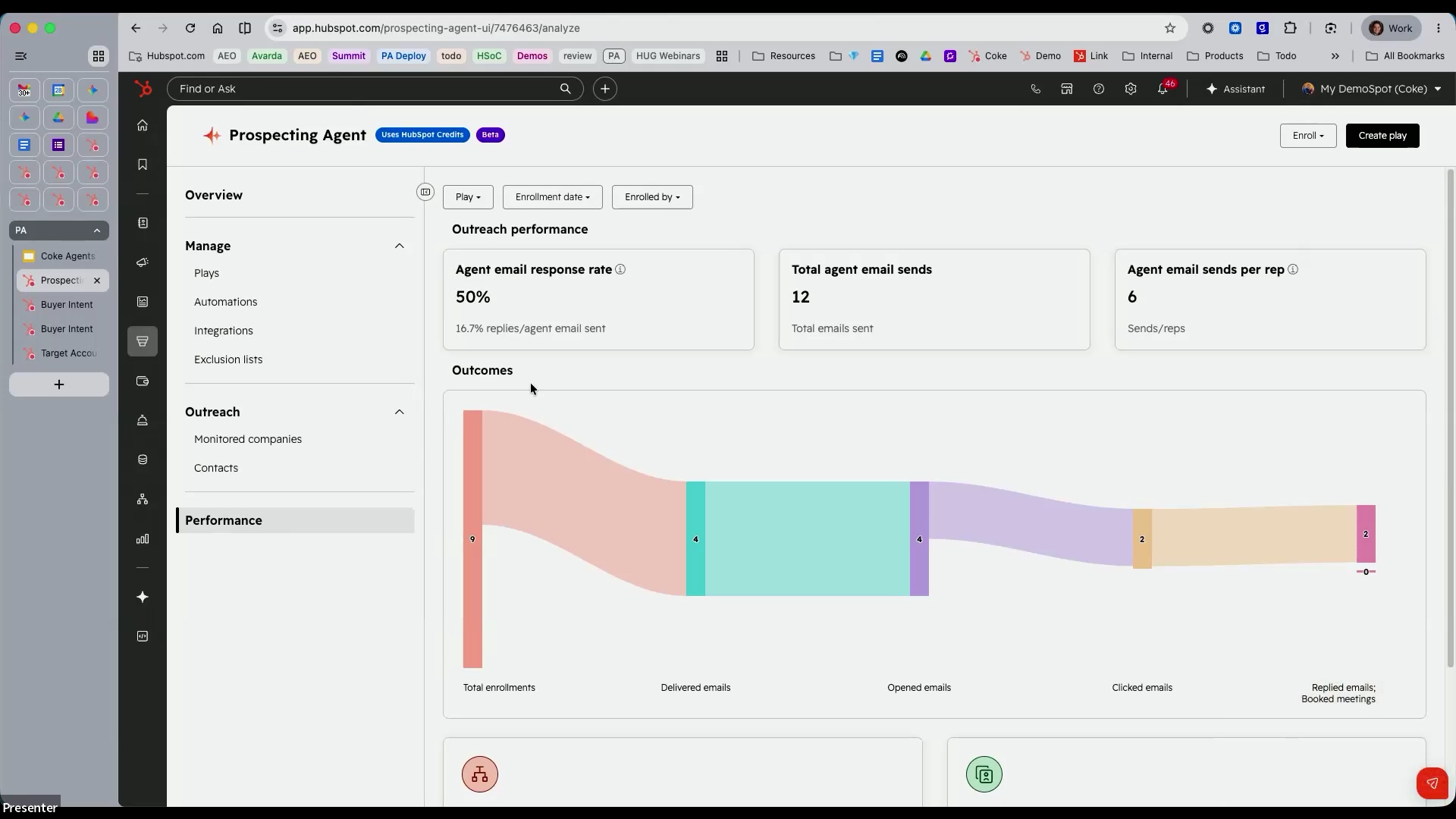
The Prospecting Agent dashboard provides real-time visibility into outreach effectiveness, allowing teams to measure and iterate on their plays. Key metrics include agent email response rate, total emails sent, emails sent per rep, and an outcomes funnel showing the progression from enrolment through to meetings booked.
Buyer Intent and Research Intent Tools
Beyond the Prospecting Agent itself, the session highlighted two complementary HubSpot tools that feed directly into signal-based prospecting.
Buyer Intent (Visitor Intent)
- Identifies companies visiting your website — including those not yet in your CRM
- Tag specific pages (e.g. pricing) as buyer-intent pages to prioritise high-value visitors
- Filter by target markets you have configured
- Available from Starter through Enterprise tiers
Research Intent
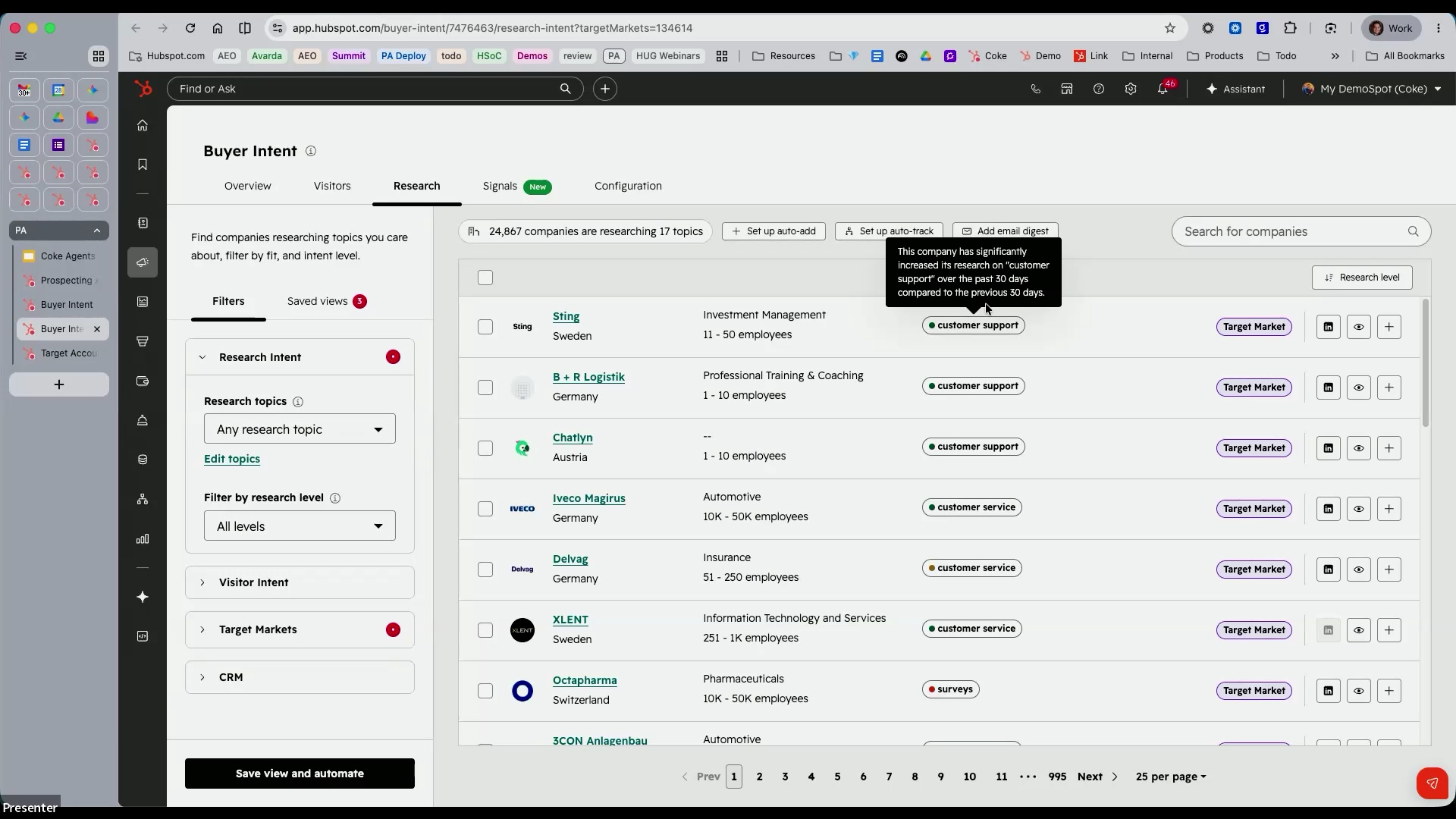
- Identifies companies researching topics relevant to your products and services — even if they have never visited your website
- Configure specific topic areas to monitor
- Track whether researching companies belong to your defined target markets
- Track companies directly from the research intent dashboard to receive ongoing signal updates
Target Accounts and Intelligence View
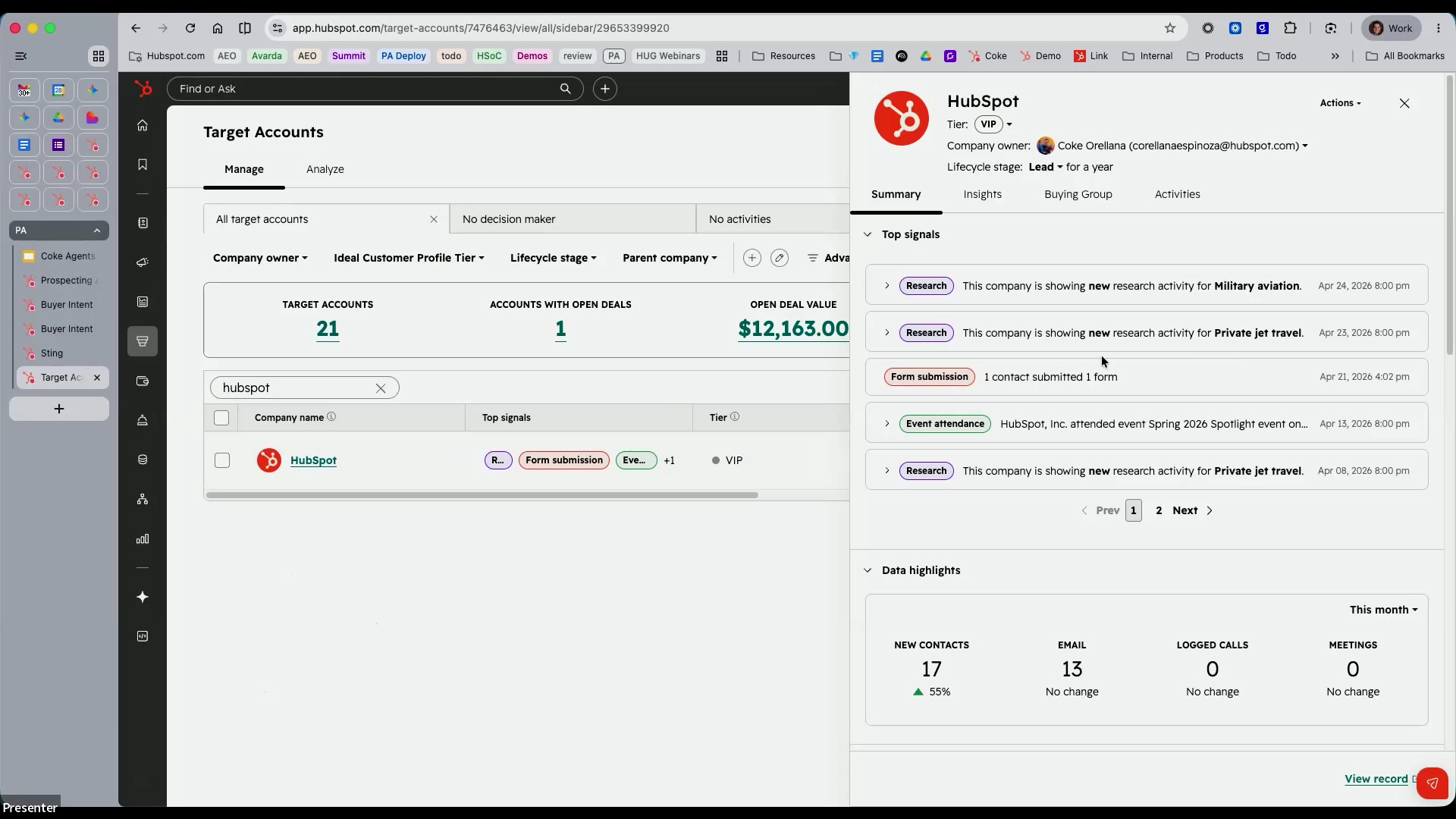
All signal data, research insights, and buying-group information surface within the Target Accounts dashboard and the CRM intelligence view. This gives teams a consolidated picture of each account's activity, buying-group contacts, open deal values, and top signals — all in one place.
Recent Updates: Evolving Towards End-to-End Outbound Execution
The Prospecting Agent is evolving from an AI-assisted outreach tool into a more complete outbound engine. Recent updates bring it closer to true end-to-end outbound execution inside HubSpot.
- The agent can now detect companies showing buying signals (growth, hiring, funding, intent) and recommend relevant contacts
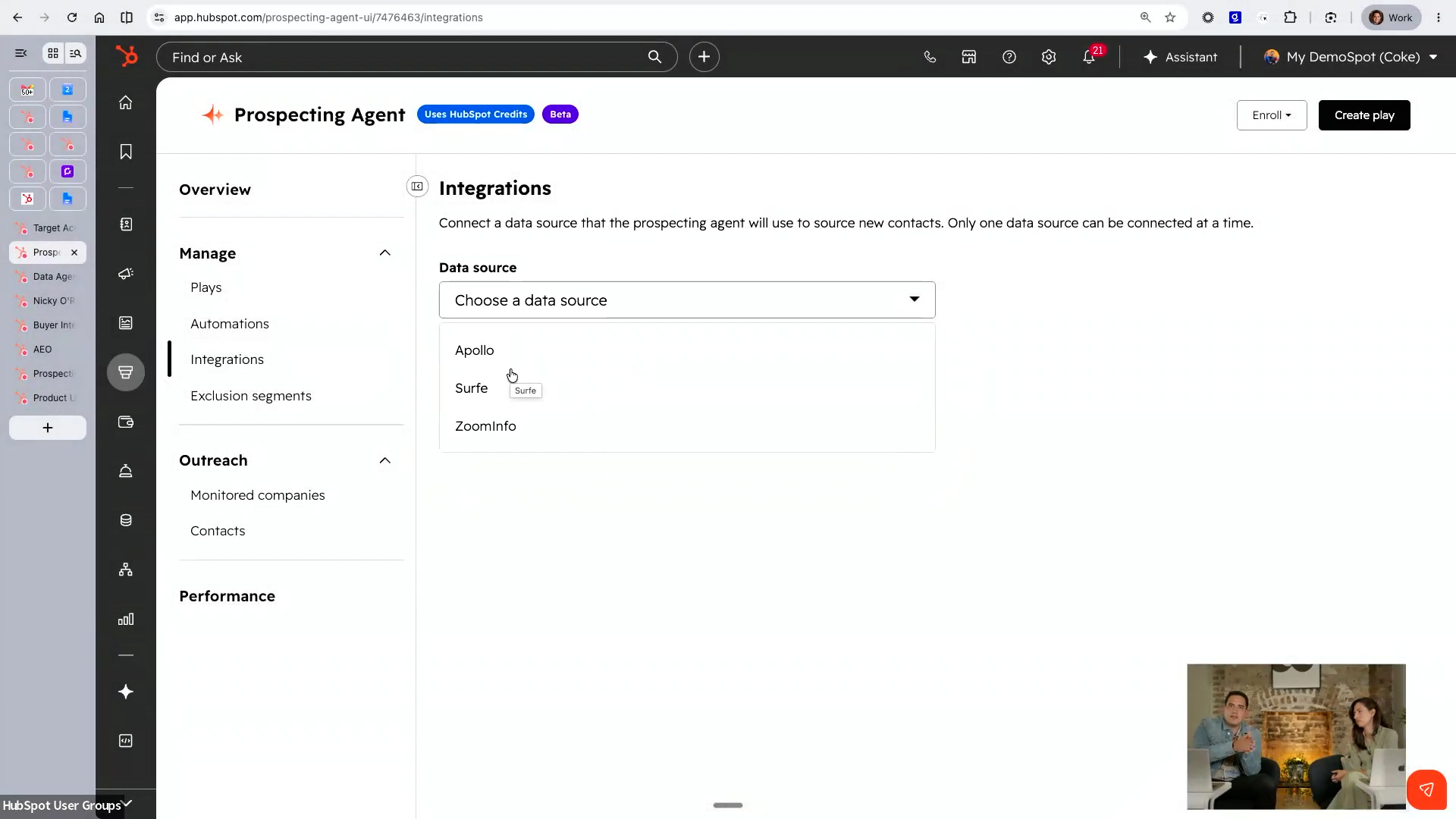
- Contact sourcing from CRM records or connected third-party providers (Apollo, Surfe, ZoomInfo)
- Generates personalised outreach and calling tasks for rep review
- Admins can define plays shaped by brand identity, tone, product details, and custom instructions
- A beta for smarter buying signals and contact sourcing is available via Product Updates — opt in to access the plays feature
Data Agent and Smart Properties as a Companion Tool
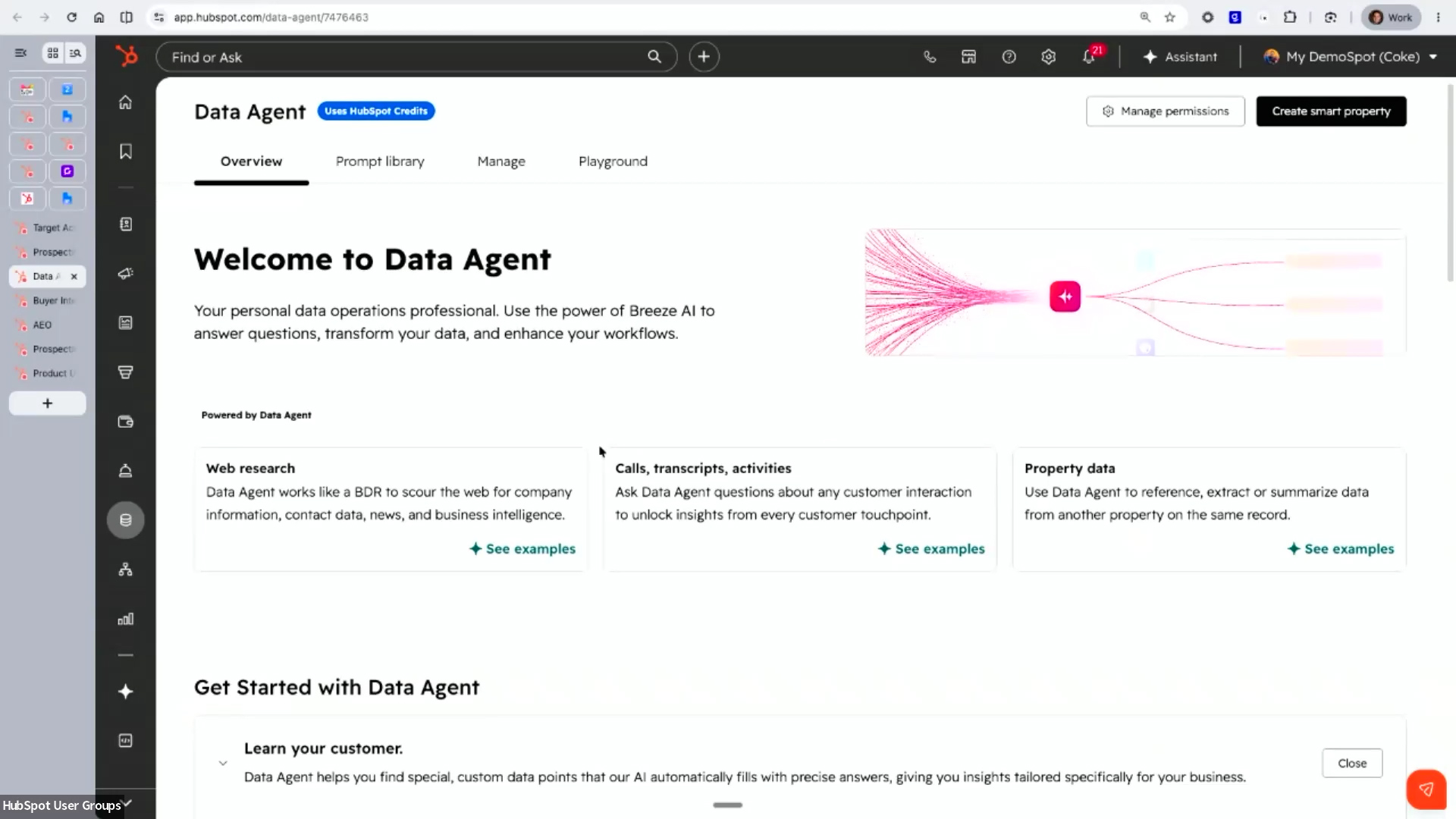
The Data Agent and smart properties were highlighted as a powerful companion to the Prospecting Agent, particularly for mining historical CRM data such as call transcripts to identify re-engagement opportunities.
- Smart properties can analyse call transcripts and activities to find contacts who previously showed interest but lacked budget or timing
- Create smart properties that scan CRM data and flag qualifying contacts automatically
- Use those flagged contacts to build targeted plays in the Prospecting Agent
- HubSpot's AI Notetaker (currently in beta for Sales and Service seats) can capture call transcripts directly into the CRM, enriching context for future outreach
Questions & Answers
Q: How do we access the "create play" function? We only have agent setup and enrol as options.
A: There is a beta that started in April for smarter buying signals and contact sourcing. Navigate to your account name → Product Updates, then search for "Prospecting Agent." You should see the option to opt into the beta for buying signals and contact sourcing — this unlocks the plays feature. If you still do not see it, check that you have opted into the beta and that you have a sales seat associated with your account.
Q: Can the signals pull from call transcripts with customers to identify a need or opportunity?
A: Call transcripts feed into the context layer rather than the signal layer. You can use the Data Agent's smart properties, which can analyse call transcripts and CRM activities to identify contacts who previously showed interest (e.g. lacked budget at the time). Create a smart property that scans this data, flags qualifying contacts, and then build a play to outreach to them. HubSpot's AI Notetaker (beta) can also capture call transcripts directly into the CRM to enrich this context further.
Q: Can you try this out without it being in the live environment?
A: Yes. You can test in a sandbox environment. Additionally, when you create a play, it does not take any action until you connect it to automation. You can enrol yourself manually, add notes, paste transcripts, and review how the agent generates emails — all without sending anything to real prospects. Start with semi-autonomous mode (review before sending) to validate quality. You can also restrict access to a small group of testers before rolling out to the wider team.
Q: What is the best way to roll this out without creating too much internal risk?
A: Control who has access, then start with lower-priority leads. Many teams begin by using the Prospecting Agent on leads that reps do not have time to reach — leads with signals but lower scores, or close-lost deals from previous years. This creates incremental pipeline without risking high-value prospects. Once the team builds confidence, expand to warmer leads. Also consider using it for customer success outreach (renewal reminders, health-score drops) rather than exclusively for sales.
Q: What is the difference between intent signals and CRM context in practical terms?
A: Signals are the when — they tell you a company has been visiting your website, researching relevant topics, or showing behavioural triggers that suggest now is the right time to engage. CRM context is the what — all the data that lives in your CRM including previous conversations, deal history, lifecycle stage, and existing relationships. Combining both means you reach out at the right time with the right message.
Q: Does the Prospecting Agent only reach out to prospects within our own CRM, or can it pull new contacts?
A: HubSpot does not provide contacts directly. However, the Prospecting Agent integrates with third-party tools such as Apollo, Surfe, and ZoomInfo, which can supply contact data (email addresses, phone numbers). Once those contacts are in your CRM via these integrations, the Prospecting Agent can use signals and CRM context to craft personalised outreach to them.
Q: What makes the Prospecting Agent different from standard sales automation (sequences)?
A: Sequences are generic and identical for every recipient — recipients can tell they are receiving automated messages. The Prospecting Agent generates unique, personalised emails for each contact based on real-time signals, CRM context, and research. It also follows outreach best practices automatically (strong opening, multiple touchpoints, well-written breakup email) and supports specifying frameworks like PAS, AIDA, or BAB in the instructions. The agent will never send an email with a missing personalisation token or irrelevant content.
Q: How long does a basic deployment usually take?
A: Approximately 15 minutes for a basic play. Much of the setup is AI-assisted — entering your domain auto-generates your selling context, and email prompts come with default best practices already in place. The main decision is defining your goal (cold outreach, close-lost re-engagement, customer success, etc.). Each additional play takes roughly 10–15 minutes to configure.
Q: How can large teams control credit consumption from the start?
A: You can set a monthly credit cap specifically for the Prospecting Agent (separate from your overall credit allocation), restrict access to specific users, pause automations at any time, and cap the number of leads sourced per day. Credit limits are currently set at the account level, not at the individual agent level. Teams that have not used the agent before may be eligible for a 28-day trial with no credit consumption.
Q: Are credit limits set at agent level or account level?
A: Currently at the account level. You can, however, remove access to specific agents for individual users, effectively controlling who consumes credits and for which purposes.
Q: How should teams use buy signals and contact sourcing together?
A: This question was noted but deferred for offline follow-up, with the answer to be shared in post-session communications.

.jpg?width=1200&length=1200&name=HUG%20Dublin%20-%20OCT%202025-070%20(1).jpg)


