


Session Summary 
HubSpot Prospecting Agent: AI-Powered Outreach for Sales Teams
The Prospecting Challenge Every Sales Team Faces
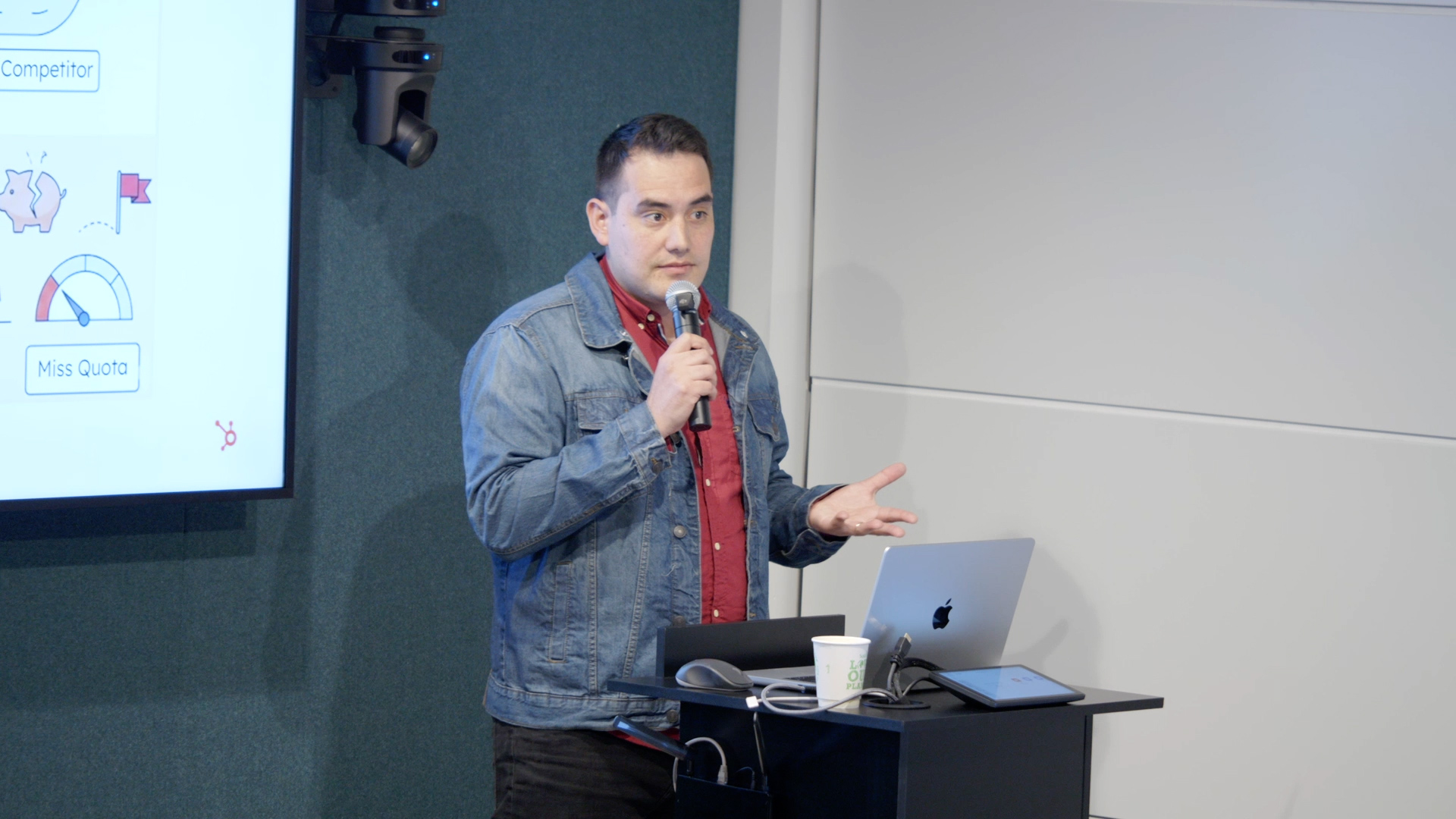
Coke Orellana, Associate Sales Specialist at HubSpot with nearly seven years of experience across support, customer success, and pre-sales, delivered a hands-on workshop exploring how the HubSpot Prospecting Agent transforms the way sales teams research and engage with leads. Coke opened with a simple but expensive problem: marketing teams invest heavily in campaigns to attract prospects, yet when those leads finally submit a form, sales reps simply do not have enough hours in the day to respond to every one of them. The result is cold leads, missed quotas, and competitors winning business that should have been yours.
Speed and Quality No Longer Have to Be a Trade-Off
Historically, sales professionals have been forced to choose between writing deeply personalised emails—often spending 30 minutes or more per prospect—and blasting out fast but generic sequences. The Prospecting Agent eliminates this trade-off entirely. It researches up to ten contacts in a single minute, draws on the full CRM history between seller and prospect, and produces highly contextual emails that avoid embarrassing mistakes. Because the agent lives inside HubSpot's CRM, it combines perfect timing (buyer intent and research intent signals) with perfect memory (past emails, call transcripts, closed-lost deal reasons) to deliver messages at the precise moment a prospect is most receptive. The reported benefit is up to twice the response rate compared to traditional outreach.
Why the Prospecting Agent Exists
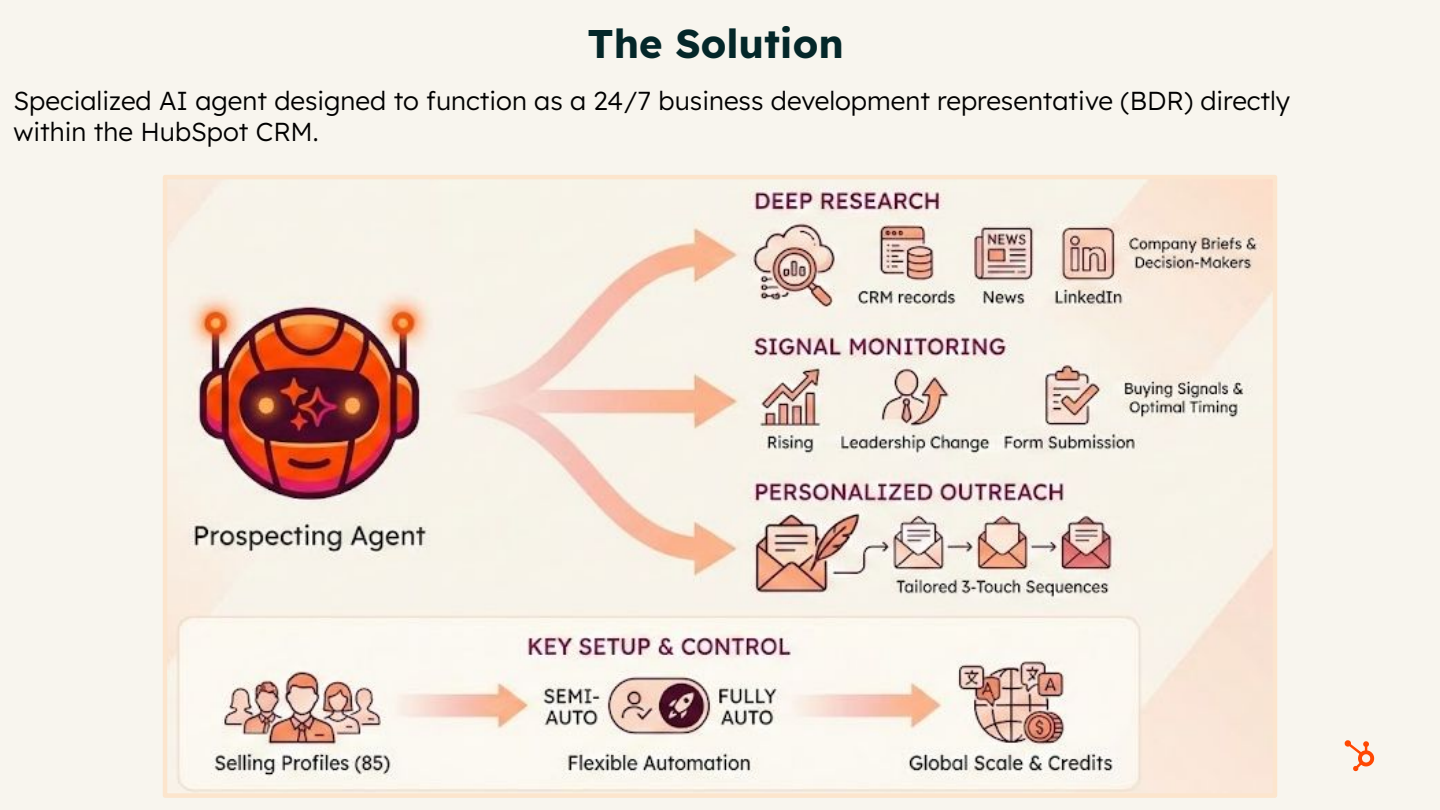
The core premise is straightforward: your human sales team takes holidays, celebrates closed deals, and enjoys downtime—but the Prospecting Agent works nights, weekends, and holidays so your reps don't have to. It functions as an always-on BDR (Business Development Representative) that continuously generates pipeline while the human team focuses on high-value conversations and closing.
- Deep research in seconds: The agent performs contact and company research in approximately six seconds, scanning CRM history, recent news, hiring activity, and internet sources.
- 24/7 signal monitoring: Watches for pricing page visits, product page views, and research intent signals around the clock.
- Personalised at scale: Every email is crafted specifically for the recipient's company, role, and history—no more generic sequences.
- Closed-lost re-engagement: Reviews past lost deals to understand why a prospect chose a competitor and re-engages when timing or budget may have shifted.
How Timing and Memory Drive Results
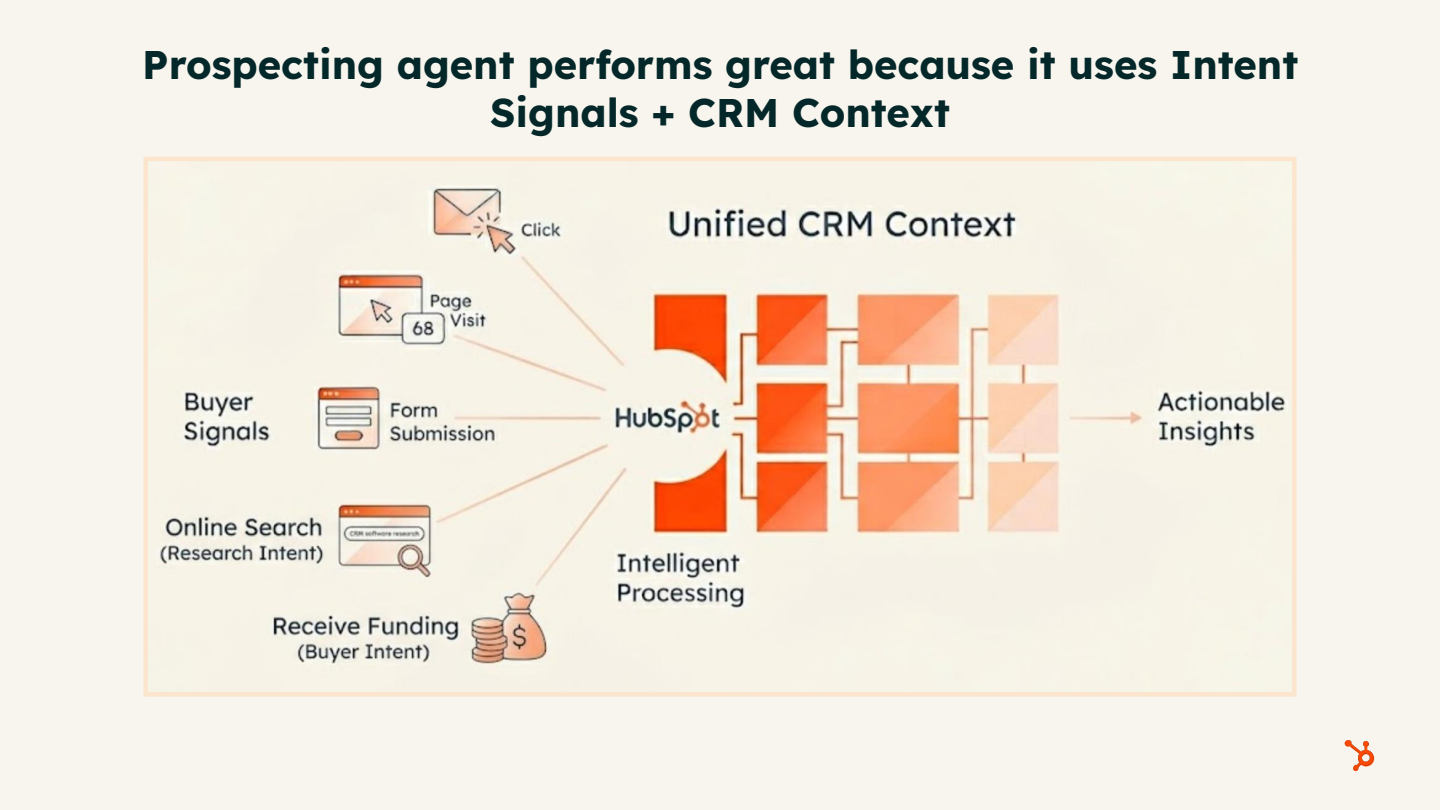
Coke explained that the agent's effectiveness rests on two pillars: timing (intent signals) and memory (CRM context). By combining these, the agent reaches out at the exact moment a prospect is actively researching or showing buying behaviour, armed with full knowledge of every previous interaction.
- Buyer intent signals: Identifies companies visiting your website—particularly high-value pages such as pricing or product pages—and flags them for outreach.
- Research intent signals: Detects companies researching topics aligned with your products or services, even if they have never visited your site.
- CRM context: Leverages all stored emails, call transcripts, meeting notes, deal history, and associated company data to craft messages that reference real interactions.
- Result: Twice the response rate when perfect timing meets perfect memory.
Credits, Costs, and Spend Controls
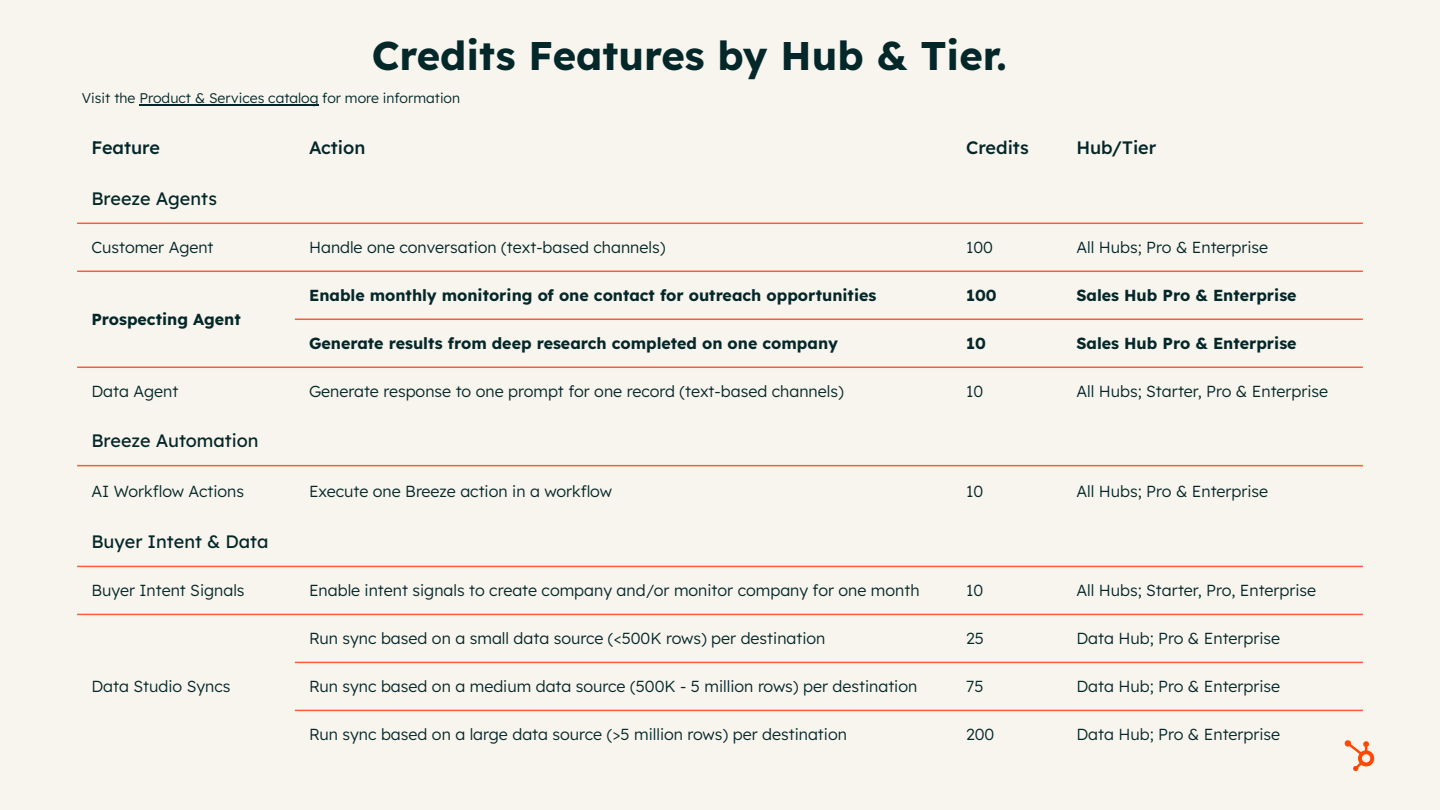
The Prospecting Agent runs on HubSpot's Breeze credits system. Each contact enrolment costs 100 credits (approximately $1.00), and Coke emphasised that the return on investment is significant when meetings are booked automatically while reps are offline. Importantly, organisations retain full control over spend.
- Included credits: Sales Hub Professional includes 3,000 free credits per month; Data Hub Professional adds 5,000; Data Hub Enterprise adds 10,000.
- Pay-as-you-go option: Choose between purchasing credit packs in advance or paying as you go to avoid over-commitment.
- Monthly spending limits: Set a hard cap on monthly credit usage; the agent pauses automatically once the limit is reached.
- Usage alerts: Receive notifications at 75%, 80%, 85%, 90%, and 100% of your credit allowance.
- Pause at any time: If the agent isn't delivering results, you can pause it instantly with no penalty.
- User access controls: Restrict which team members can activate or use the agent.
- Negotiable pricing: Credit pricing can be negotiated with your HubSpot sales representative.
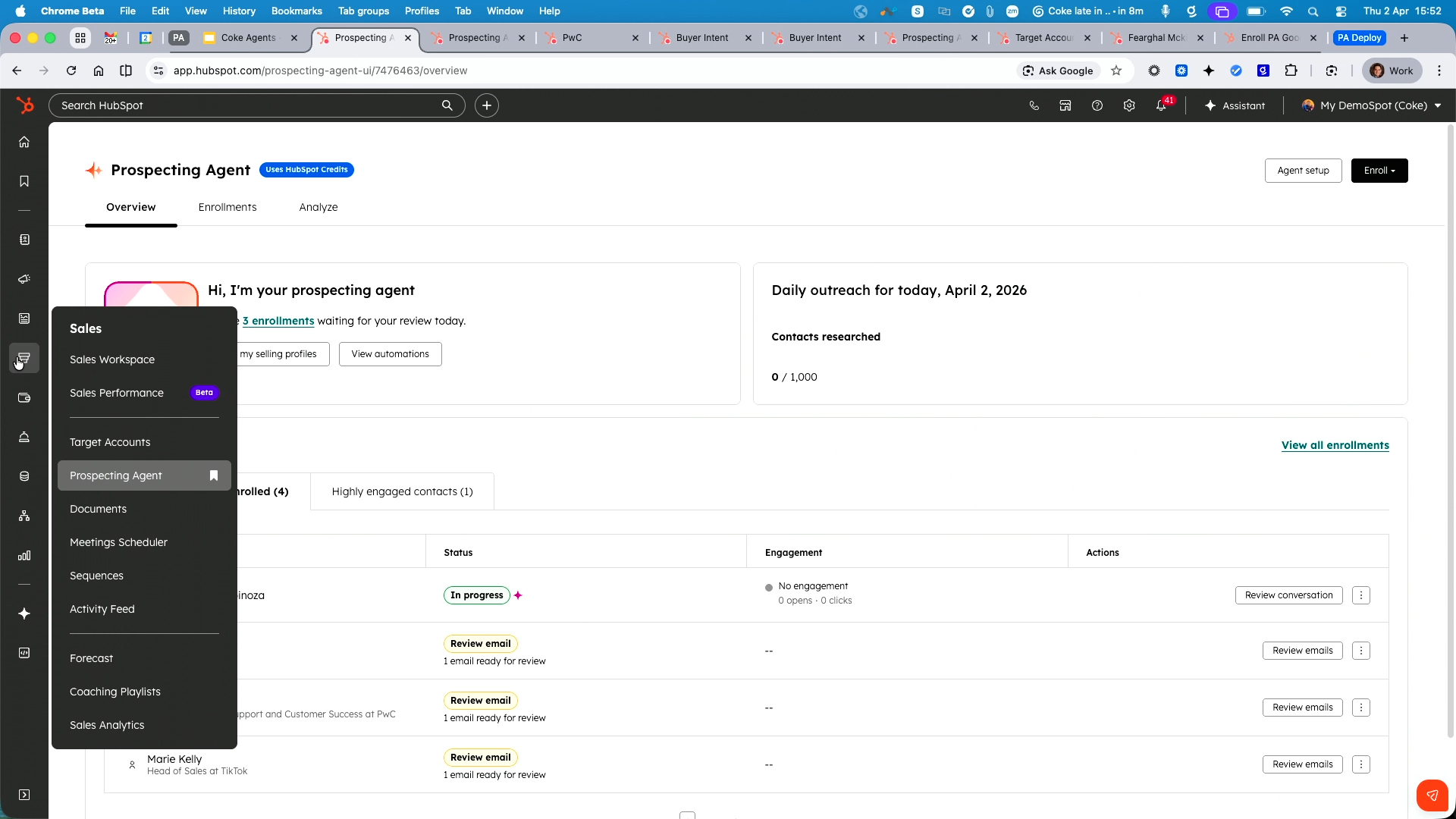
Live Demo: The Prospecting Agent Dashboard
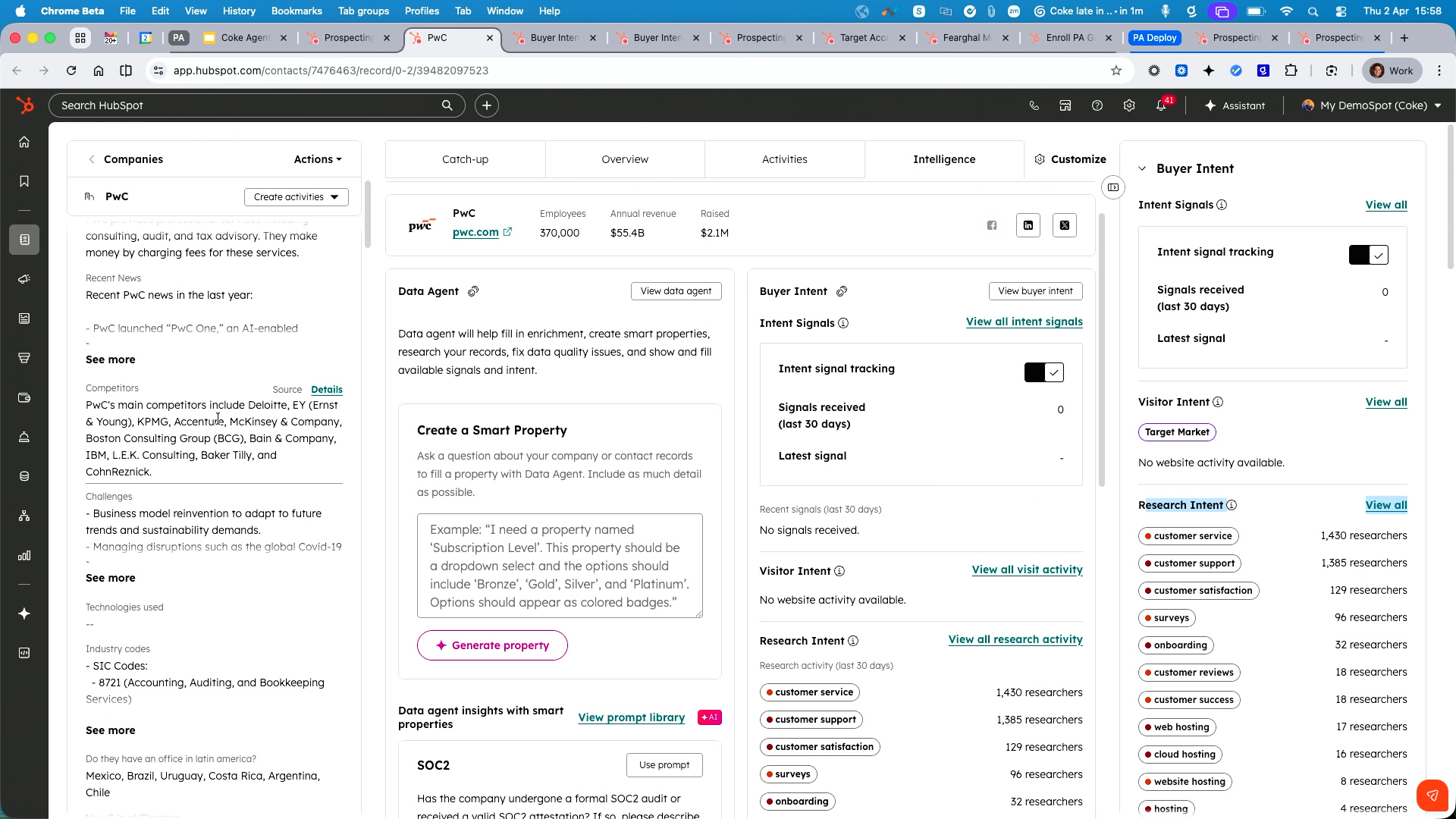
Coke navigated to the Prospecting Agent inside HubSpot (Sales → Prospecting Agent) and demonstrated the full experience. He showed a selling profile configured for Service Hub, where the agent had researched a contact named George Orellana at PwC. The agent's research panel displayed a comprehensive timeline including previous email exchanges, company data, other contacts at the same company, internet research on recent news, and hiring activity.
- Email drafts for review: The agent composes highly personalised emails referencing real CRM data; in semi-autonomous mode, the rep reviews and approves before sending.
- Full autonomy mode: The agent researches, writes, and sends emails without manual approval—reps simply wake up to a calendar full of booked meetings.
- Multi-language support: A separate selling profile for the Spanish market produced emails entirely in Spanish, complete with a meeting link.
- Performance analytics: A built-in dashboard tracks enrolments, emails sent, replies, and meetings booked to measure agent effectiveness over time.
Contact Research and Email Personalisation
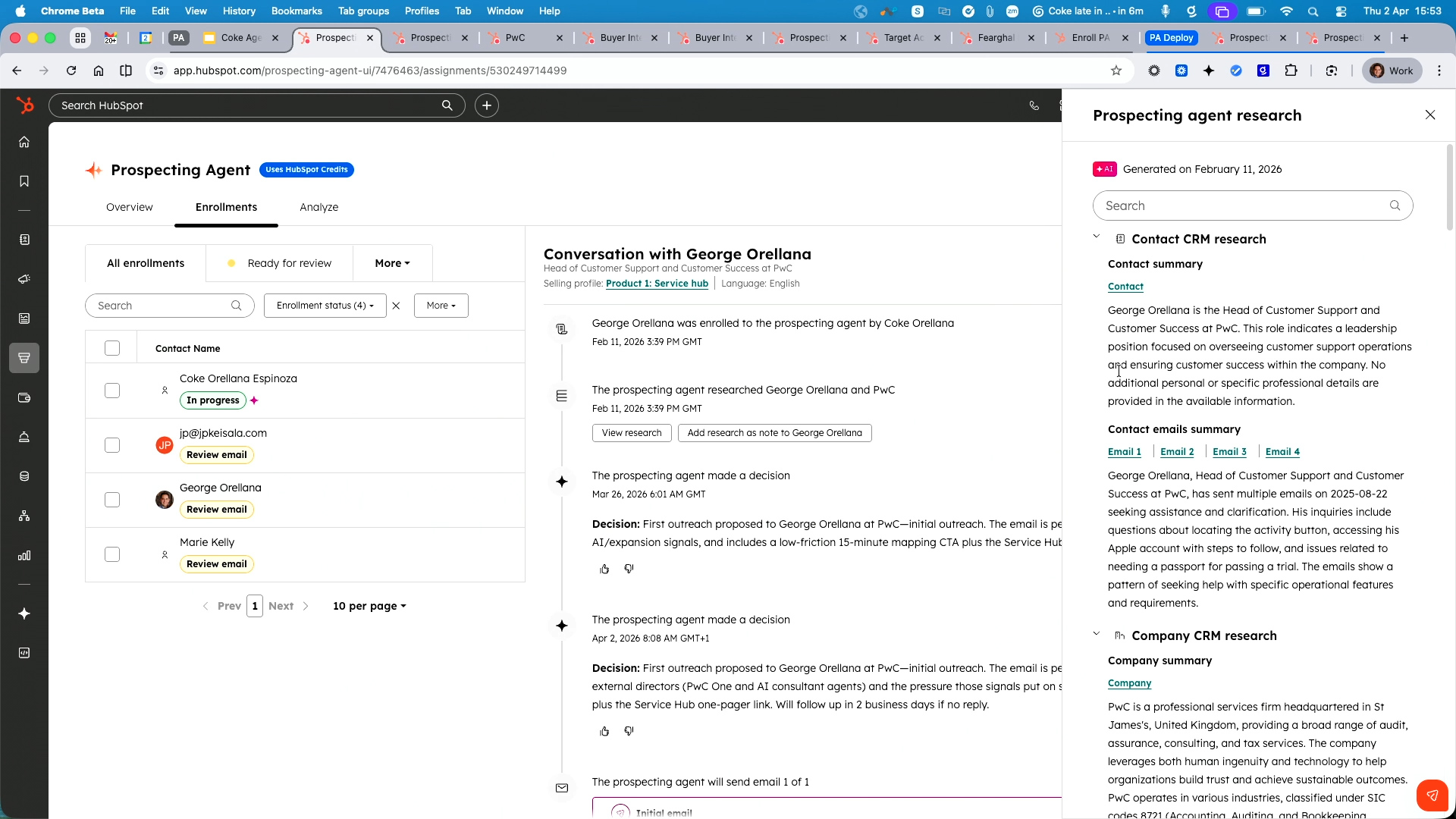
The agent's research capabilities were demonstrated in detail. When a contact is enrolled, the agent examines the contact record, associated company, other people at the same organisation, past communication history, and publicly available internet data. The resulting email is tailored to the specific business, the product being sold, and the prospect's context—far beyond what personalisation tokens in traditional sequences can achieve.
- CRM history scanning: Past emails, call transcripts, and deal outcomes inform the email's angle and tone.
- Company intelligence: Recent news, expansion activity, hiring signals, and competitor tool usage are all incorporated.
- Save research to CRM: Findings can be added back to the CRM record for future reference by any team member.
- No embarrassing mistakes: Because the agent knows the full history, it avoids referencing outdated deals or incorrect information.
AI-Generated Email Drafts and Multi-Language Outreach
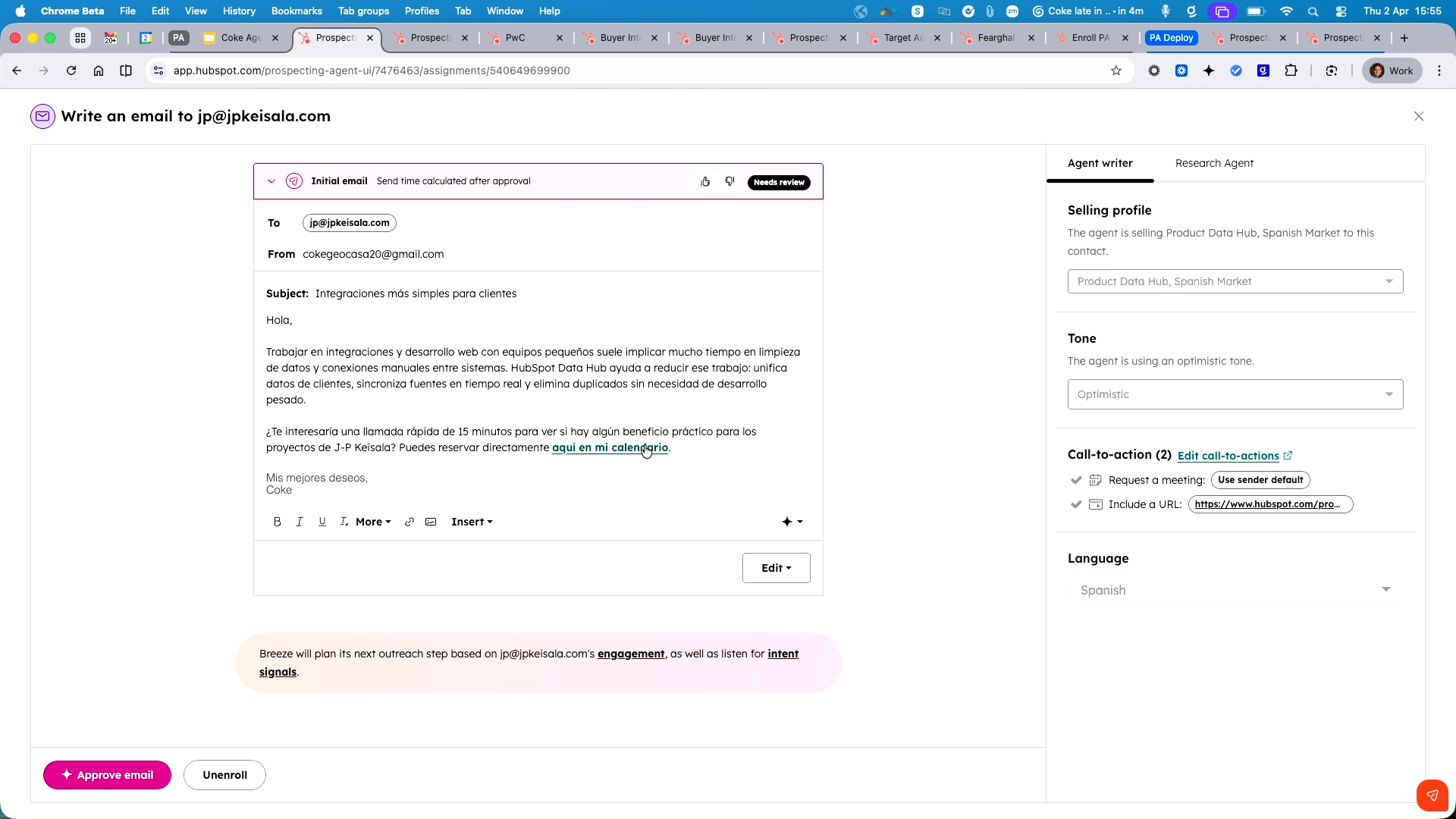
Coke showed the actual email drafts generated by the agent. For the Service Hub selling profile, the agent composed an English-language email referencing PwC's specific situation. For the Data Hub profile targeting the Spanish market, the entire email—including the call-to-action and meeting link—was written in Spanish. The agent can be configured to detect the contact's preferred language property and write accordingly, with a fallback language for contacts without a preference set.
- Language detection: Uses the contact's preferred language property to select the outreach language automatically.
- Fallback language: A default language (e.g., English) is used when no preference is stored on the contact record.
- Meeting link integration: Each email includes the rep's calendar link for frictionless booking.
Buyer Intent and Research Intent Signals
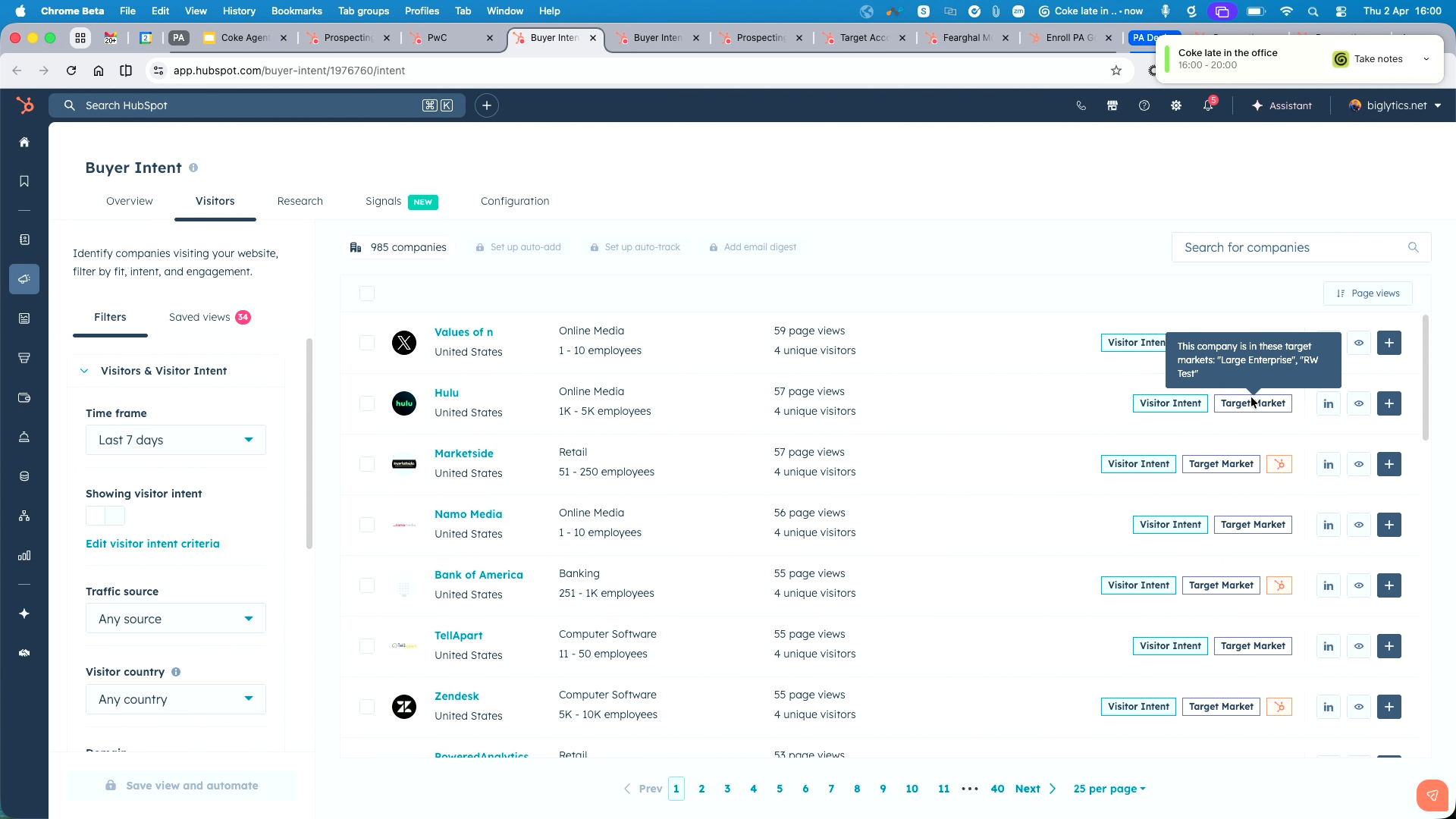
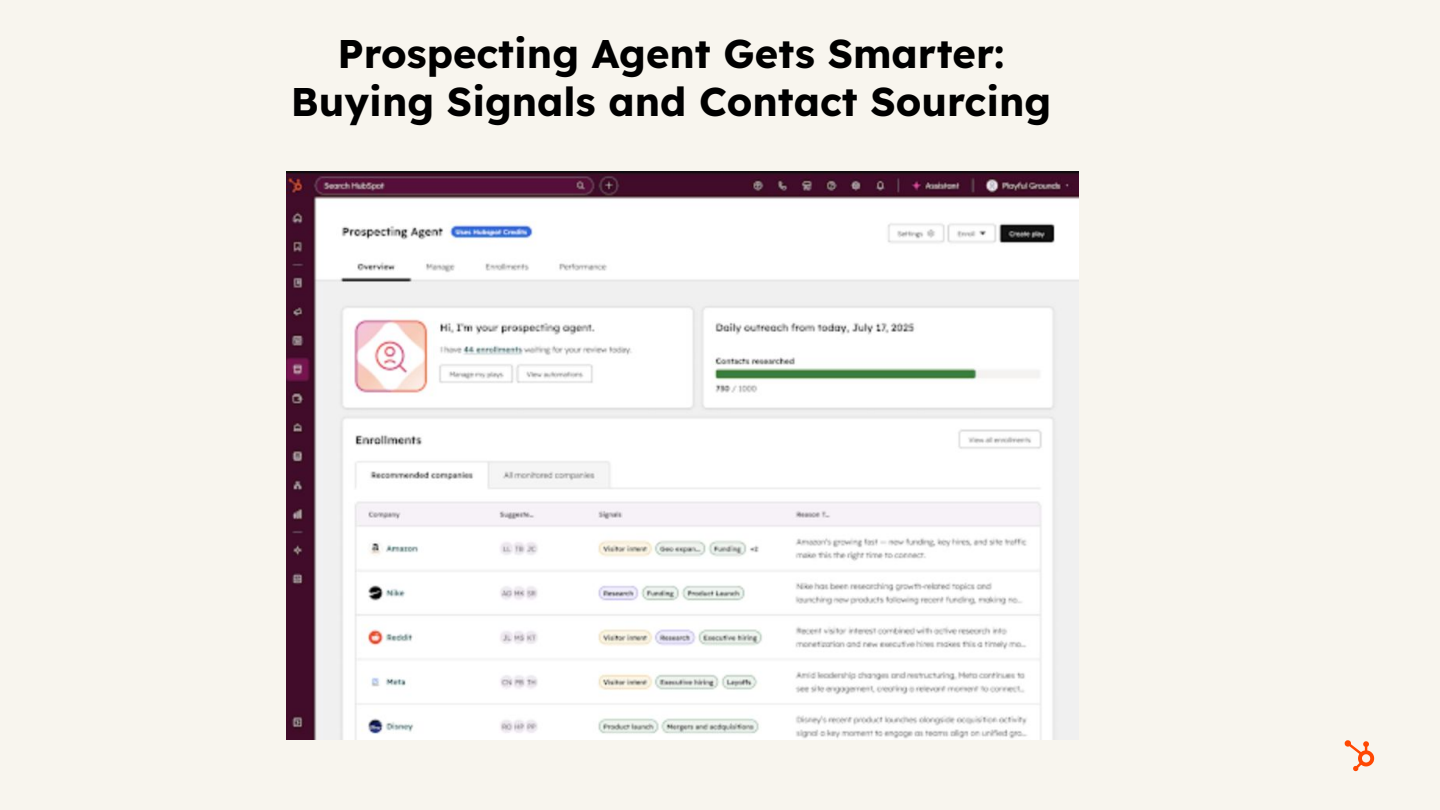
A significant portion of the demo focused on how the Prospecting Agent leverages intent data. Coke demonstrated two complementary signal types that feed directly into the agent's decision-making about when and how to reach out.
Buyer Intent
- Requires HubSpot's tracking code on your website to identify visiting companies.
- Shows which companies are viewing specific pages (pricing, product pages) and how frequently.
- Companies already in your CRM display the HubSpot icon; unknown companies are flagged as visitor intent.
- Target market filters allow you to narrow results (e.g., only companies in London or the Nordics).
Research Intent
- Identifies companies researching topics related to your products or services—even if they've never visited your website.
- Custom terms are configured to match your offerings; the system then surfaces companies showing research activity in the last 30 days.
- In Coke's example, 483,000 global leads were available, which could be filtered by target market to a manageable set.
- These leads can be added to the CRM and enrolled in the Prospecting Agent for automatic outreach.
Setting Up Selling Profiles
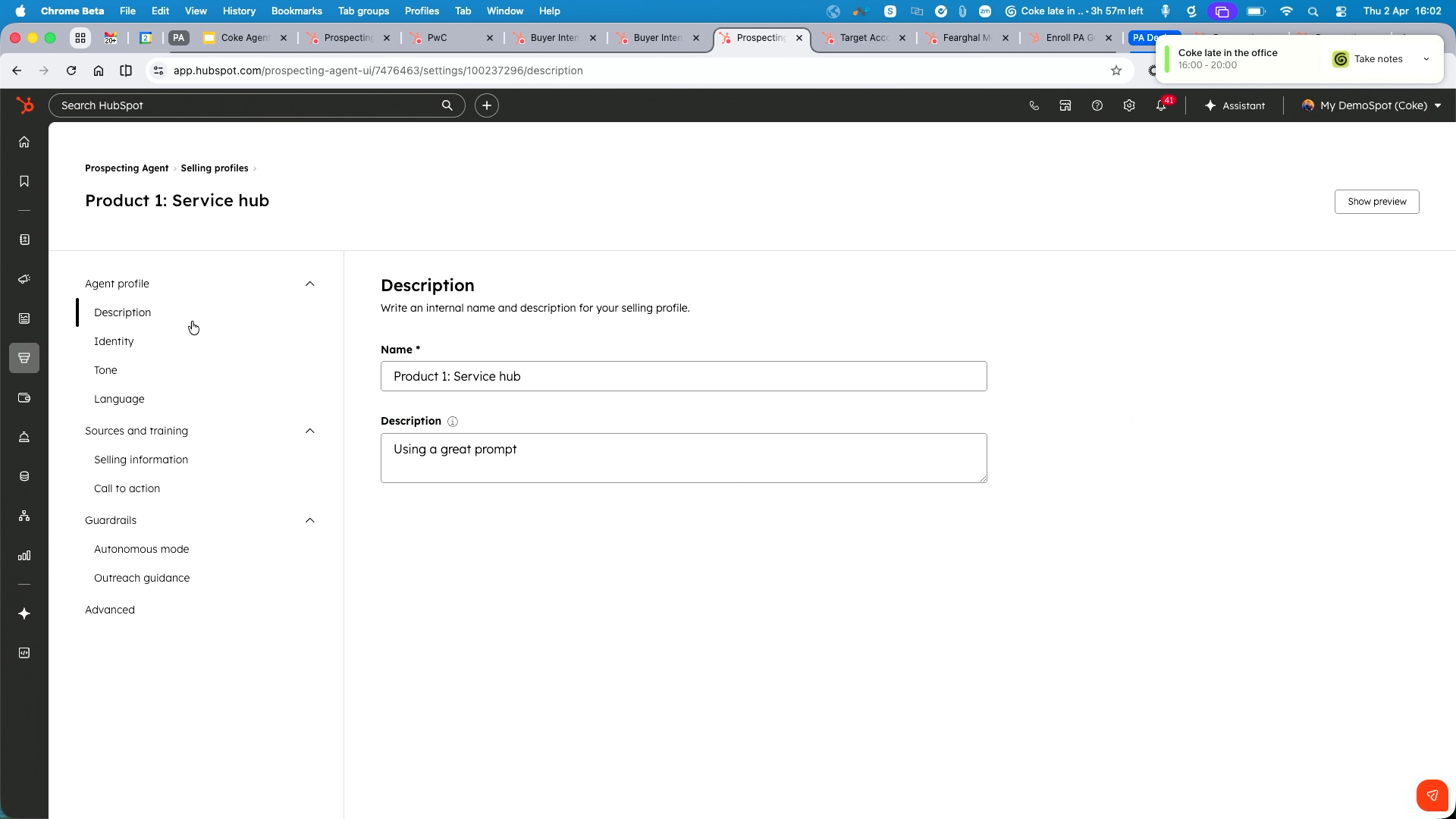
Coke walked through the selling profile configuration in detail, emphasising that multiple profiles can be created for different products, markets, and teams. The setup process takes approximately 10–15 minutes and covers the following areas:
- Profile name and description: Mandatory fields that describe what the profile is selling.
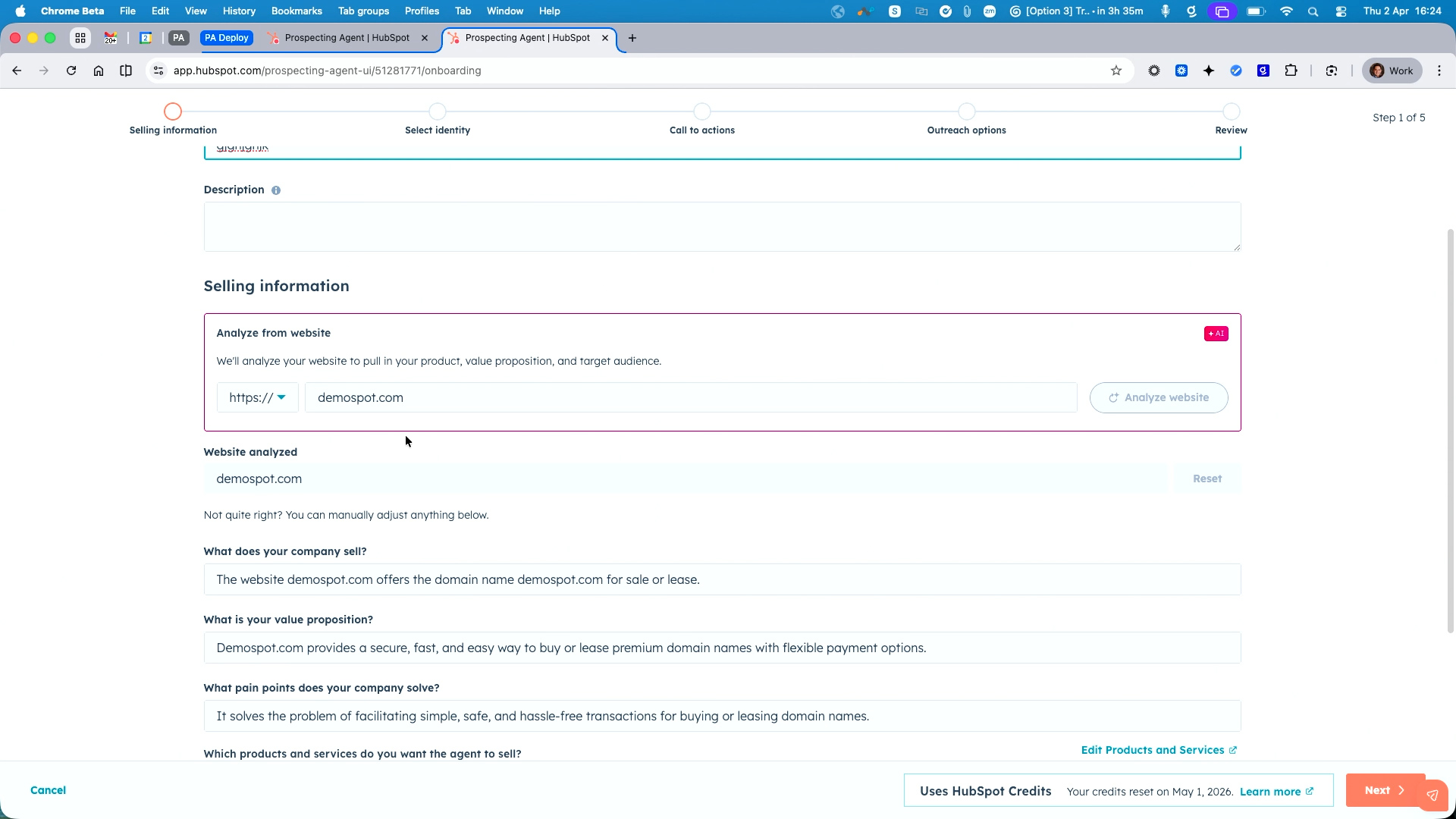
- Website analysis: Enter your domain and the agent scans it to auto-populate your company description, value proposition, pain points, industries, and personas.
- Email and calendar connection: Link the sending email address (can be the contact owner's address) and connect a meeting link (individual or round-robin).
- Tone of voice: Choose from Professional, Helpful, Witty, Formal, or Optimistic—or use your Content Hub brand voice for consistency.
- Call-to-action: Configure meeting links, document attachments, and URLs to include in outreach emails.
Autonomy, Outreach Timing, and Custom Instructions
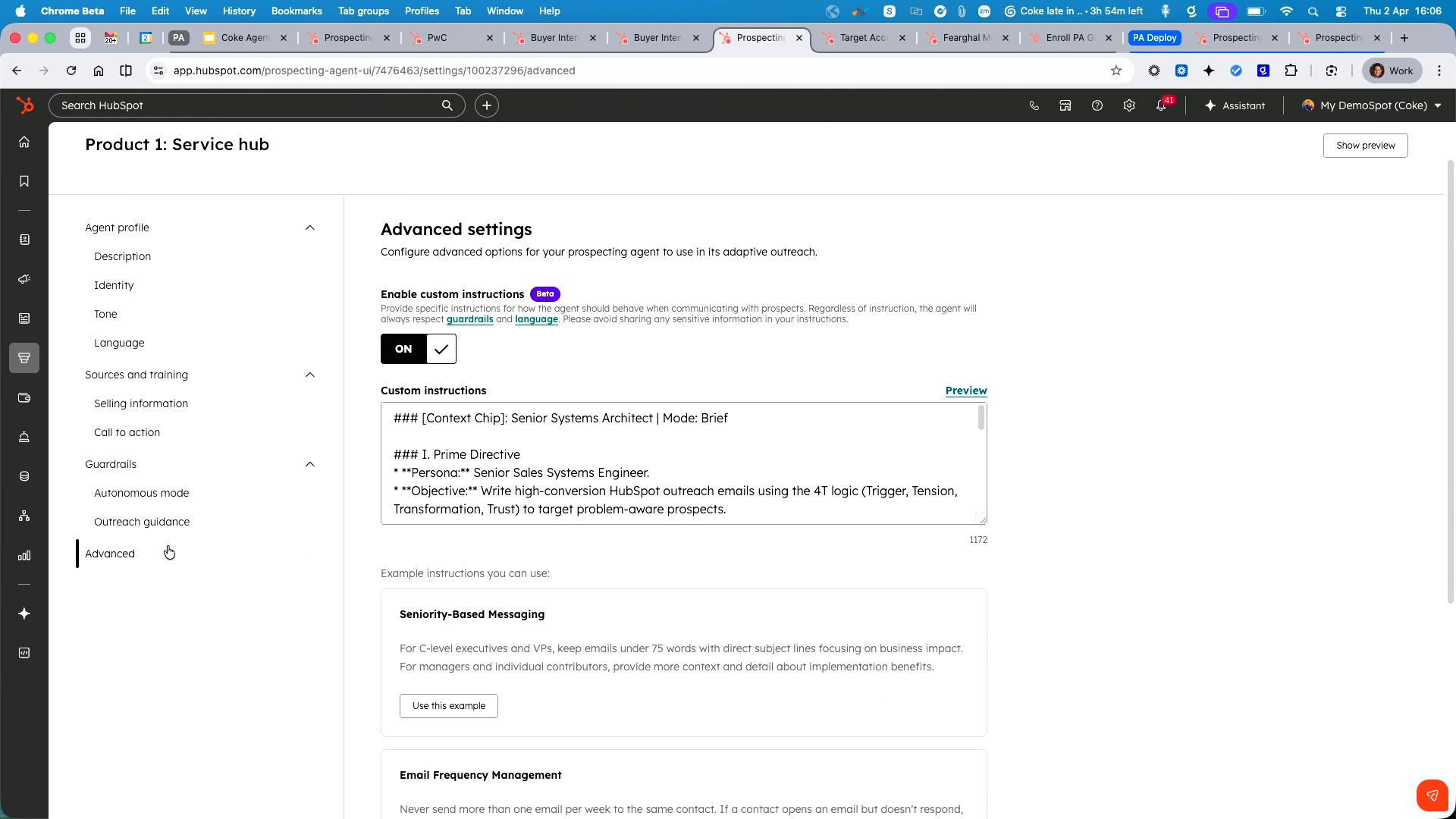
The selling profile also governs how much freedom the agent has and when it is allowed to send. Coke recommended starting with semi-autonomy for teams new to the tool, then graduating to full autonomy once confidence in the output grows.
- Semi-autonomous mode: The agent drafts emails and presents them for human review and approval before sending.
- Fully autonomous mode: The agent researches, writes, and sends emails independently—reps wake up to booked meetings.
- Send window: Configure the hours during which the agent is permitted to send emails (e.g., 8:00 AM–6:00 PM) to avoid midnight outreach.
- Time zone awareness: Respects the prospect's time zone for delivery timing.
- Email frequency: Set the maximum number of emails per contact and the waiting period between messages.
- Custom instructions prompt: A free-text field where you can specify sales methodology, terms to avoid, specific messaging frameworks (e.g., the "4T" outreach logic), and sensitive data handling rules.
- Upcoming feature: Task integration (announced for the 13 April spotlight) will allow the agent to combine emails with tasks for a more multi-touch approach.
Enrolment Methods: Manual, Bulk, and Workflow-Based
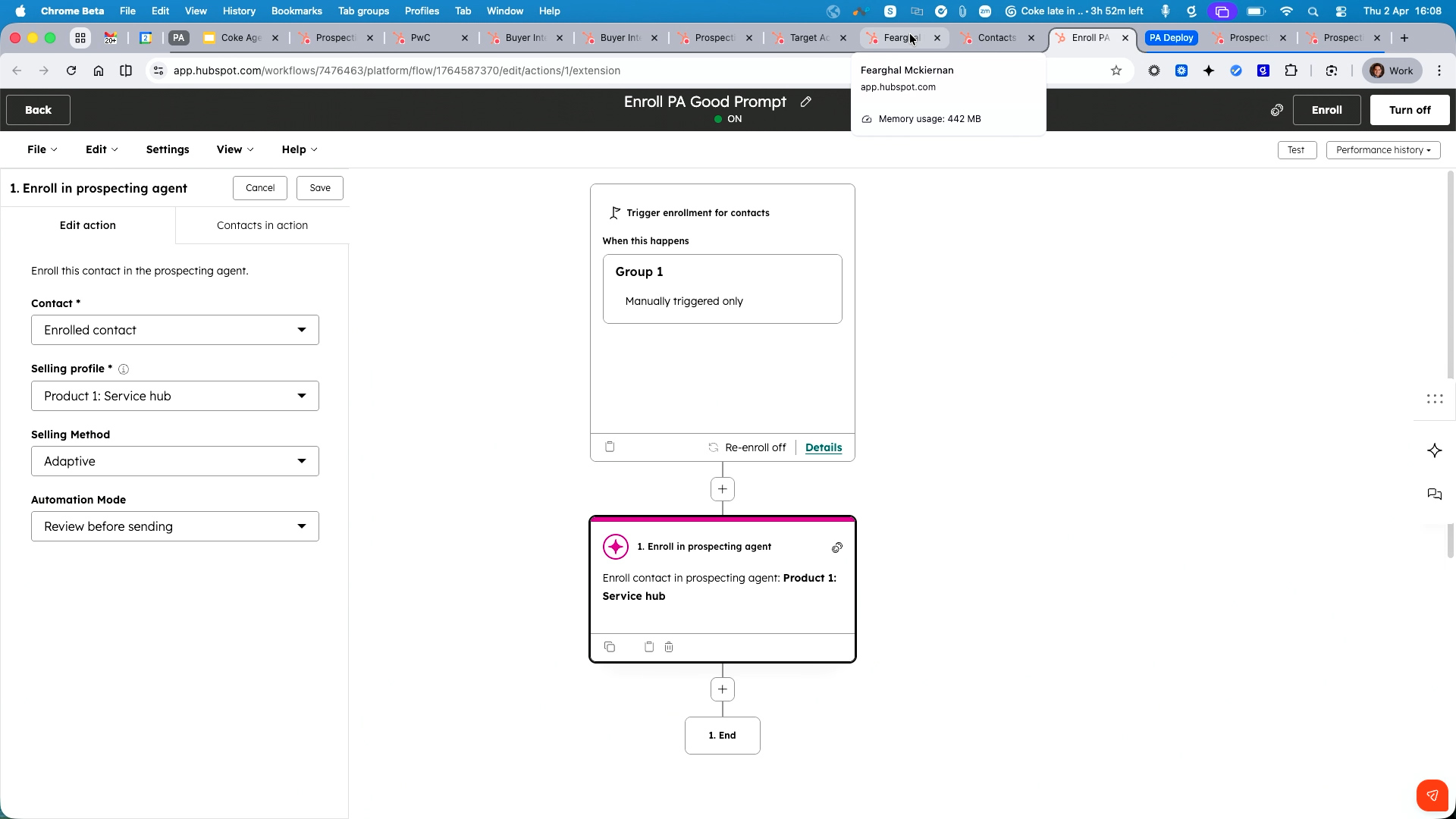
Coke demonstrated three ways to enrol contacts into the Prospecting Agent, ranging from simple one-off actions to fully automated pipeline generation.
- Individual enrolment: From any contact record, click the enrol button. If multiple selling profiles exist, dynamic buttons appear based on the contact's market, persona, or role.
- Bulk enrolment: Select up to 25 contacts from the contacts list view and enrol them all at once—the agent begins research and outreach immediately.
- Workflow automation: Build HubSpot workflows that enrol contacts automatically based on triggers such as lead score thresholds, lifecycle stage changes, form submissions, or health score criteria. This enables precise segmentation—for example, only enrolling small business and mid-market leads while excluding enterprise prospects that require a personal touch.
- Automated enrolment via intent: Configure the agent to automatically enrol contacts when a specific page is visited, linked to the appropriate selling profile.
Data Enrichment and Smart Properties
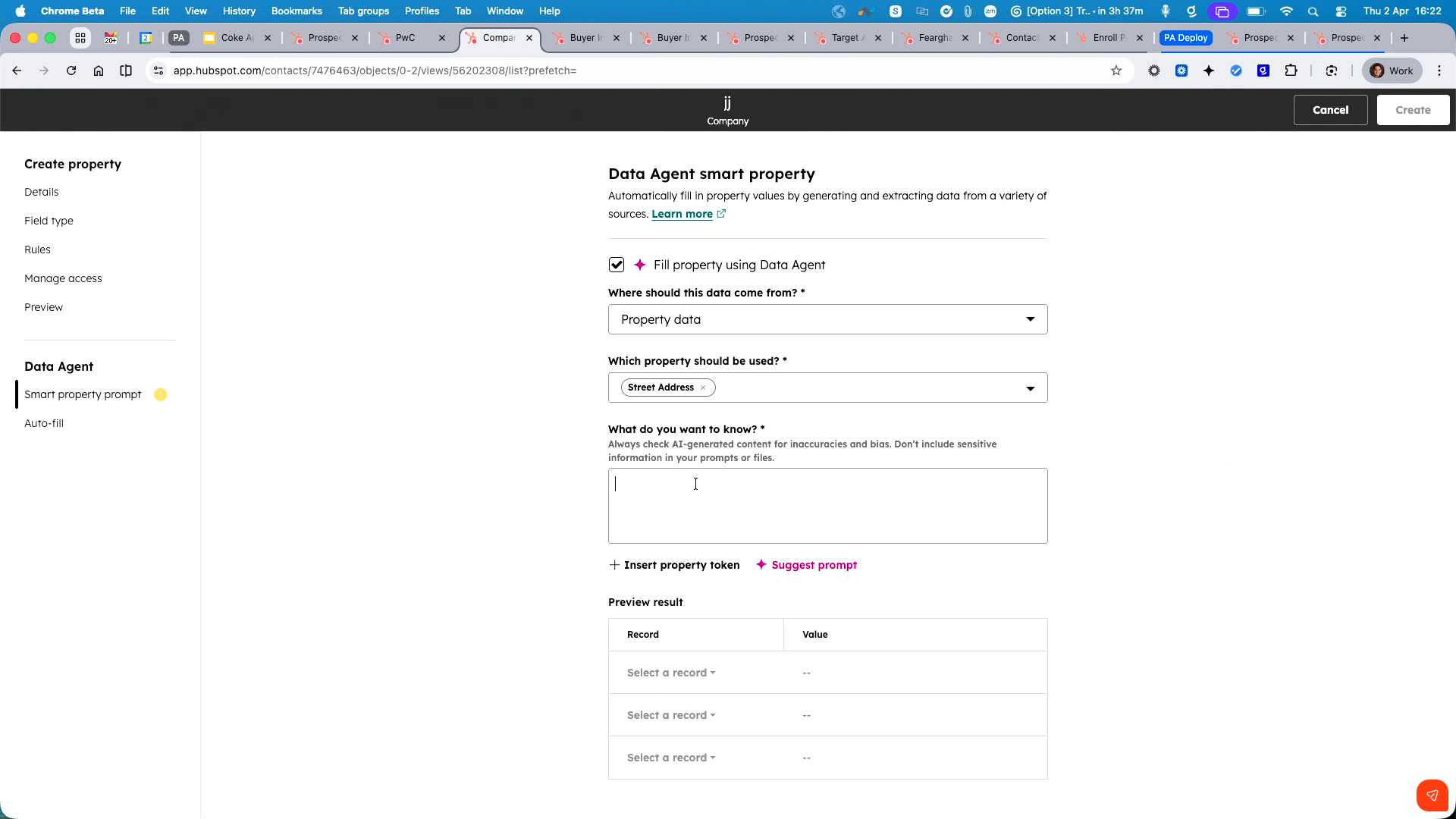
Beyond the Prospecting Agent itself, Coke highlighted the complementary data tools that enhance the quality of outreach. HubSpot provides approximately 22–23 free enrichment properties for companies (industry, Facebook page, web technologies, tracking code presence, etc.), which are valuable for segmentation and account tiering. But for deeper intelligence, the Data Agent and smart properties offer powerful customisation.
- Smart properties: Custom properties with AI-generated prompts that can pull data from web research, the company's website, existing CRM properties, or activity data (emails, call transcripts, meeting notes).
- Property data source: If you store documents like CVs in a property field, the agent can read the PDF and evaluate it against specified criteria, returning a yes/no or extracted value.
- Cost: Each smart property enrichment costs 10 credits ($0.10) per company or contact.
- Use cases demonstrated: Checking whether a company is expanding, has an office in a specific city, or has mentioned a particular product in call transcripts.
Live Setup Walkthrough: Deploying in 15 Minutes
In the final portion of the demo, Coke walked through the complete setup process from scratch on a fresh account, reinforcing that deployment genuinely takes only 10–15 minutes. He stressed that setting up the agent does not trigger any outreach—nothing happens until automation is explicitly turned on.
- Step 1: Navigate to Sales → Prospecting Agent → Set Up Agent.
- Step 2: Enter a profile name (mandatory) and your domain; the agent automatically analyses your website to populate company description, products, value propositions, industries, and personas.
- Step 3: Connect a sending email address and calendar (individual or round-robin meeting link).
- Step 4: Configure autonomy level, tone of voice, send window, time zone, and frequency settings.
- Step 5: Optionally add custom instructions, documents, and URLs.
- Step 6: Save the profile—the agent is ready. Enrol contacts manually, in bulk, or via workflows.
- Caution: Coke recommended against turning on all automated enrolment triggers simultaneously; start with segmented workflows for controlled rollout.
Beyond Prospecting: Upselling, Cross-Selling, and Retention
Coke briefly noted that the Prospecting Agent is not limited to new business outreach. It can also be deployed for existing customers—targeting upsell and cross-sell opportunities as well as proactive retention campaigns. By monitoring existing customer intent signals and activity within the CRM, the agent can identify when a current customer is researching competitor products or exploring new needs, and engage them before they look elsewhere.
Private Beta: Third-Party Contact Identification
A significant discussion point was the current limitation that buyer intent can identify companies visiting your website but not the specific individuals. Coke explained that a private beta is now available that allows connecting third-party tools—such as Apollo or Leadinfo—directly into the buyer intent workflow. This integration fills the missing piece: the third-party tool provides the contact's email address, and the Prospecting Agent can then automatically enrol and begin outreach, creating a fully automated pipeline from anonymous website visit to personalised email.
- Current state: Buyer intent identifies the company; a connected third-party tool identifies the contact.
- Private beta: Available now with no restrictions—the integration happens instantly, adding the contact and triggering outreach automatically.
- Compatible tools mentioned: Apollo, Leadinfo, Cognism, and others.
Questions and Answers
Q: How does the agent handle sensitive information?
A: You must specify in the custom instructions what data the agent should and should not use when composing emails. For example, you can instruct it to avoid referencing certain sensitive properties while permitting the use of others. The guidelines must be explicit.
Q: Is the Prospecting Agent free with Sales Hub Professional, or does it require additional payment?
A: The Prospecting Agent is included with Sales Hub Professional and Enterprise. You pay only for the credits it consumes—100 credits per contact enrolment. Sales Hub Professional includes 3,000 free credits per month.
Q: How quickly will I burn through 3,000 credits?
A: At 100 credits per contact, 3,000 credits allows you to enrol 30 leads. Once the limit is reached, the agent pauses. Additional credits can be purchased, and pricing is negotiable with your HubSpot sales representative.
Q: Is there an additional charge to run campaigns or activities beyond the credits?
A: No. You set a monthly credit limit, and the agent operates within that budget. Once the limit is hit, it pauses—there are no hidden charges.
Q: Will HubSpot's pricing model change from marketing contacts to a credits-based model?
A: Coke indicated he did not have that information but noted that any changes would be communicated officially by HubSpot.
Q: Are people using their main work email addresses when giving the agent full autonomy, or a subdomain?
A: Yes, the agent sends from the rep's main connected email address (Outlook, Gmail, etc.). It respects the same sending limits imposed by the email provider, similar to sequences.
Q: Is there a risk of emails being marked as spam?
A: Less risk than with marketing emails because the Prospecting Agent sends personalised, text-based sales emails rather than image-heavy marketing messages. The personalised nature reduces spam triggers significantly.
Q: Does HubSpot use its own intent data or a third party?
A: HubSpot acquired Clearbit (around end of 2024) and integrated the technology natively into HubSpot. Buyer intent and research intent are built-in tools accessible to all users. Tracking a specific company's intent signals costs 10 credits ($0.10).
Q: Can you identify the specific person visiting your website, or only the company?
A: Currently, only the company is identified. However, a private beta now allows connecting third-party tools (Apollo, Leadinfo, Cognism) to resolve the individual contact. This integration creates the contact automatically and can trigger Prospecting Agent enrolment instantly.
Q: Is there a cost associated with adding intent-identified companies to HubSpot?
A: Yes—tracking a company's intent signals costs 10 credits ($0.10). The companies always appear in the intent dashboard for free, but actively tracking and adding them to your CRM uses credits.

.jpg?width=1200&length=1200&name=HUG%20Dublin%20-%20OCT%202025-070%20(1).jpg)


