Standardising Job Titles with AI
Enhance your business operations with programmable automation and AI, specifically GPT, to tackle the challenge of varied job titles with different meanings across companies. By leveraging AI and industry-specific context, you can accurately infer and classify job titles based on your industry persona. Inject contextual information from HubSpot properties directly into the model, allowing it to analyze and select the closest match for job titles, even when dealing with typos or multiple languages.
Use Case
In the realm of business operations, accurately categorising job titles presents a significant challenge, especially when these titles vary widely across different companies and industries. We recently tackled this issue for different B2B clients providing technology solutions for the healthcare sector, all struggling with persona segmentation to generate meaningful nurturing communication throughout the customer journey. By integrating AI, specifically GPT, with HubSpot Operations Hub, we used programmable automation to address this challenge. The solution involved injecting contextual information from HubSpot properties directly into the AI model. Users could provide industry context via a HubSpot property, define a list of job title options, and let the AI model select the closest match based on the contact's job title and the provided industry context. When the default job title property in HubSpot was known, the AI model analysed it and inferred the best option from the predefined list. This system was capable of handling job titles in any language and could interpret titles with typographical errors, ensuring accurate and relevant classifications.
The AI model didn't just make a selection; it provided a reason for its choice, ensuring transparency and trust in the automation process. This feature allowed the property value to be refined continuously as more data was processed, making the model more robust and accurate over time. Automating the classification of job titles significantly reduced manual data entry errors, ensured consistent data quality, and enhanced the ability to generate meaningful business insights from CRM data.
Video Overview
Powering Operations Hub with AI Models
This automated process saved time and ensured data reliability, enabling better decision-making and strategic planning. With these advanced capabilities, HubSpot Operations Hub and AI integration empowered our clients to tackle complex data challenges efficiently. The ability to accurately infer and classify job titles enhanced overall data integrity, providing a solid foundation for various business operations and customer interactions.
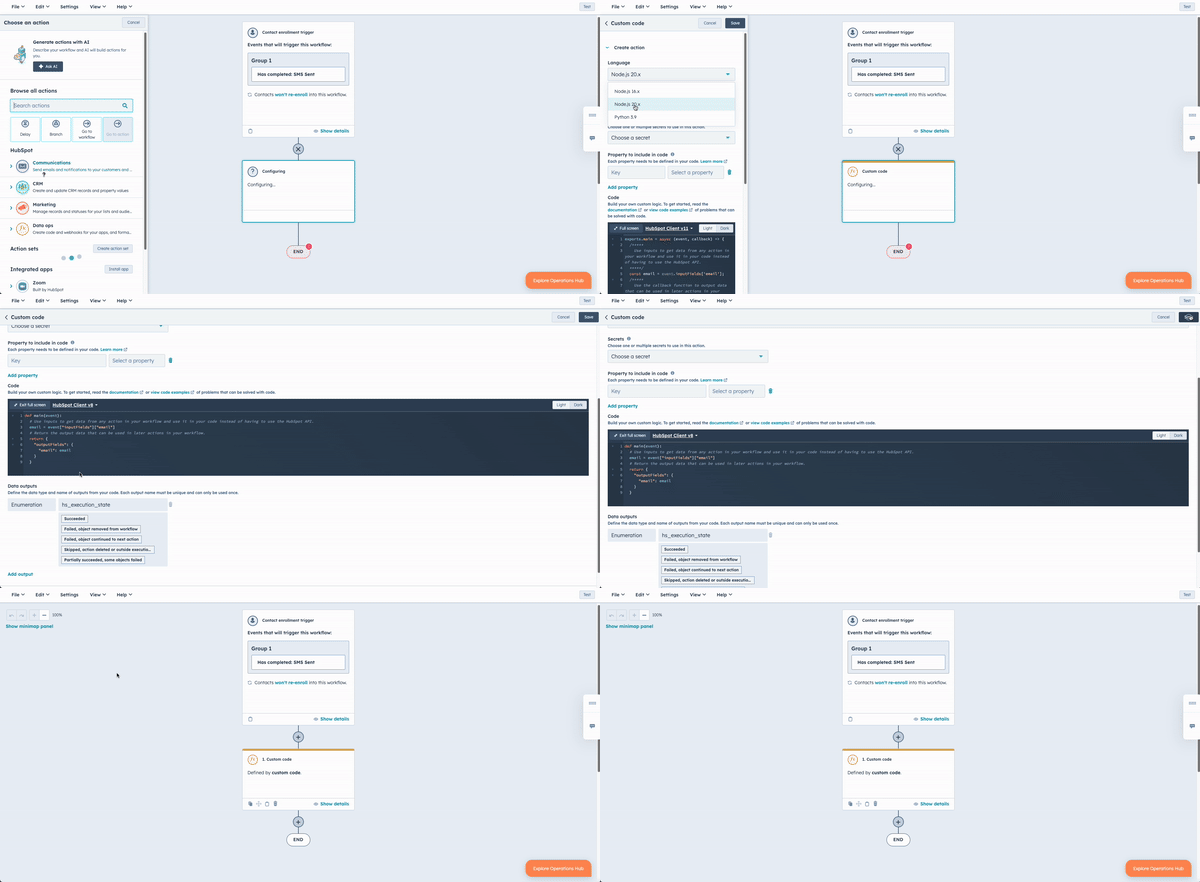
Step-by-Step Instructions for Custom Code Actions
- Navigate to Workflows:
- In your HubSpot account, go to
Automation>Workflows.
- In your HubSpot account, go to
- Create or Select a Workflow:
- Click on the name of an existing workflow or create a new one by clicking the
Create workflowbutton.
- Click on the name of an existing workflow or create a new one by clicking the
- Add a Custom Code Action:
- Click the
+ plus iconto add a workflow action. - In the right panel, select
Custom code.
- Click the
- Set Up Your Action:
- By default, custom code actions will use Node.js 16.x. If you want to use Python, click the
Language dropdown menuand selectPython. - To add a new secret, click
Add secret. Enter theSecret nameandSecret value. ClickSave. You can now select this secret in future custom code actions.
- By default, custom code actions will use Node.js 16.x. If you want to use Python, click the
- Manage Secrets:
- To edit or delete existing secrets, click
Manage secrets. - Note that secrets are stored as environment variables, and you can access them in your code. For example, using
os.getenv('secret_name')in Python 3.
- To edit or delete existing secrets, click
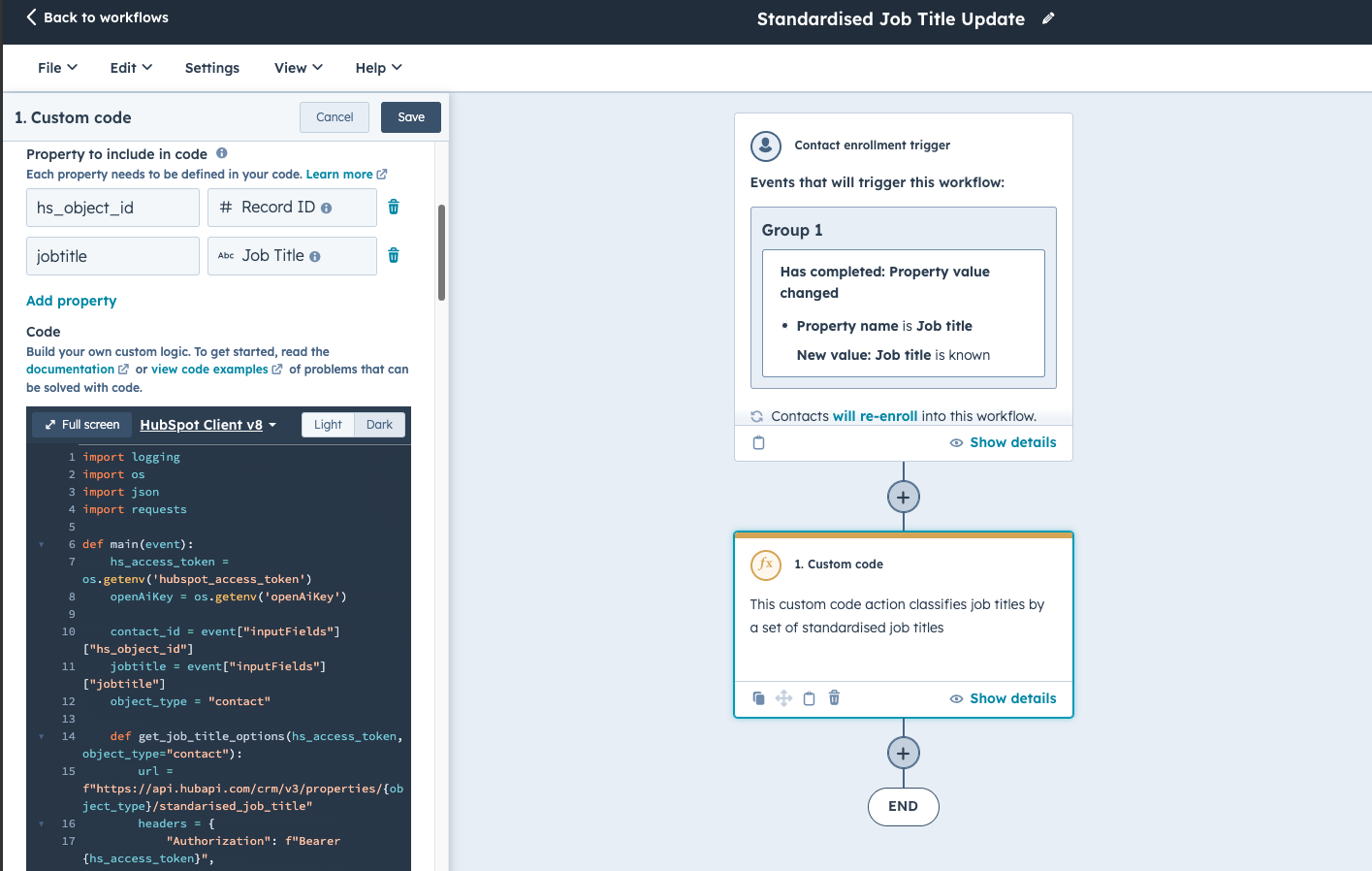
- Include Properties:
- Click the
Choose propertydropdown menu and select the property you want to use in your code. Enter aProperty nameto reference in your code. - To add another property, click
Add property. You can use up to 50 properties in your custom code action.
- Click the
- Enter Your Custom Code:
- In the code field, enter the Python code below.
- In the code field, enter the Python code below.
- Save the Action:
- Once you’ve entered your code and defined your outputs, click
Saveto save your custom code action.
- Once you’ve entered your code and defined your outputs, click
Hidden Treasures: Event Attendees Only Code Snippet
This code snippet is exclusive for Customer SpeakEasy attendees. It looks like you are not part of the list. If you are looking for our AI Programmable Solutions, check out our designated page. If you attended the event and need help getting access, feel free to reach out.
Ready to enhance your revenue operations and streamline your data management processes?
Implement AI-driven programmable automation with HubSpot Operations Hub to tackle complex data challenges efficiently. Contact us today to learn how our solutions can optimize your business operations, ensure data integrity, and drive more effective persona segmentation. Unlock the full potential of your CRM and elevate your customer interactions to the next level.