Unlock the Power of your HubSpot Portal
katie magorrian

Product Spotlight: Sales Hub New Features

Discover the newest tools designed to boost productivity and pipeline visibility.

Katie Magorrian – Customer Success Manager, HubSpot

3:00 PM – 3:10 PM

Take a look inside HubSpot’s latest Sales Hub innovations. From AI-generated templates to dynamic content, learn how AI is reshaping your day-to-day Sales tools.

Session Recording

In this session, Katie, Customer Success Manager at HubSpot, delivers a live walkthrough of the Sales Workspace, showcasing how sales teams can manage their entire day from a single, unified view. Filmed during an in-person event in Dublin, the recording explores how reps can prioritise tasks, streamline prospecting, assess deal health, and stay focused on pipeline creation using HubSpot’s latest sales tools. Viewers will gain a practical understanding of how the Sales Workspace supports efficiency, visibility, and better sales outcomes.


Session Summary

The summary below provides a structured breakdown of the key moments from the session. It follows the flow of the live demo, highlighting how each area of the Sales Workspace works together to support sales reps throughout their day—from task management and prospecting through to deal progression, reporting, and automation.

The Sales Workspace Overview and Daily Command Centre

The Sales Workspace Overview and Daily Command Centre

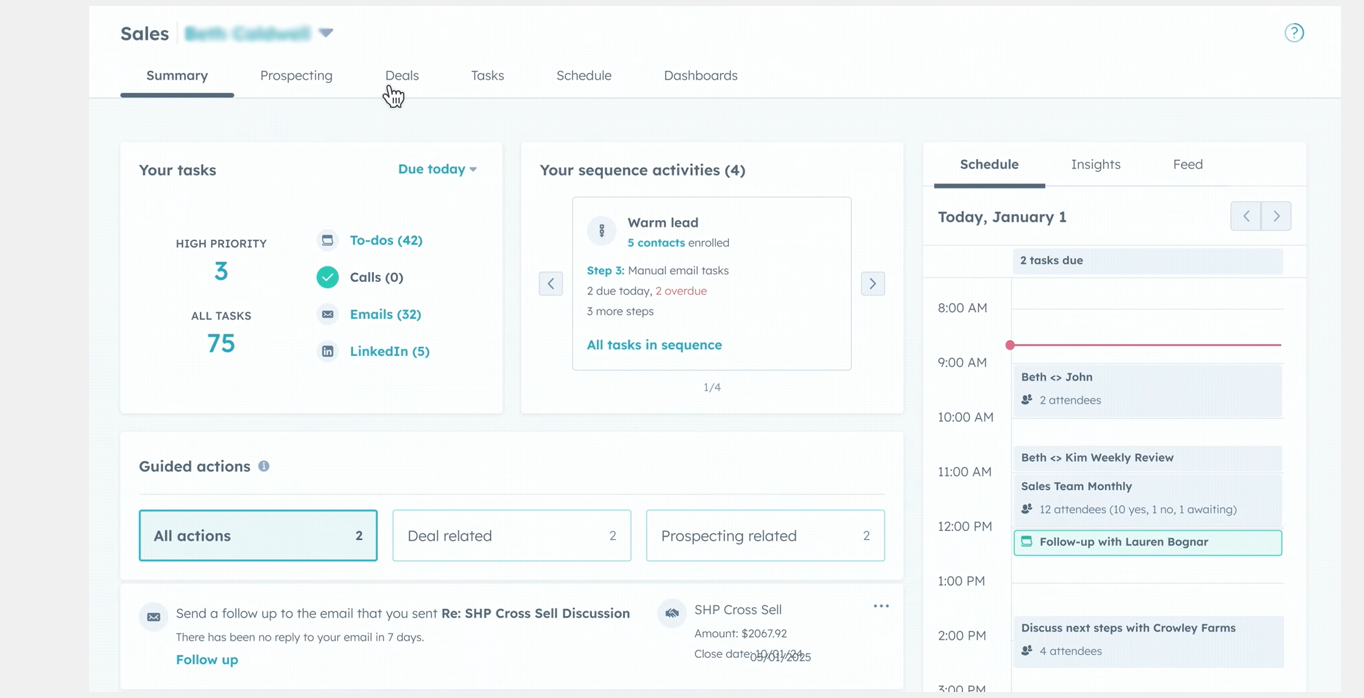
Katie opens by introducing the Sales Workspace and its purpose: giving sales reps one central place to run their entire working day. Rather than switching between tools and tabs, reps can manage tasks, prospecting, deals, and reporting within a single experience designed to reduce friction and increase focus.

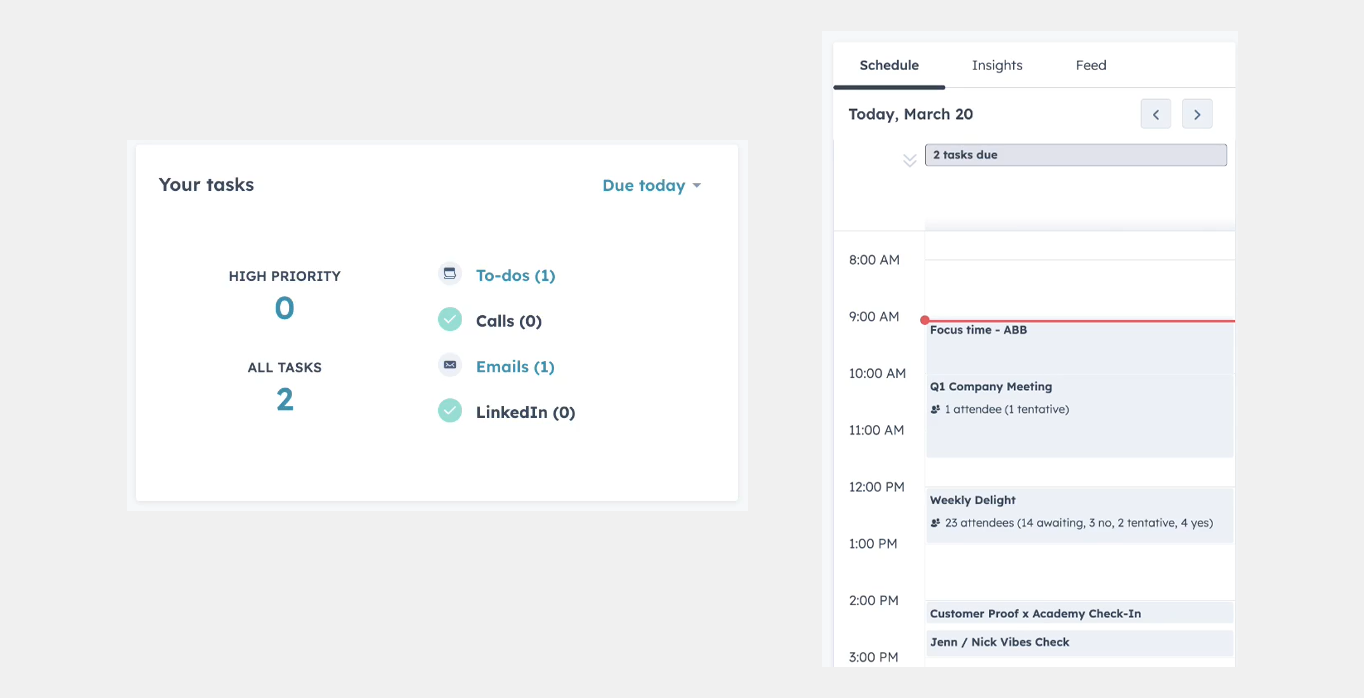
The session begins with the Summary tab, which acts as a command centre. Here, reps can immediately see what needs attention: tasks due today, overdue actions, or upcoming work. Dedicated sections for sequence tasks and guided actions help reps prioritise prospecting activities that directly contribute to pipeline creation and closed-won revenue.


Guided Actions, Tasks, and Context-Driven Prioritisation

A key focus of the demo is guided actions, which provide a prioritised list of recommendations based on rep activity in the portal. HubSpot analyses behaviour and suggests next best actions, such as preparing for an upcoming meeting or reaching out to newly assigned leads.

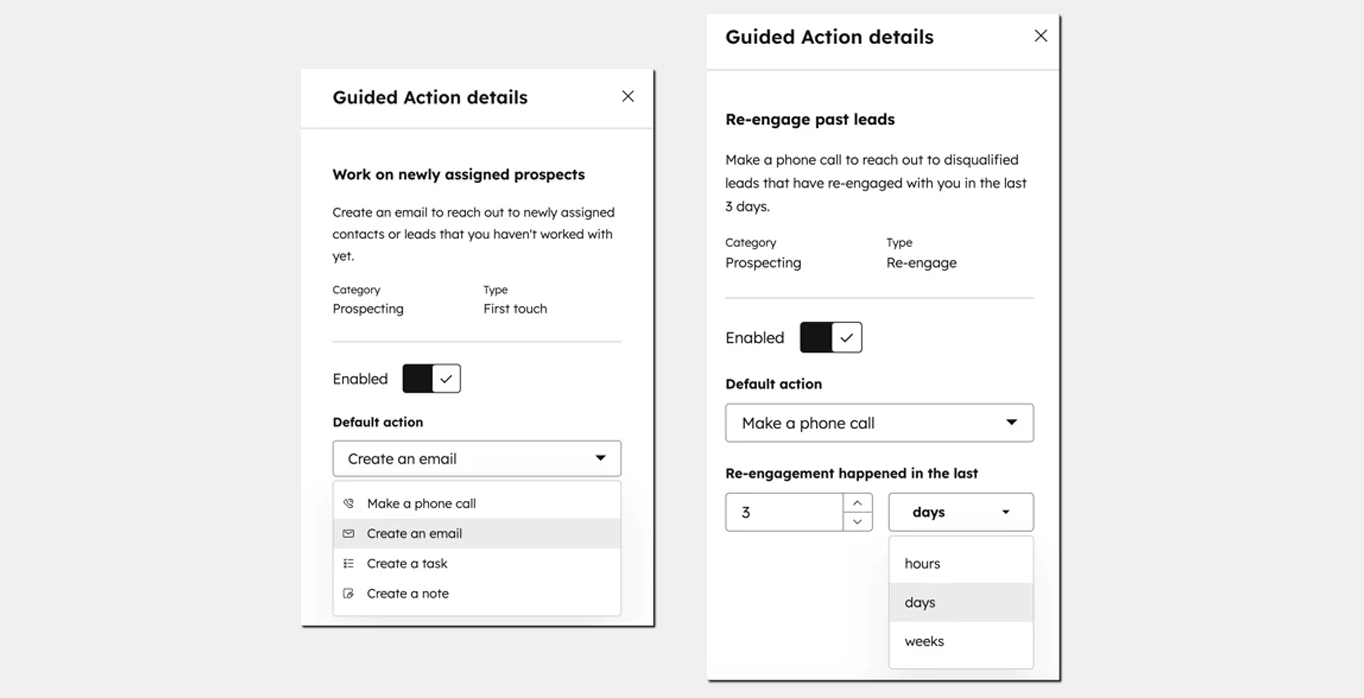
Katie explains how guided actions can be customised to support common sales scenarios. Examples include prompting reps to follow up on deals stuck in discovery for too long or reminding them to reply to emails awaiting a response. These actions reduce reliance on memory and help ensure important opportunities do not slip through the cracks.

Guided Actions, Tasks, and Context-Driven Prioritisation
Schedule, Insights, and Real-Time Sales Signals

Schedule, Insights, and Real-Time Sales Signals

On the right-hand side of the Summary tab, reps can switch between Schedule, Insights, and Feed views. The Schedule view consolidates calendar activity in one place, eliminating the need to jump between Google or Outlook calendars and reducing context switching during the day.

The Insights view gives reps visibility into performance against targets, including attainment, meetings delivered, pipeline creation, completed activities, and lead progress. The Feed view surfaces real-time engagement signals, such as email opens, page views, and document interactions, allowing reps to act quickly when prospects show buying intent.

Prospecting Workspace and Automated Lead Progression

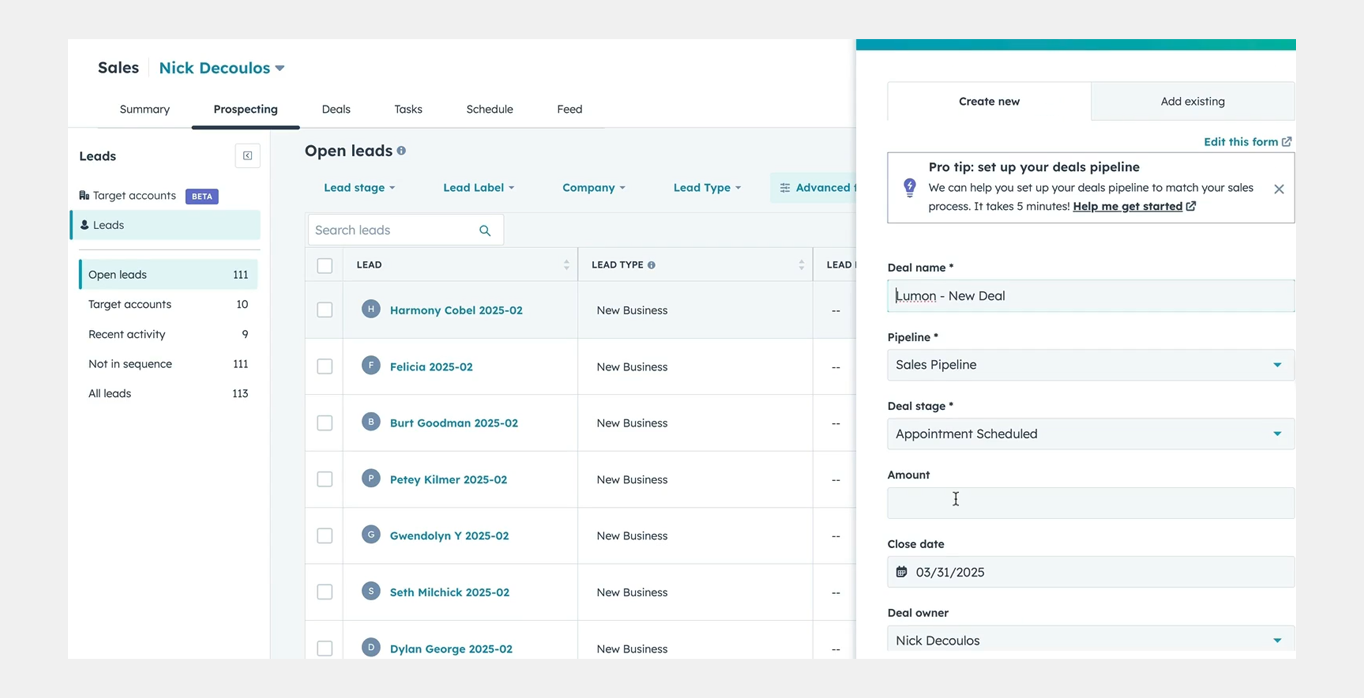
The session then moves into the Prospect section, designed to help reps manage leads efficiently without manual tracking. Leads are clearly grouped by stage: new, contacted, connected, or meeting booked—so reps always know where each prospect stands.

Katie highlights built-in automations that update lead stages automatically based on rep activity. Sending an email, receiving a reply, completing a call, or booking a meeting instantly moves the lead forward. This automation removes administrative work and ensures data stays accurate without additional effort from the sales team.

Prospecting Workspace and Automated Lead Progression
Deals, Deal Health, and Sales Reporting

Deals, Deal Health, and Sales Reporting

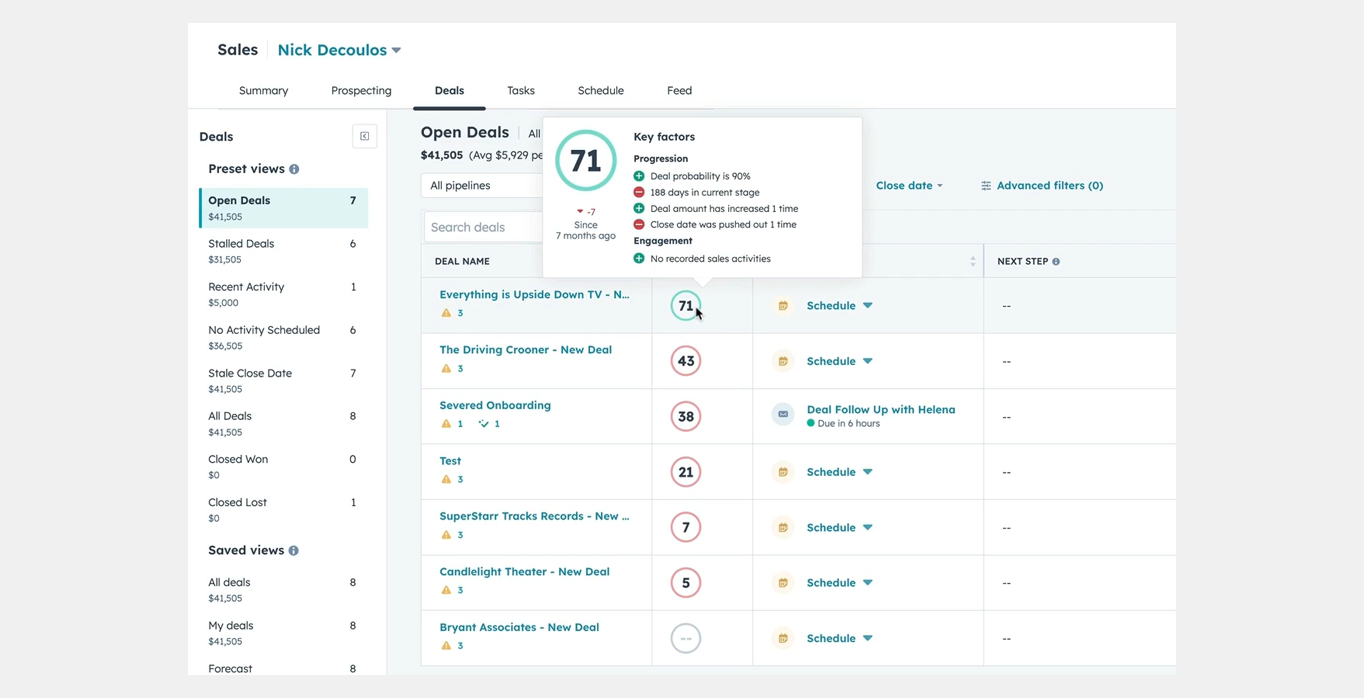
The final walkthrough covers the Deals tab, including a newly released board view that allows reps to visualise deals more easily. Preset views help surface stalled deals, deals with past close dates, or deals without next steps, making it easier to identify where attention is needed.

Katie also introduces deal scoring, which acts as a virtual sales coach by assessing deal health and likelihood to close. With a newly released beta, teams can now customise what defines a healthy or unhealthy deal. The session concludes with the Dashboard tab, where relevant sales reports can be surfaced to give reps ongoing visibility into the metrics that matter most.

Q&A Highlights: 

The session concludes with a live Q&A focused on automating deal creation from multiple lead sources, including Bark, Lead Factory, and inbound emails

Can deal creation be automated when leads come from multiple sources?

Context: The attendee explains they receive leads from Bark (integrated), Lead Factory (via email), and a shared inbox (info@ address), and is manually creating deals. Yes, automation is possible depending on the source and how structured the data is. Bark is already integrated and creating records automatically, which is working as expected. For website-based leads, HubSpot forms can be integrated so that submissions automatically create contacts and trigger workflows to create leads or deals based on source criteria.

Is there a way to automate deal creation from emails sent to a shared inbox (e.g. info@)?

If the leads are arriving purely as unstructured data in the body of an email, there is no simple out-of-the-box automation to extract that information automatically. In those cases, manual import or creation is typically required unless additional tooling is used.

Would Operations Hub help automate leads coming from email?

Yes. With Operations Hub, it may be possible to read structured strings (such as email addresses or consistent data patterns) from incoming emails and use those as triggers for automation. This could allow contacts or leads to be created automatically, but it requires that the email format is consistent and that Operations Hub is available.

If the email subject line and body always follow the same format, can that be used for automation?

Potentially, yes. If incoming emails follow a consistent naming convention and structure, they could be used as a trigger to create contacts or add records to a list. That list could then be used as the basis for further automation, such as creating leads or assigning records, although this approach is less sophisticated than native integrations.

Should every inbound lead automatically create a deal?

Not necessarily. The recommendation is to review and clearly define when a deal should be created versus when a lead should remain in qualification. In many cases, it makes more sense to qualify contacts first in the prospecting workflow and only create deals once there is clear intent or opportunity.

 

Sales Workspace

Explore the latest Sales Workspace tools and how they help boost productivity and improve pipeline visibility. Katie Magorrian from HubSpot’s Customer Success team walks through real scenarios and shares best practices to help your sales team get the most out of the workspace.


✦   Dublin HubSpot User Group

Prospecting Agent & Target Account

Explore the latest AI-powered sales tools in HubSpot, including the Prospecting Agent and new Target Accounts features. Fiachrá Duffy demos what’s possible and dives into a live Q&A on how sales teams can get the most from these updates.


✦   Dublin HubSpot User Group

Prospecting Agent & Target Account

Explore the latest AI-powered sales tools in HubSpot, including the Prospecting Agent and new Target Accounts features. Fiachrá Duffy demos what’s possible and dives into a live Q&A on how sales teams can get the most from these updates.


✦   Dublin HubSpot User Group

Dublin HUG = Your  New Community 

Share the vibe, shape the next one

HUG Dublin - OCT 2025-070 (1)
IMG_4227
HUG Dublin - OCT 2025-091
HUG Dublin - OCT 2025-069
IMG_4227