Automatic Email Validation
Enhance your email marketing efforts by validating email addresses with ZeroBounce. This custom code action ensures high deliverability and real engagement in your campaigns by verifying email addresses in your CRM. Reduce bounce rates and improve your email sending score with automated email validation, maintaining a clean and accurate contact list. Access our code snippet to implement this solution and ensure your email campaigns reach genuine contacts for maximum effectiveness.
Use Case
Email marketing success heavily relies on the quality of your contact list. Invalid or fake email addresses can significantly harm your email deliverability and affect your sender's reputation. Our customers faced challenges with CRM databases filled with inaccurate email addresses, which impacted their marketing campaigns. By integrating ZeroBounce with HubSpot Data Hub, we provided a solution to validate email addresses automatically using a custom code action and ZeroBouce API. This integration ensures that every email address in the CRM is checked and validated, maintaining a clean and reliable contact list. The implementation process begins by setting up a custom code action within a HubSpot workflow. When a new contact is added, or an email address is updated, the custom code action triggers and sends the email address to ZeroBounce for validation. If the email address is deemed invalid, it is automatically added to an exclusion list, preventing it from being used in future campaigns. This automation significantly reduces bounce rates and improves the overall health of the email list. Additionally, by ensuring that only valid email addresses are used, our clients have seen improved email engagement rates, higher open rates, and better overall campaign performance.
Automating email validation not only saves time but also enhances the efficiency and effectiveness of email marketing strategies. With accurate email addresses, businesses can confidently send marketing emails, knowing they will reach genuine recipients. This process also helps in maintaining a good sender reputation, which is crucial for email deliverability. By leveraging HubSpot Data Hub and ZeroBounce, our clients have transformed their email marketing efforts, ensuring high deliverability and real engagement. Implementing this custom code action is straightforward, and the benefits are substantial. Keep your CRM data clean and your email campaigns effective by accessing our code snippet and following the instructions below to automate email validation into your workflows.
Demo Overview
Demo from Cat Media's Implementation Team
In this demo, Juan A. Zabala from Cat Media guides you through the step-by-step process of setting up an email validation workflow using ZeroBounce and HubSpot Data Hub. The goal is to automate email validation and scoring within your HubSpot portal. Action: Watch the demo to learn how to integrate ZeroBounce for automatic email validation. Juan will show you how to validate email addresses, check their safety, and identify email providers. By leveraging validated email lists, you can enhance your email marketing campaigns and use exclusions to better segment your audience, ultimately improving your email sending metrics. Follow along as he demonstrates the integration, workflow setup, and email validation process.Create Custom Properties
Create ZeroBounce Account
Create Token + Workflow
Create Email Lists
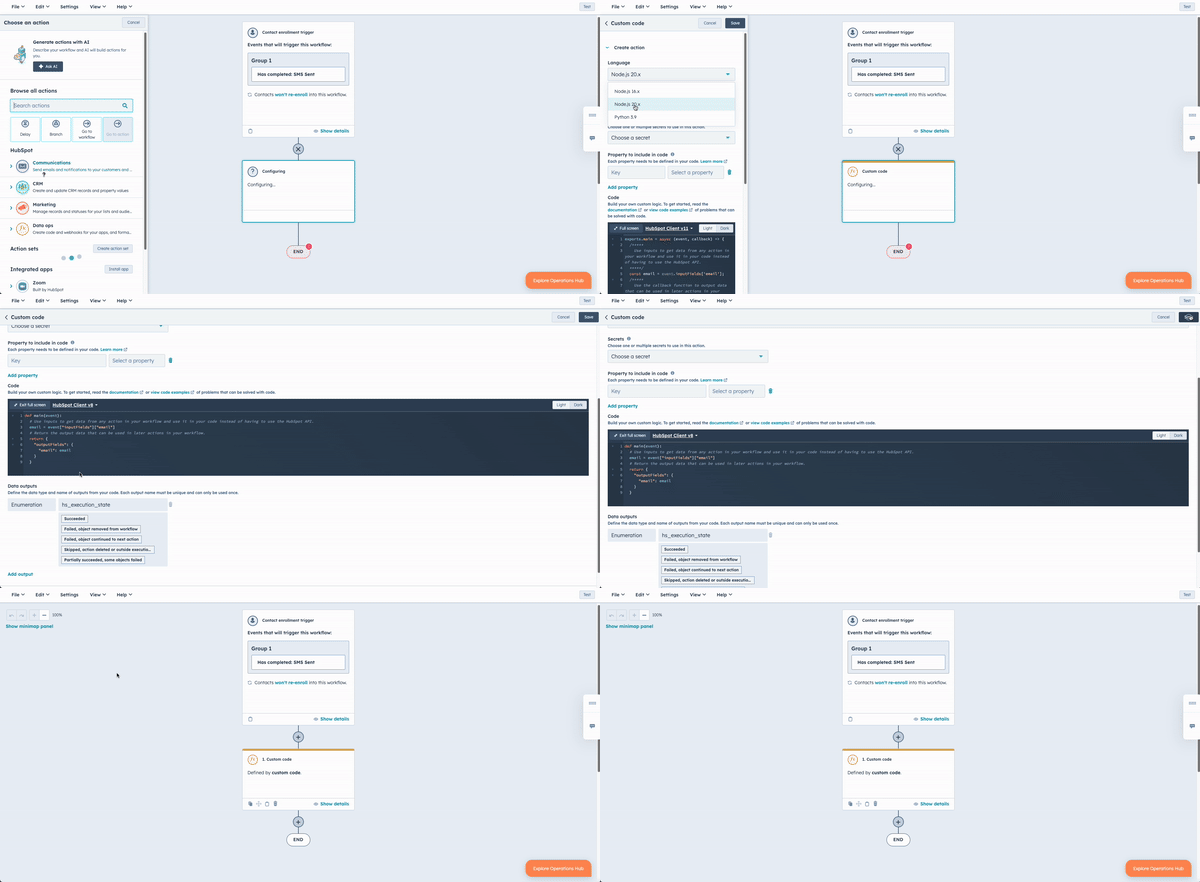
Step-by-Step Instructions to Create Custom Code Action Workflow
- Navigate to Workflows:
- In your HubSpot account, go to
Automation>Workflows.
- In your HubSpot account, go to
- Create or Select a Workflow:
- Click on the name of an existing workflow or create a new one by clicking the
Create workflowbutton.
- Click on the name of an existing workflow or create a new one by clicking the
- Add a Custom Code Action:
- Click the
+ plus iconto add a workflow action. - In the right panel, select
Custom code.
- Click the
- Set Up Your Action:
- By default, custom code actions will use Node.js 16.x. If you want to use Python, click the
Language dropdown menuand selectPython. - To add a new secret, click
Add secret. Enter theSecret nameandSecret value. ClickSave. You can now select this secret in future custom code actions.
- By default, custom code actions will use Node.js 16.x. If you want to use Python, click the
- Manage Secrets:
- To edit or delete existing secrets, click
Manage secrets. - Note that secrets are stored as environment variables, and you can access them in your code. For example, using
os.getenv('secret_name')in Python 3.
- To edit or delete existing secrets, click
- Include Properties:
- Click the
Choose propertydropdown menu and select the property you want to use in your code. Enter aProperty nameto reference in your code. - To add another property, click
Add property. You can use up to 50 properties in your custom code action.
- Click the
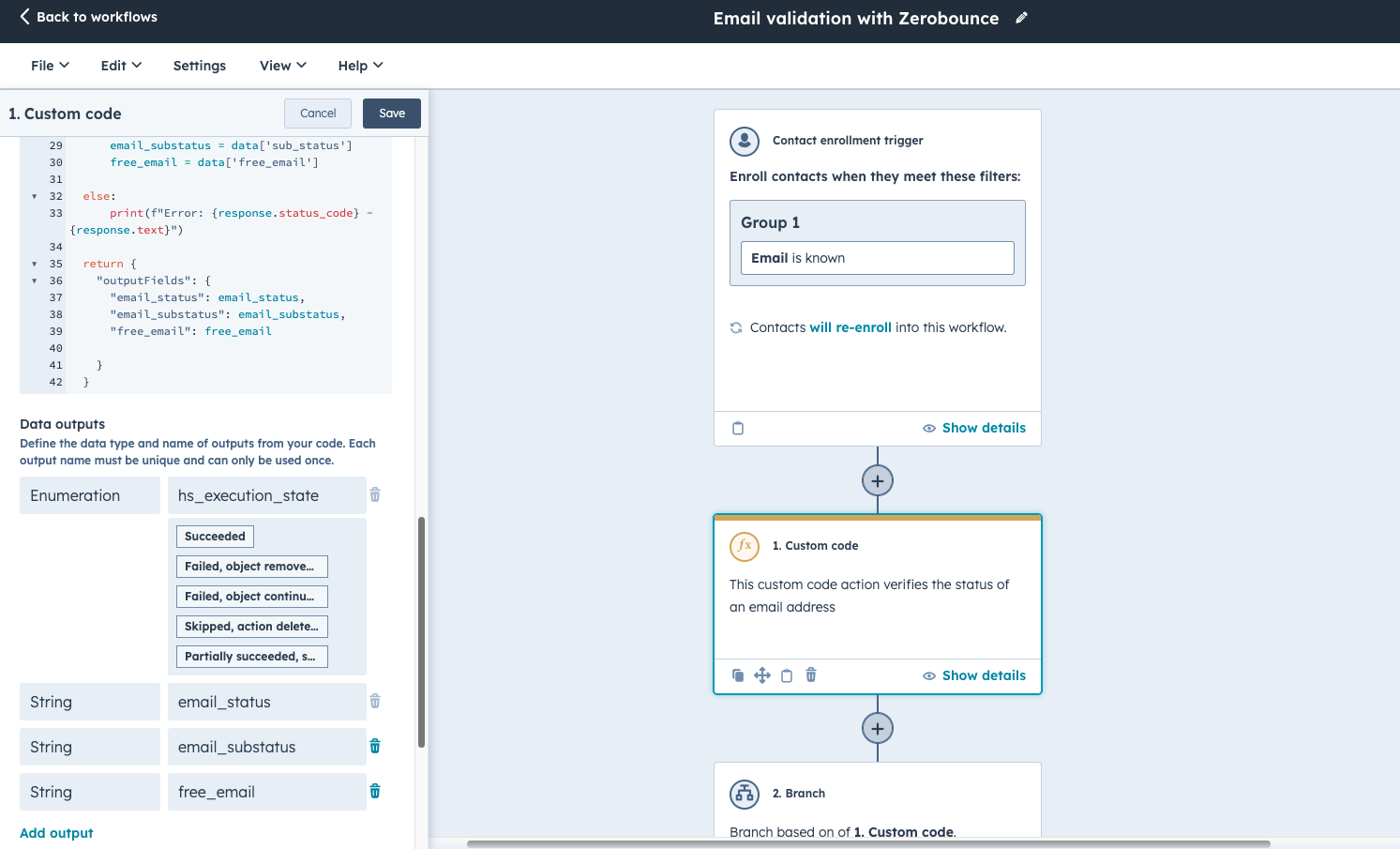
- Enter Your Custom Code:
- In the code field, enter the Python code below.
- In the code field, enter the Python code below.
- Save the Action:
- Once you’ve entered your code and defined your outputs, click
Saveto save your custom code action.
- Once you’ve entered your code and defined your outputs, click
HubSpot Properties
-
Email Score
- Type: Number
- Developer Name:
email_score - Description: This property represents the quality score assigned to an email address by the ZeroBounce A.I. scoring system. It helps determine the engagement potential of an email lead.
-
Safe to Send Email
- Type: Single checkbox
- Developer Name:
safe_to_send_email - Description: This boolean property indicates whether an email address is considered safe to send emails to, based on the combined results of the ZeroBounce A.I. scoring system and email validation process. A value of true signifies that the email address has a high engagement potential and has passed validation checks, making it safe for email campaigns. Conversely, a value of false indicates potential issues such as low engagement scores or failed validation, suggesting a higher risk for sender reputation if used.
- Values:
- Yes:
true - No:
false
- Yes:
-
Free Email
- Type: Single checkbox
- Developer Name:
free_email - Description: This boolean property is true when the email address is provided by a free service like gmail.com or yahoo.com.
- Values:
- Yes:
true - No:
false
- Yes:
-
Email Validation
- Type: Dropdown select
- Developer Name:
email_validation - Description: Email Validation from Zerobounce
- Values:
- Valid:
Valid - Invalid:
Invalid - Catch-all:
Catch-all - Spamtrap:
Spamtrap - Abuse:
Abuse - Do_not_mail:
Do_not_mail
- Valid:
Email Validation Code Snippet
Looking to optimise your email marketing with automated validation?
While our custom code snippet empowers you to do it yourself, we’re here to help if you need further assistance. Our team specialises in programmable automation services, ensuring your CRM data is clean, accurate, and efficient. Whether it's email validation, data management, or custom automation solutions, we can handle it all for you. Reach out to us today to enhance your marketing strategy and achieve better results.